EasyManua.ls Logo

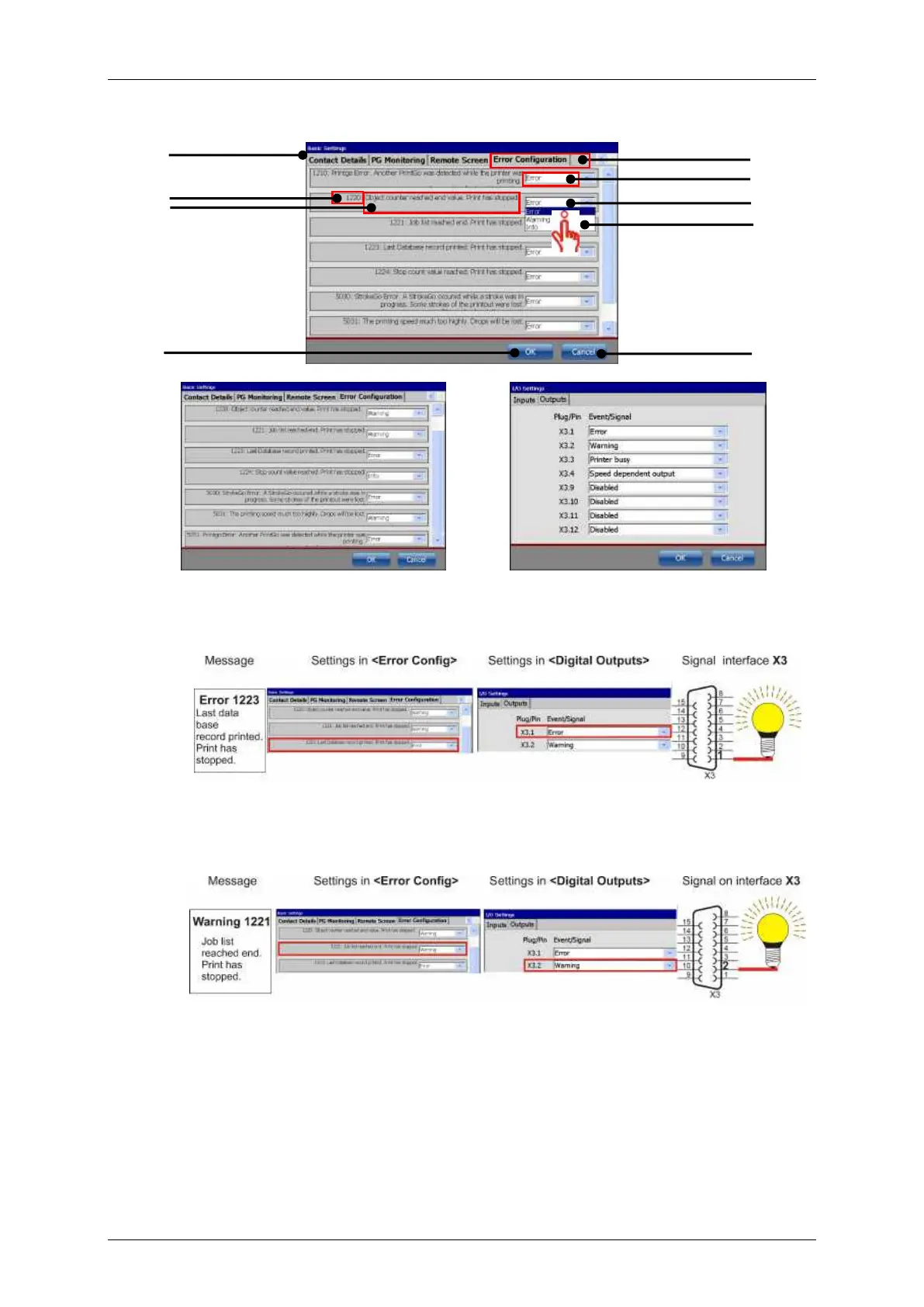
Leibinger JET3 Series - Figure 59 Error Config

Leibinger JET3 Series
406 pages
Print Icon
To Next Page IconTo Next Page
To Previous Page IconTo Previous Page
Loading...
Group 8 Job Editor Page 145
JET3 Series Release 2.02
Figure
59
Error config
Example settings on the
<Error Config> tab.
Example settings on the <Outputs> tab
of the <I/O settings> dialog box.
Example Error Message
Example for a error message: After the last record of a data base was printed the
error message with code 1223 pops up and the digital output X3.1 switches.
Example Warning Message
Example for a warning message: After the end of a job list is reached the error
message with code 1221 pops up and the digital output X3.2 switches.
1 Dialog box <Basic Settings>
6 Drop-down list message options
2 Tab <Error Config>
7 Select option
3 Message code
8 <OK> button
4 Message content
9 <Cancel> button
5 Default setting <Error>
10 Examples
1
2
4
6
5
3
7
8
9
10
10
10
10

Table of Contents

Related product manuals