EasyManua.ls Logo

Leibinger JET3 Series - Creating Job Lists

Leibinger JET3 Series
406 pages
Print Icon
To Next Page IconTo Next Page
To Previous Page IconTo Previous Page
Loading...
Page 92 Job Editor Group 8
Release 2.02 JET3 Series
7.2.4 Load Job to print
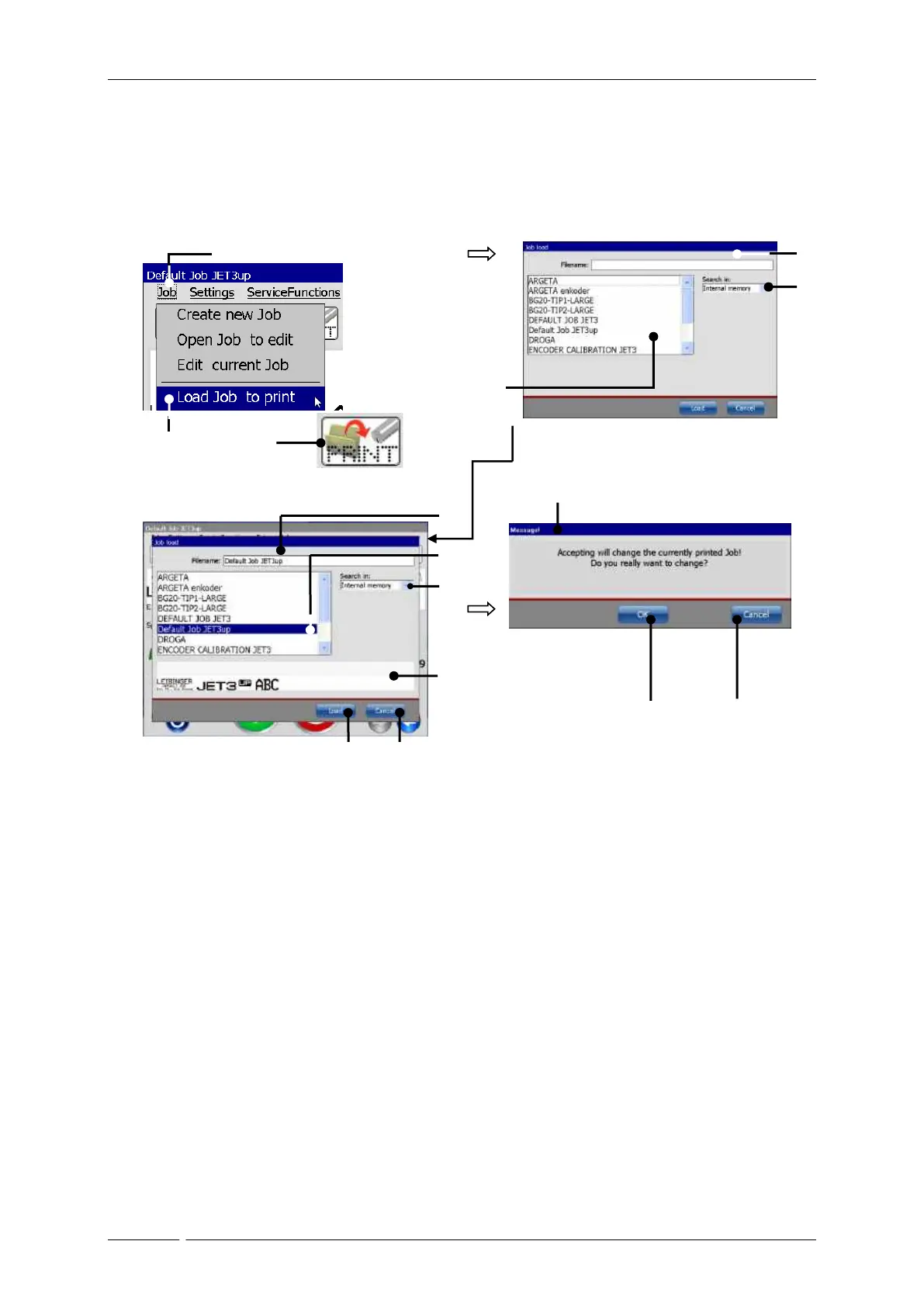
With the option <Load Job to print> you can load (open) a saved job directly for printing.
For selection of a job the window “Load job” opens.
Figure
33
Load job to print
or:
1 – Drop-down menu<Job>
9 – Selected storage medium
2 – Option <Load Job to print>
10 – Display <Job preview>
3 – Direct button (shortcut)
11 – <Load> Button
4 – Window <Job load>
12 – <Cancel> Button
5 – Pick list<Print jobs>
13 – Message <Change print job>
6 – Drop-down list <Search in>
14 – <OK> Button
7 – <Filename> of selected print job
15 – <Cancel> Button
8 – Selected job
1
2
13
6
4
11
7
8
9
5
3
10
12
14
15

Table of Contents