EasyManua.ls Logo

Leibinger JET3 Series - Delete Extern Text Memory; Login; Log in; Log out Dialog Box; Figure 89 Log in; Log out Dialog Box

Leibinger JET3 Series
406 pages
Print Icon
To Next Page IconTo Next Page
To Previous Page IconTo Previous Page
Loading...
Group 8 Job Editor Page 189
JET3 Series Release 2.02
7.5.2.4 Delete extern text memory
With this function the extern text memory will be reset. Please see chapter 8.7.5 Extern
Text for details.
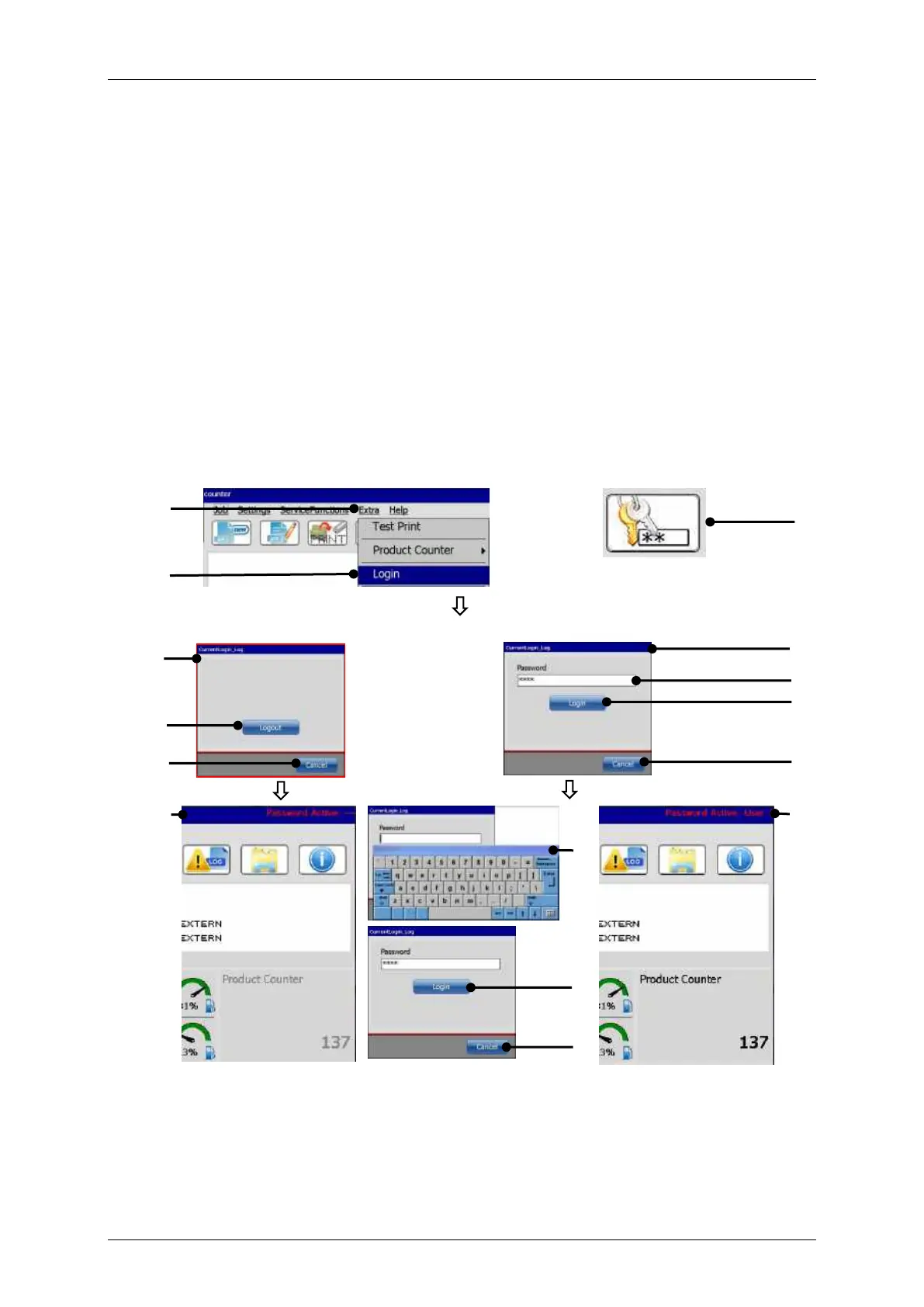
7.5.3 Login
With the <Password function> activated the <Login> option can be used in order to
change the current user.
Please see chapter 7.3.5 Password settings and user permissions for details about
the <Password function>.
For the currently logged in user it is also possible to log out in order to prevent parameter
changes by unauthorized staff.
The current state of the <Password function> is indicated in the upper right corner of
the main window. When there is nothing indicated the password function is disabled.
7.5.3.1 Log in / log out dialog box
Figure
89
Log in / log out dialog box
A user is already logged in
No user is logged in
10
7
9
1
2
3
4
8
9
6
5
7
9
11
12

Table of Contents