Using the LU600 LiveU LU600 User Guide
Select the active SIM slot (A or B) on any specific Dual-SIM module
To change the SIM slot that your LU600 will use for any particular Dual-SIM module, take
the following steps:
• Tap the Connections button on the Home screen to display the Connections
screen which lists the interfaces that the LU600 can connect to.
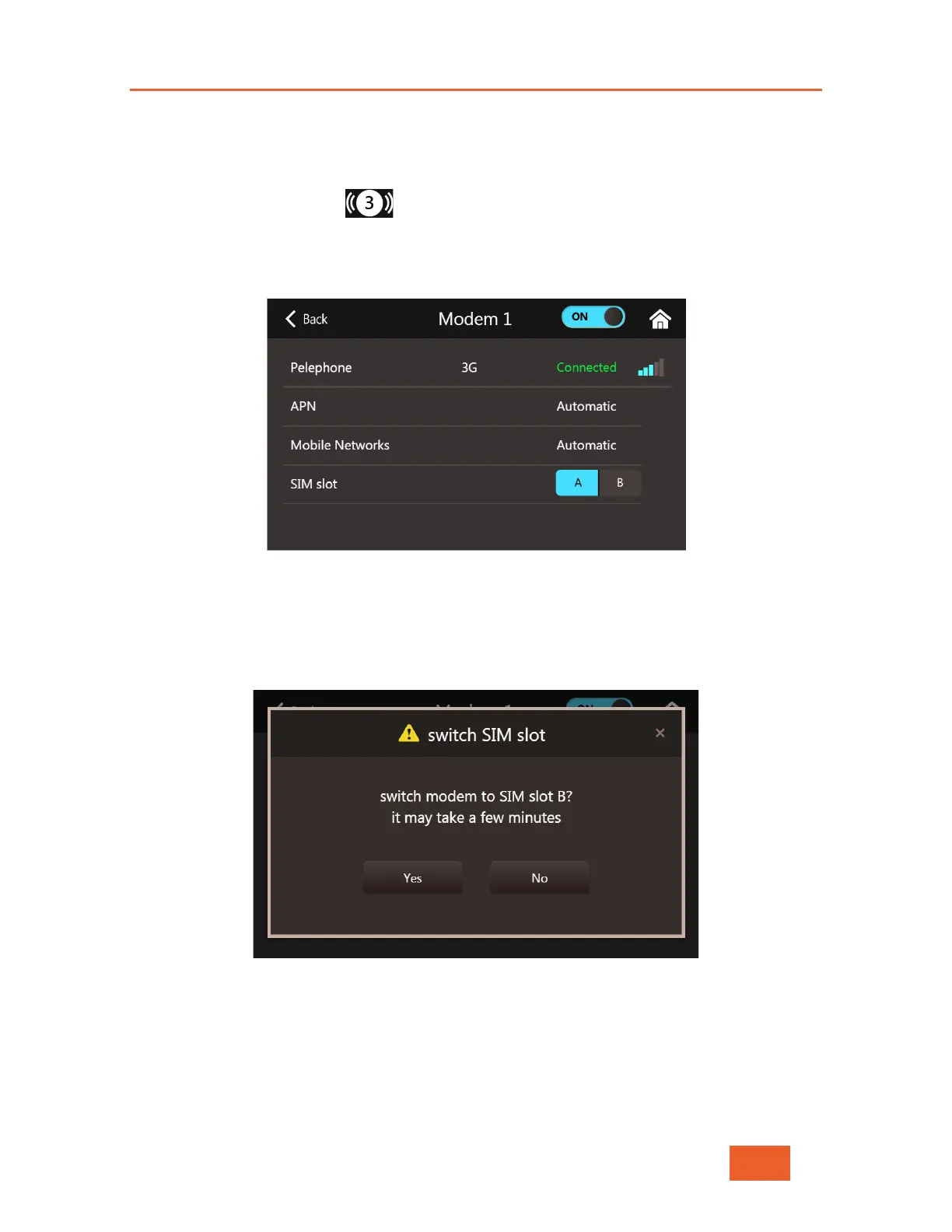
• Now tap on the Dual-SIM modem you wish to change, and the Dual-SIM Cellular
Interface Screen will open.
Figure 40: Dual-SIM Cellular Interface Screen
• Select the SIM slot that you’d like your LU600 to use for this Dual-SIM module (A or
B). The system will display the following message
Figure 41: Dual-SIM Slot Switch Message
• Accept the change by tapping Yes, or cancel by tapping No. Once accepted, the
system will try to reconnect the interface, using the SIM in the slot you selected.
This may take a few minutes depending on your local network operator
configuration.



 To Next Page