Store & Forward LiveU LU600 User Guide
NOTE
During S&F streaming, both the Data sent and the Data stored
shown in the progress bar increase, but not necessarily at the same
Monitoring S&F Sessions
In addition to the Home screen (shown on the previous page), you can monitor the status
of your S&F progress by using the Files Transfer Info log.
Monitoring – Files Transfer Info Log Screen
The Files Transfer Info screen lists the files transmitted using S&F, including files currently
being transmitted and files transmitted in previous sessions.
To display the Files Transfer Info list:
• While your S&F session is active, tap the progress indicator at the top of the
screen (this indicator shows the overall progress of all the current file transfers from
the LU600).
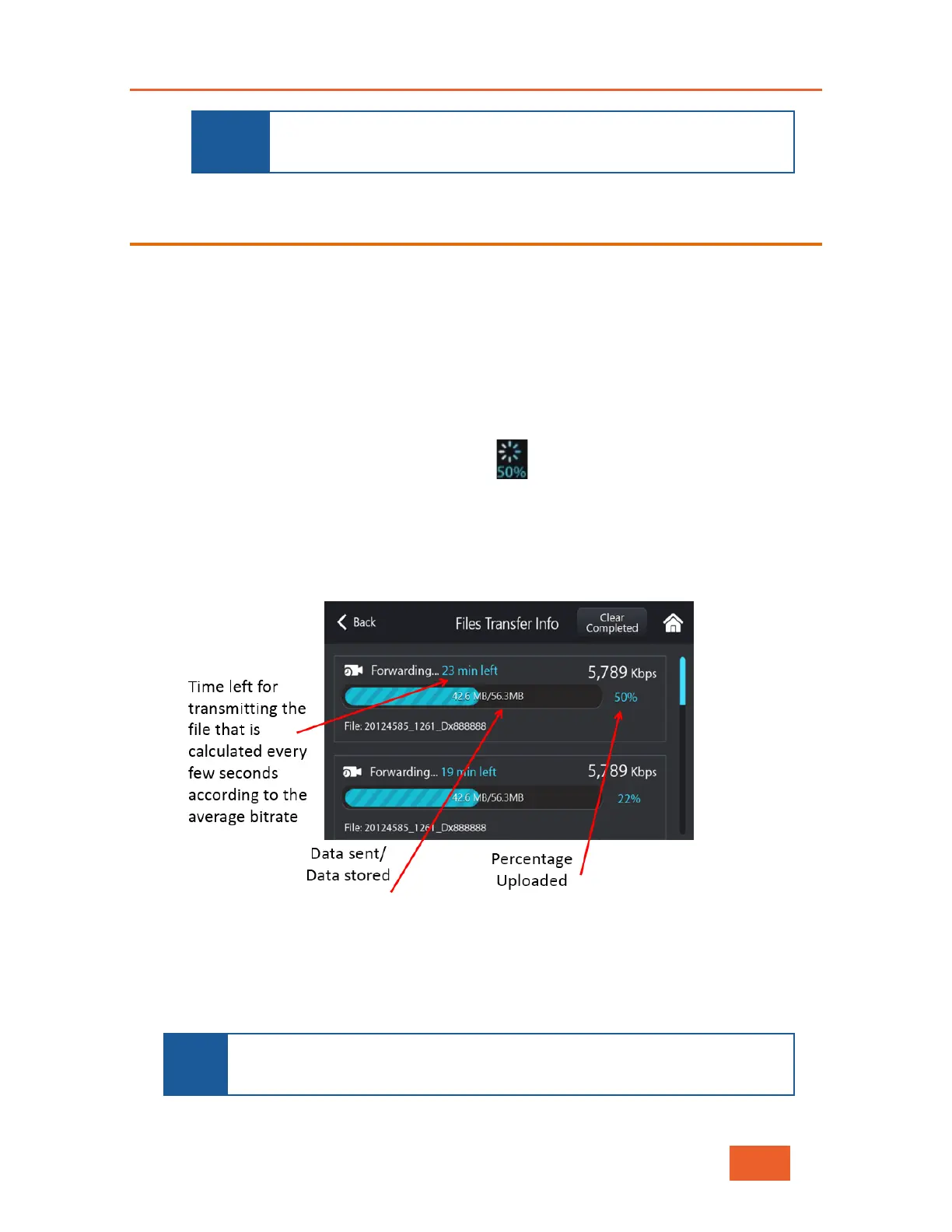
The following display shows information about the files being uploaded and their status,
including the time remaining and the upload percentage status:
Figure 67: Monitoring an S&F Session
This screen can also be displayed after the file(s) finish uploading. In this case, the
indicator shows 100%.
To remove any files that have uploaded successfully from the list, tap the Clear
Completed button.
NOTE
The progress indicator icon that enables you to display the Files Transfer
Info screen will not appear on the Home screen if the File Transfer List is



 To Next Page