Handling the LU600 LiveU LU600 User Guide
Dual-SIM Module Installation
Your LU600 unit may have been supplied with Dual-SIM modules. These modules allow you
to install 2 sets of SIMs (A and B), where the LU600 GUI provides the option to switch
between these SIMs on a specific module or on all modules at once.
Why Use Dual-SIM Modules
These modules turn any LU600 into a dual-purpose local / roaming unit, and support a
number of real life situations, for example:
• Roaming: install a local SIM in one slot, and a roaming SIM in the other
• Pre-Paid Extension: in certain scenarios where it would be more practical to switch
an expended pre-paid SIM with a fresh one
Installing SIMs in a Dual-SIM Module
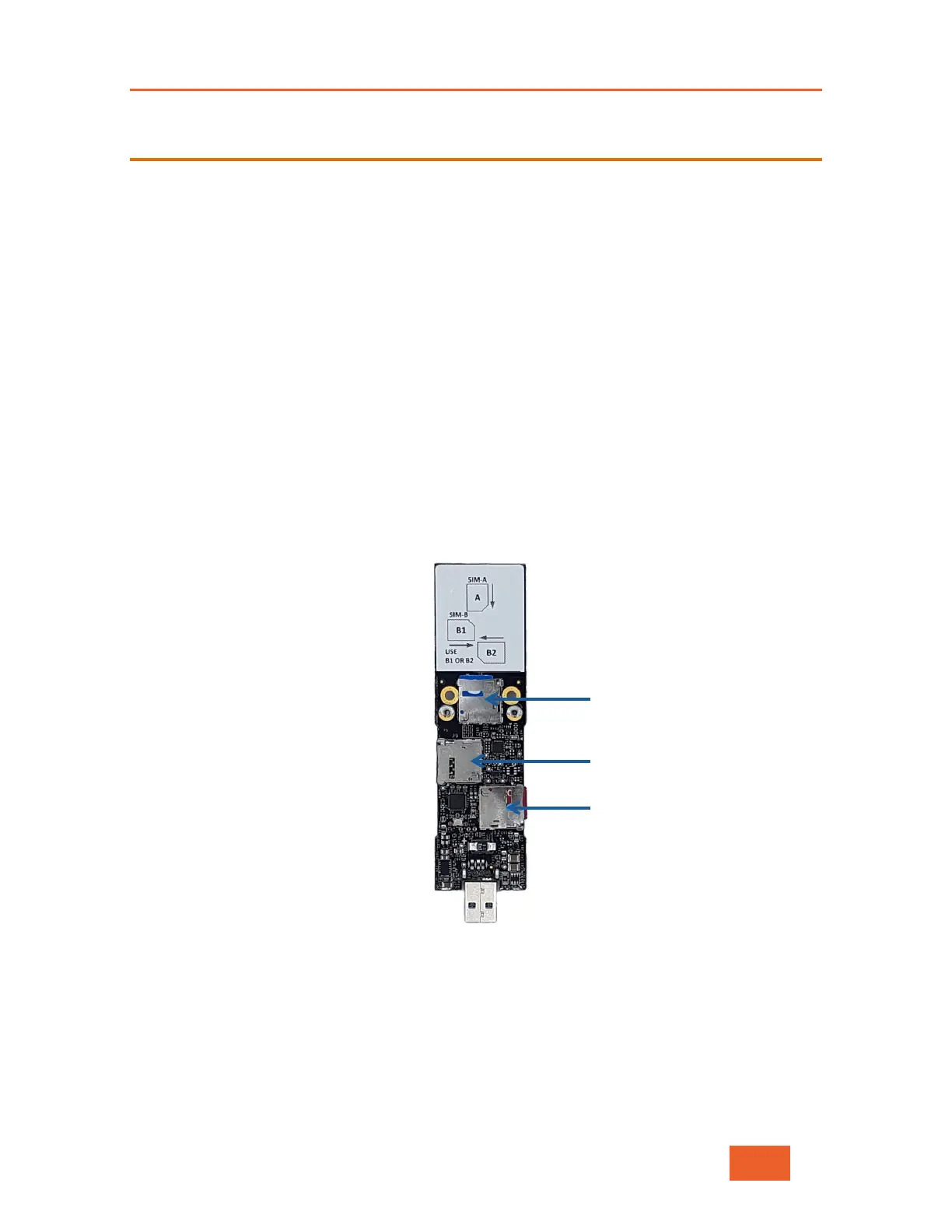
Each Dual-SIM module has 3 SIM slots: the top slot (called “A”) and two lower slots (called
“B1” and “B2”). The two B slots are interchangeable and provide convenient access to the
SIM, regardless of the orientation of the module when installed in the LU600.
Figure 106: Dual-SIM Module
Choose a SIM to install in slot A (depending on your preference, it could be a local SIM, a
roaming SIM, or even a pre-paid SIM). Now choose another SIM to install in either B1, or
B2. Do NOT install a SIM card in both of the B slots.



 To Next Page