Using the LU600 LiveU LU600 User Guide
Ethernet Interface Network Parameters
By default, the IP address of an Ethernet interface is obtained automatically from the DHCP
server. If preferred, you can manually configure the IP address and other standard network
parameters for the Ethernet interface.
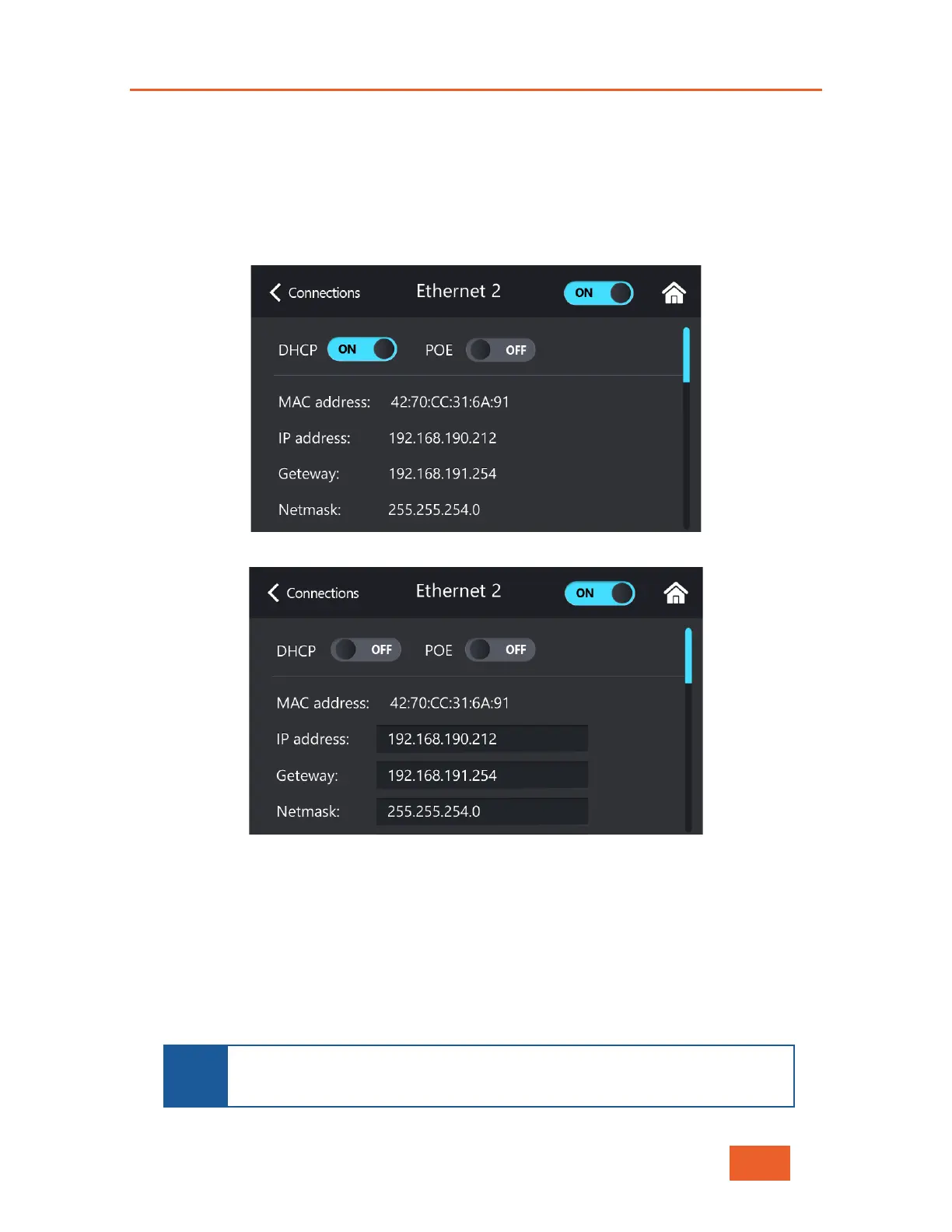
To do so, tap an Ethernet interface in the Connections screen (see Figure 42) to display the
following screen:
Figure 42: Ethernet Interface Screen – DHCP Enabled
Figure 43: Ethernet Interface Screen – DHCP Disabled
Then, configure the following parameters in this screen:
• DHCP: When ON, indicates that the Ethernet configuration is automatically received
from the network. This is the default setting. To manually configure the Ethernet
network parameters, set the value to OFF and then specify the values for the other
fields in the screen.
• IP Address, Gateway, Subnet, DNS1 and DNS2: Specify the values for these
standard Ethernet connection parameters.
NOTE
If you are unsure about these parameters and their correct configuration,
then either set the DHCP value to ON so that the confi
automatically, or contact your system administrator.



 To Next Page