101
SC100/200 Series Users Manual EM-6337-B Rev.15
11.3.2. SWITCHING OPERATION
Normal Mode
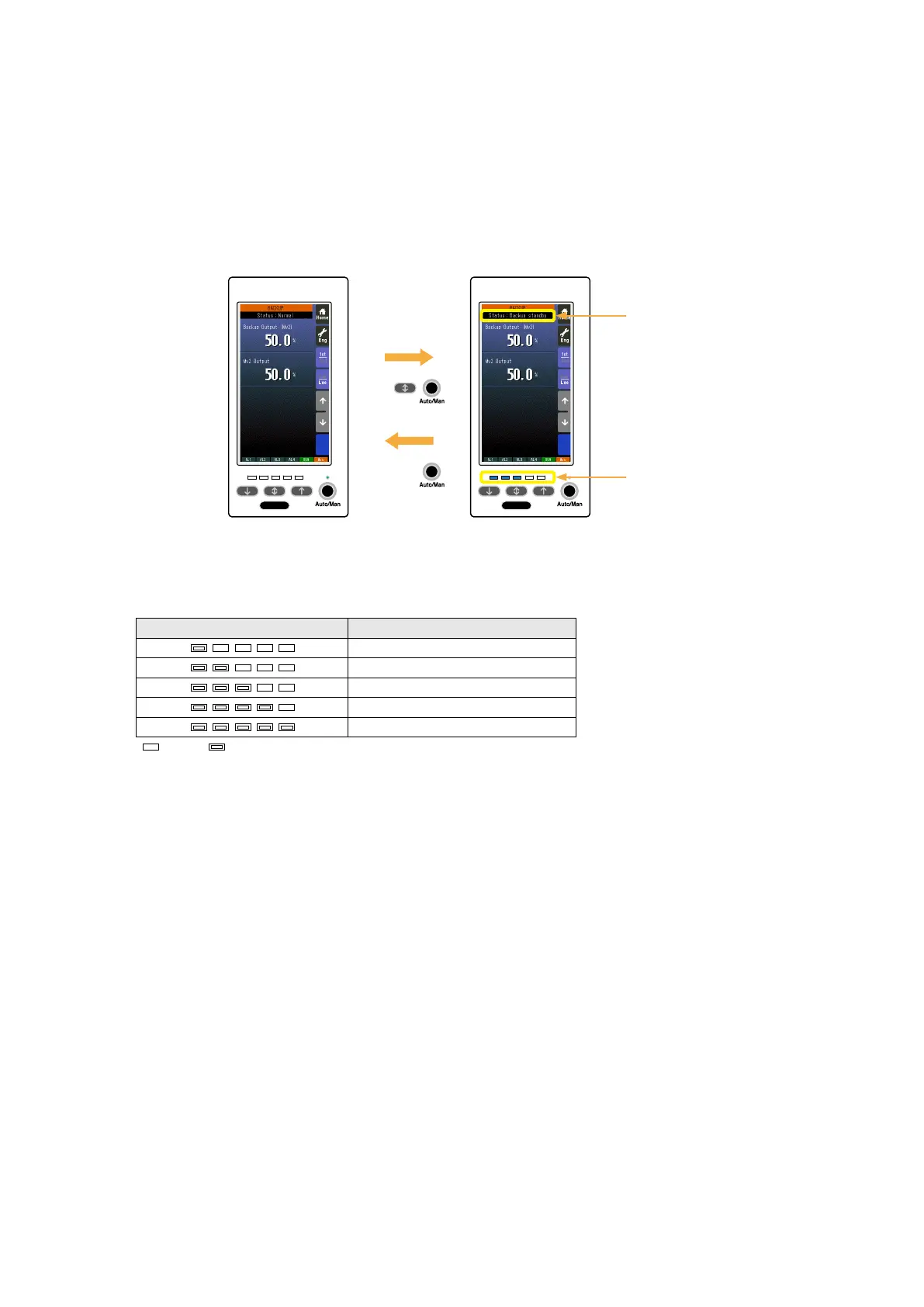
The Backup view (Engineering view > Backup) shows ‘Normal’ status and all the LEDs are at off state.
Backup Standby
Pressing the front acceleration button and Auto/Man button at once during the normal mode status switches to ‘Backup
Standby’ status.
• The Backup view (Engineering view > Backup) shows ‘Backup Standby’ status and the LEDs indicate the Mv 2 output value.
• The front LEDs blink according to the Mv 2 output value as shown in the table below.
• If the standby status is not switched to ‘Running’ status within 1 minute, the Controller goes back to the normal status.
• Pressing and holding Auto/Man button switches back to the normal status.
• MV and Auto/Man switching controls are not functional during the standby status. Other functions such as switching views
are available.
78% or more
: OFF: Blinking
53% ≤ Mv 2 < 78%
28% ≤ Mv 2 < 53%
3% ≤ Mv 2 < 28%
Less than 3%
MV OUTPUTLED STATUS
Press
&
Hold
Press
&
Hold
Normal Status Backup Standby
Status: Backup Standby
LED: Mv 2 output


 To Next Page