47
SC100/200 Series Users Manual EM-6337-B Rev.15
6.2.2.2. BARGRAPH DISPLAY VIEW OPERATIONS
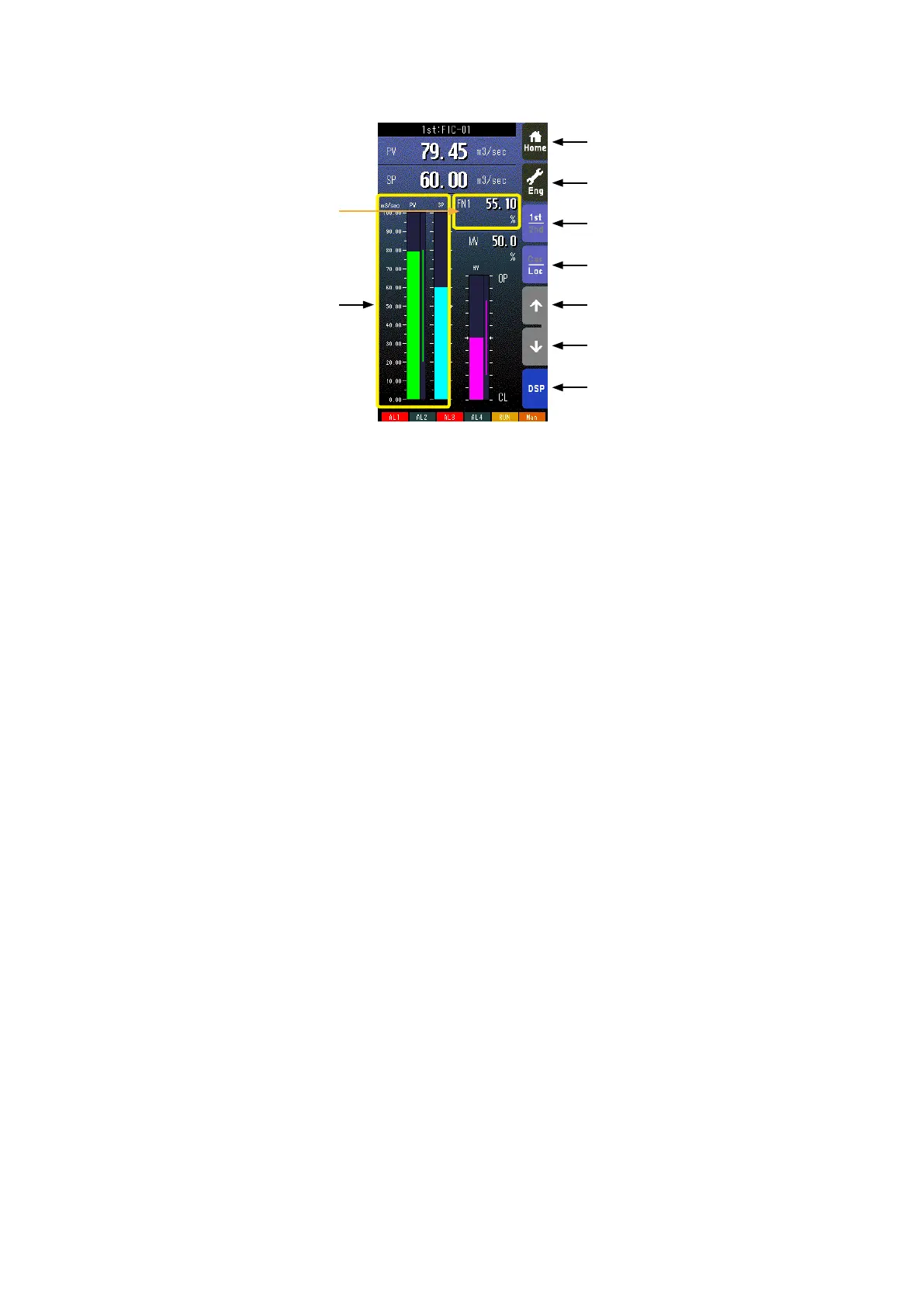
Home button
Used to switch the view to the one registered as Home operation view.
Pressing/holding the button for approx. 1 second registers the view as Home view (including the 1st/2nd choice).
Eng button
Pressing/holding the button for approx. 1 second switches the view to Engineering view.
Once the view is switched, it is used to switch among the engineering views.
1st/2nd select button
Used to switch between the primary and the secondary loops. Valid only when the secondary is set.
Cas/Loc select button
Pressing/holding the button for approx. 1 second switches the control mode between cascade (Cas) and local (Loc). Valid
only when ‘Set mode Cas/Loc’ setting under the tuning parameters is set to ‘Cascade/Local.’
The button operation can be locked by SC eld terminal setting. Refer to SC100/200 Series Function Block List.
SP value UP button *
1
Used to increase SP value in the speed of 40 seconds per full-scale. Touching it briey increases the value digit by digit.
The button operation can be locked by SC eld terminal setting. Refer to SC100/200 Series Function Block List.
SP value DOWN button *
1
Used to decrease SP value in the speed of 40 seconds per full-scale. Touching it briey decreases the value digit by digit.
The button operation can be locked by SC eld terminal setting. Refer to SC100/200 Series Function Block List.
DSP button
Used to switch among
the operation views.
Bargraphs
% and engineering unit scale switched in turn by touching on the eld when ‘Select unit mode’ is set. (Refer to: 6.3.1.28. SE-
LECT UNIT MODE) Switching the scale on this view affects the same setting for Dual Loop Bargraph view.
Note: Refer to Section 3.12. FRONT PANEL CONFIGURATION for MV operation details.
*1. SP buttons are locked in CAS mode.
Home Button
FN1 - FN4 switched in turn
by touching on the eld.
Eng Button
1st/2nd Select Button
Cas/Loc Select Button
SP Value UP Button
SP Value DOWN Button
DSP Button
Bargraphs


 To Next Page