65
SC100/200 Series Users Manual EM-6337-B Rev.15
6.3.2.2. PROGRAMMING VIEW OPERATIONS
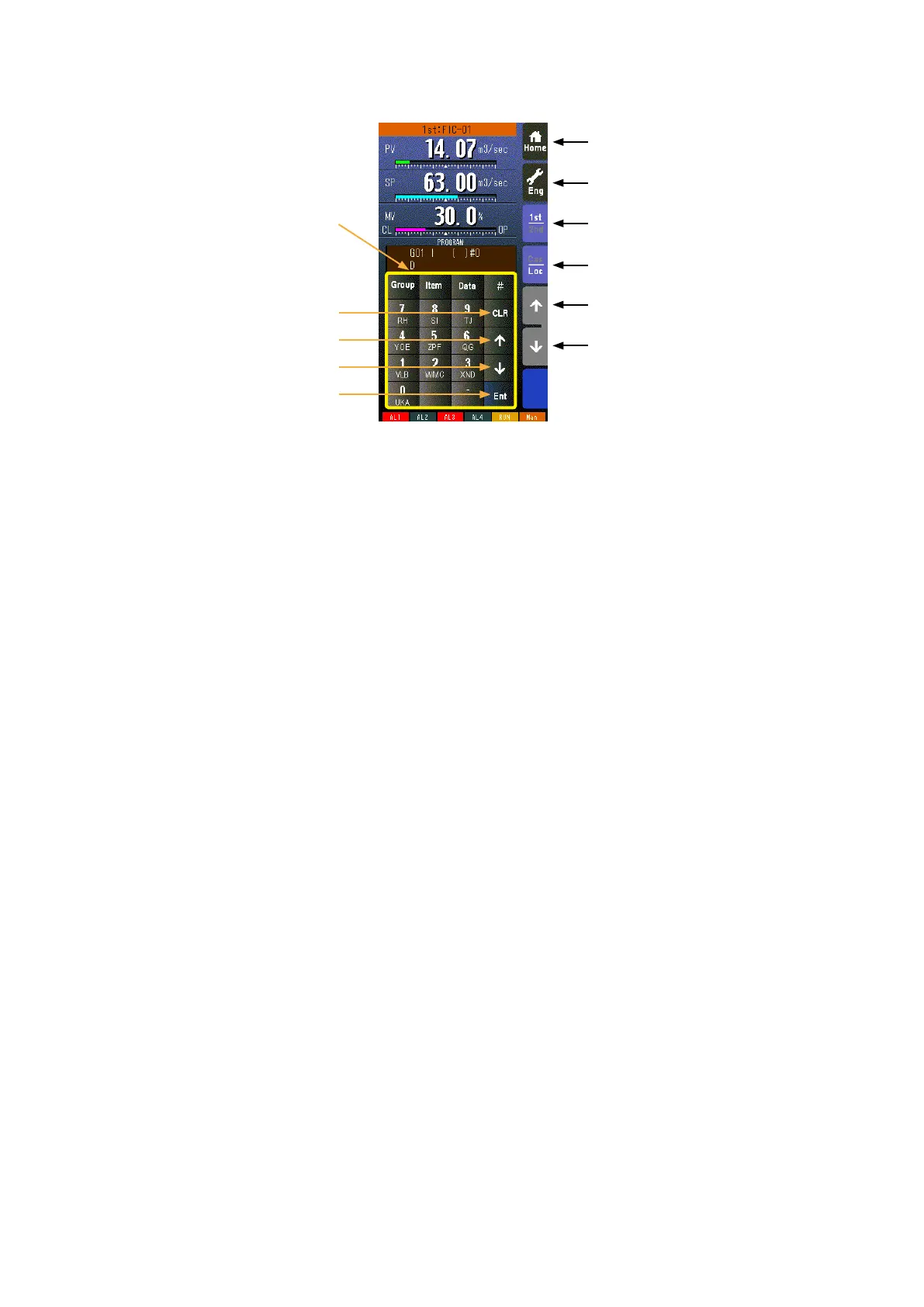
Home button
Used to switch the view to the one registered as Home operation view.
Eng button
Used to switch among the engineering views.
Pressing/holding the button for approx. 1 second switches the view to Operation view.
1st/2nd select button
Used to switch between the primary and the secondary loops. Valid only when the secondary is set.
Cas/Loc select button
Pressing/holding the button for approx. 1 second switches the control mode between cascade (Cas) and local (Loc). Valid
only when ‘Set mode Cas/Loc’ setting under the tuning parameters is set to ‘Cascade/Local.’
The button operation can be locked by SC eld terminal setting. Refer to SC100/200 Series Function Block List.
SP value UP button *
1
Used to increase SP value in the speed of 40 seconds per full-scale. Touching it briey increases the value digit by digit.
The button operation can be locked by SC eld terminal setting. Refer to SC100/200 Series Function Block List.
SP value DOWN button *
1
Used to decrease SP value in the speed of 40 seconds per full-scale. Touching it briey decreases the value digit by digit.
The button operation can be locked by SC eld terminal setting. Refer to SC100/200 Series Function Block List.
CLR key
Used to clear the program data display.
UP key
Used to go to the previous ITEM number.
DOWN key
Used to go to the next ITEM number.
Ent key
Used to apply the data on the display.
*1. SP buttons are locked in CAS mode.
Home Button
Eng Button
1st/2nd Select Button
Cas/Loc Select Button
SP Value UP Button
SP Value DOWN Button
Keypad
DOWN Key
CLR Key
Ent Key
UP Key


 To Next Page