113
SC100/200 Series Users Manual EM-6337-B Rev.15
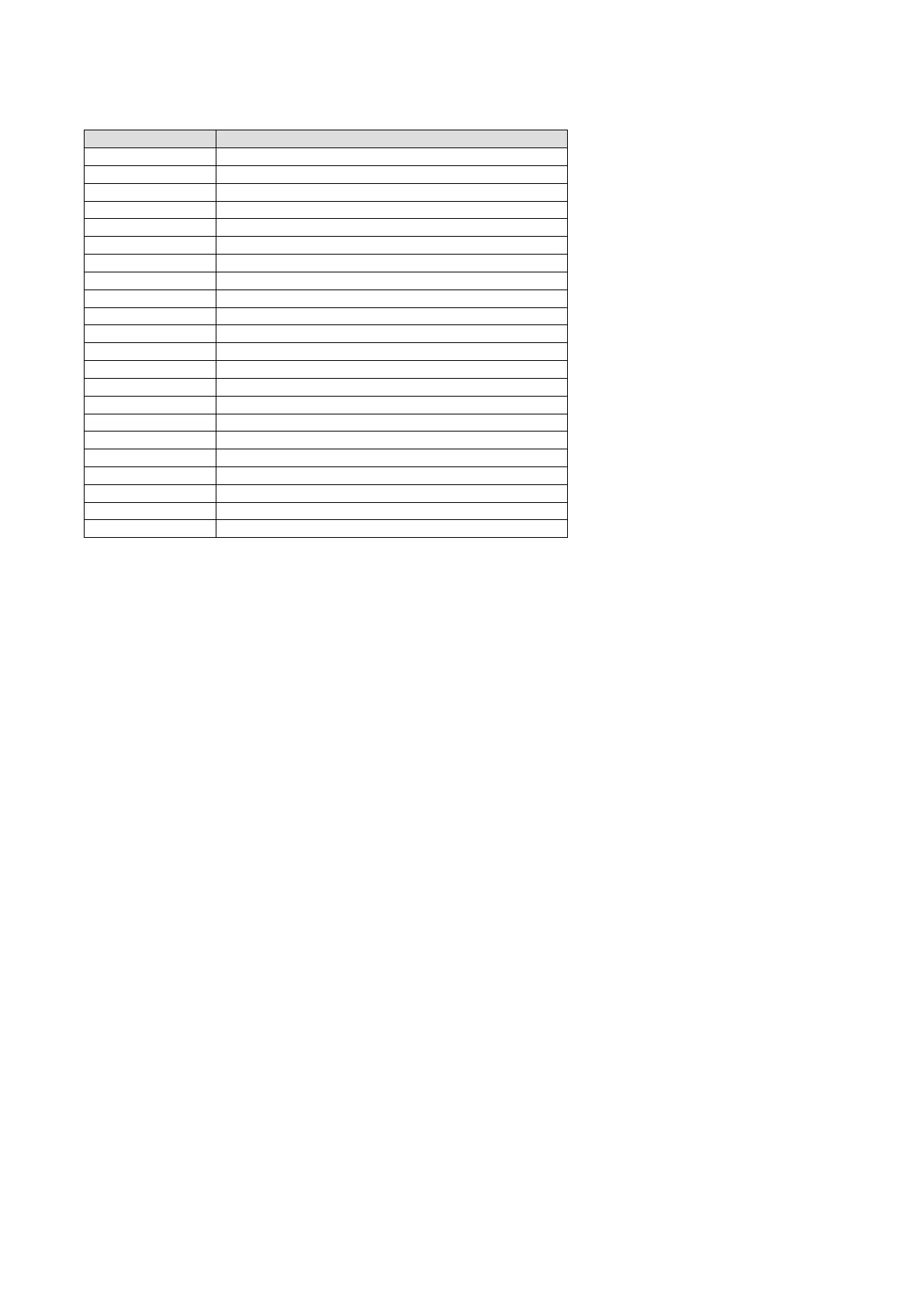
■ FUNCTION BLOCK ERROR CODES
Once Group No. in which an error is occurring presently, you can access error information in ITEM 02 of the identied GROUP.
ERROR ID CONTENTS
ER : 00 Normal
ER : 01 Connection terminal 1 undened
ER : 02 Connection terminal 2 undened
ER : 03 Connection terminal 3 undened
ER : 04 Connection terminal 4 undened
ER : 05 Connection terminal 5 undened
ER : 06 Connection terminal 6 undened
ER : 07 Connection terminal 7 undened
ER : 08 Connection terminal 8 undened
ER : 09 Connection terminal 9 undened
ER : 10 Computation error: Divided by ‘0’
ER : 11 Computation error: Result out of range *
1
ER : 20 Communication terminal: Not received
ER : 21 Communication terminal: Connected external device error
ER : 22 Connected internal device error
ER : 70 Illegal block combination
ER : 80 Sequence error: Illegal command
ER : 81 Sequence error: Undened connection terminal
ER : 87 Sequence error: Non-registered step
ER : 88 Sequence error: Register overow
ER : 89 Sequence error: One-shot overow
ER : 90 EEPROM data failed *
2
* 1. 32767 < Computation Result < -32768
*2. Red RUN lamp turns on and error message is indicated when the EEPROM data-
base is destroyed. When this happens, process either of the following:
(1) In PROGRAM mode, write ‘1’ in GROUP 00 / ITEM 95 to execute BLOCK RE-
LEASE.
(2) Connect the Loop Builder Software (model: SFEW3E).
Execute EEPROM Clear and download a new loop conguration.


 To Next Page