215922 95 Revision A
Setting Alarm Volume
The volume control adjusts the audible alarms. It is depicted with a 10-segment bar graph and is adjustable down to 10%.
The default volume is factory-set to 50%.
Adjust the volume as follows:
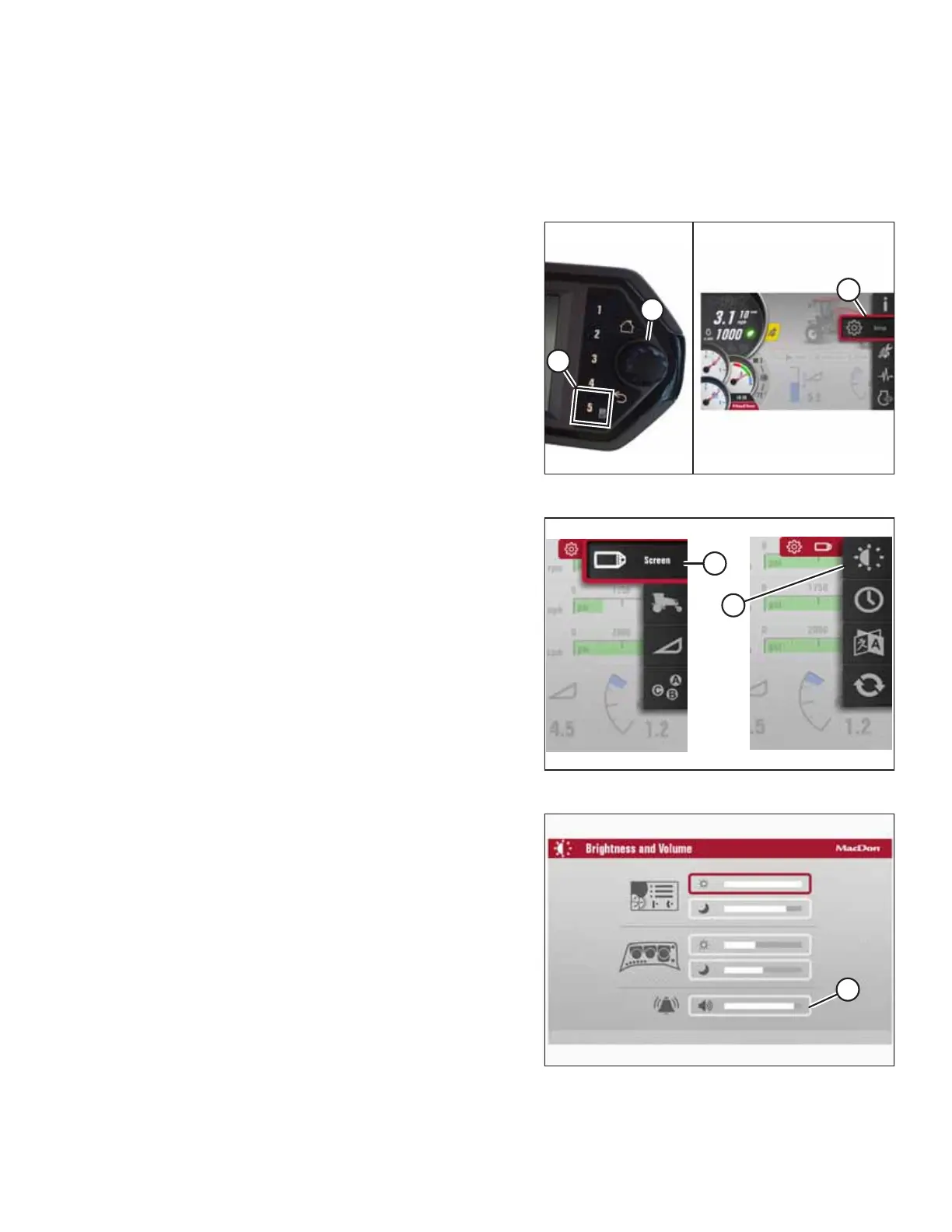
Figure 3.101: Main Menu
1. Navigate to SETUP Menu (C) by pressing soft key 5 (A) and
HPT scroll knob (B). For instructions, refer to 3.17.2
Navigating Harvest Performance Tracker Display, page 84 if
required.
Figure 3.102: Brightness and Volume
2. Scroll to SCREEN icon (A) and select it.
3. Scroll to BRIGHTNESS AND VOLUME icon (B), and select it
to open the adjustment window.
Figure 3.103: Brightness and Volume
4. Scroll to VOLUME option (A) and select it.
5. Adjust the volume by scrolling.
OPERATOR’S STATION



 To Next Page