215922 99 Revision A
7. Select YES to save changes and close the dialog box, or select NO to close the dialog box without saving changes.
3.17.4 Clearing Fault Codes
The lists of inactive fault codes stored on the Harvest Performance Tracker (HPT) can be cleared using the operator’ s
console.
1. Turn the ignition key to the ACC or RUN position. Make sure the engine is not running.
NOTE:
You cannot clear fault codes if the engine is running, or if there are any active fault codes.
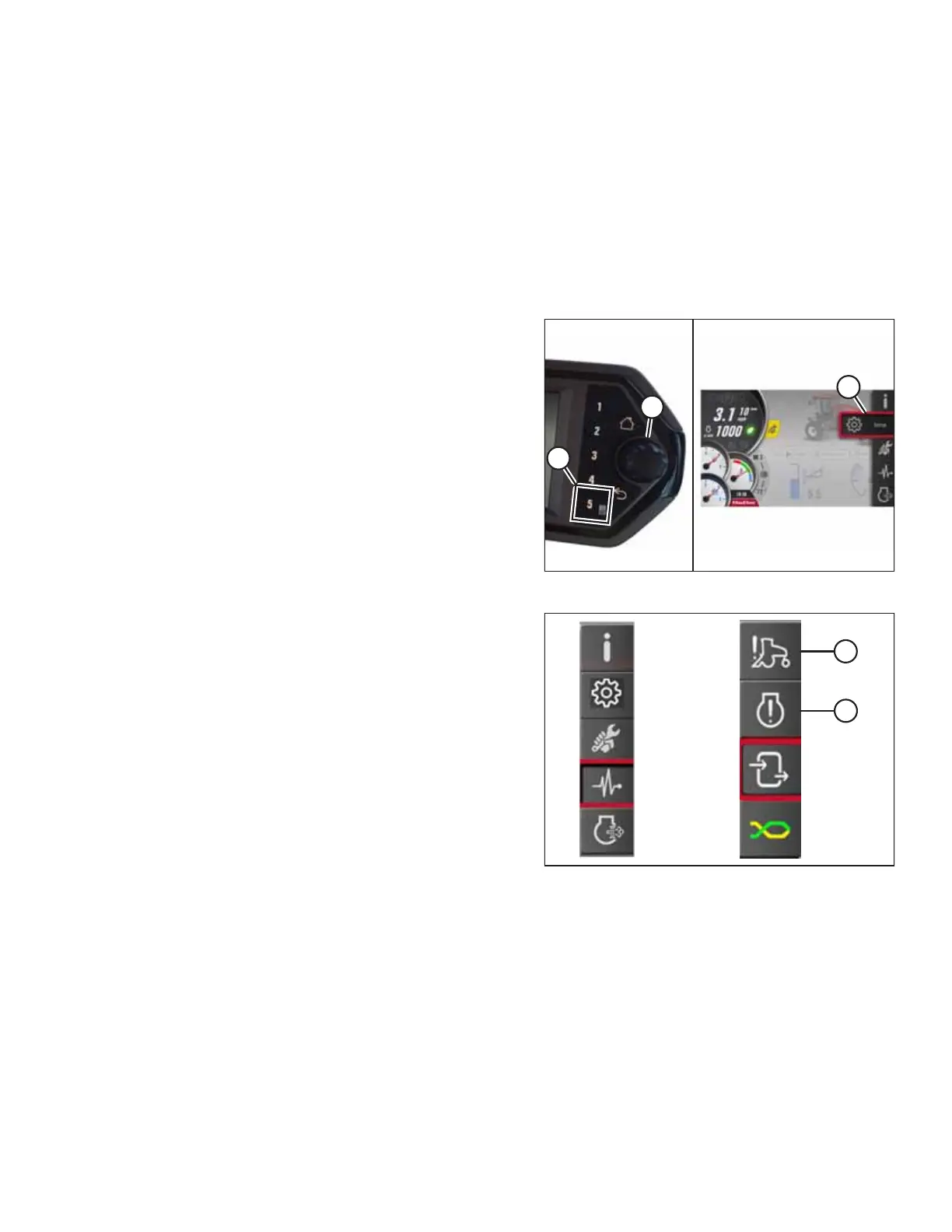
Figure 3.109: Opening the Main Menu
2. Press soft key 5 (A) to open the main menu or press SHIFT
and SELECT on the ground speed lever (GSL).
3. Use Harvest Performance Tracker (HPT) scroll knob (B) or
the GSL scroll wheel (not shown) to place red cursor (C)
over the diagnostics icon.
Figure 3.110: Diagnostics Icon and Diagnostics
Submenu Icon
4. Scroll to windrower fault codes (A) or engine fault codes (B)
and select it to open the fault window.
5. Verify on the screen that there are no active error
messages. You must resolve all active fault codes before
you can clear the fault codes.
OPERATOR’S STATION



 To Next Page