MOOR INSTRUMENTS moorLDI2 RESEARCH USER MANUAL
135
Record the serial number of your LDI
Examine the labels on the back panel of either the scan head or the control box for the MLDI number. This is
a four figure number beginning MLDI 5 _ _ _. Make a note of this number.
Ensure the LDI is connected to the PC via the Moor RS232 lead and that both the PC and the LDI are
switched on.
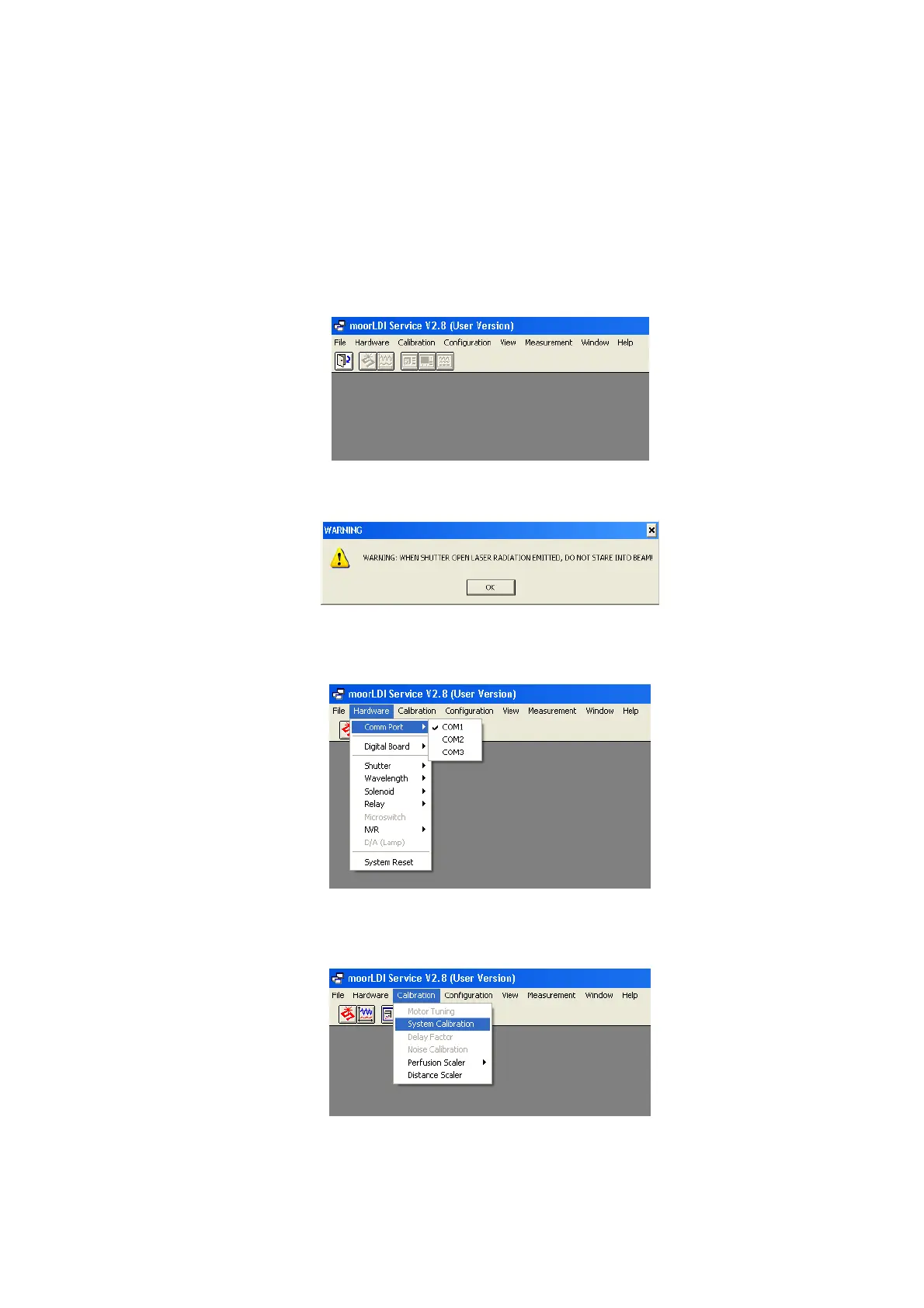
1.1 Load the moorLDI service package 2.8 (Mldise29u.exe). The following screen will appear:
1.2 Click the Shutter Open icon and observe the laser hazard warning.
1.3 Check the COM port setting is correct. This is set by default to COM1 but if your LDI is connected
to COM2 or COM3 etc then you will need to select accordingly.
1.4 Check if the serial number is already in the LDI memory by clicking on ‘Calibration’ then ‘System
Calibration’….
….then ‘Get sets’. If the serial number is already loaded, it will appear in the appropriate box. See below:



 To Next Page