GENESYS User Manual Issue 1
Live Recording
Front of House console
DAT
Group / matrix Main Mix
outputs into Output
Genesys External 3 inputs
Engineers
Headphones
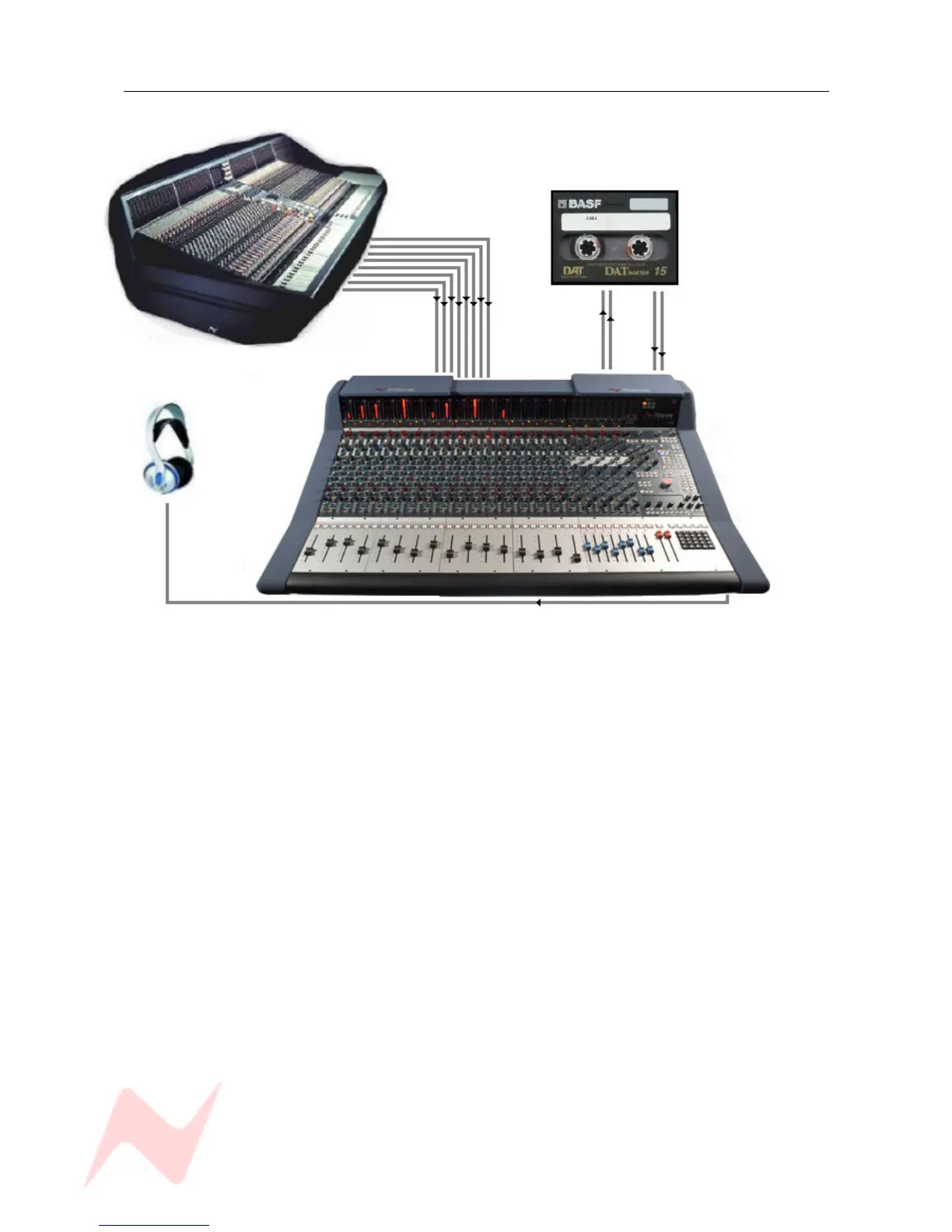
While the output for the main Front Of House console may be of a high standard, the mix created for the
venue does not have the correct balance for a live recording.
Genesys solves this problem.
The main mix outputs of Genesys should be connected to a recording device such as a DAT or DAW
running on a laptop Mac or PC.
The output of the recording device should be connected to the Ext 3 input on Genesys (Externals 1 and 2
are Surround inputs).
Key elements such as the lead vocal can be connected directly to an input on Genesys from a Direct Out
on the FOH console. Other elements such as drums, keyboards, etc can be connected to the Genesys
inputs either from the Group Outputs or from the Matrix Outputs of the FOH console depending on the
type of FOH console being used.
A correct balance between the individual and pre-mixed sounds can be set up on Genesys using Channel
faders. The mix is now passing through the Genesys mix bus.
The engineer can monitor the live recording on headphones and switch between monitoring the Genesys
Main Output and the Ext 3 return path from the recorder (for a confidence check on the recorded
sound).
- 22 -



 To Next Page