GENESYS User Manual Issue 1
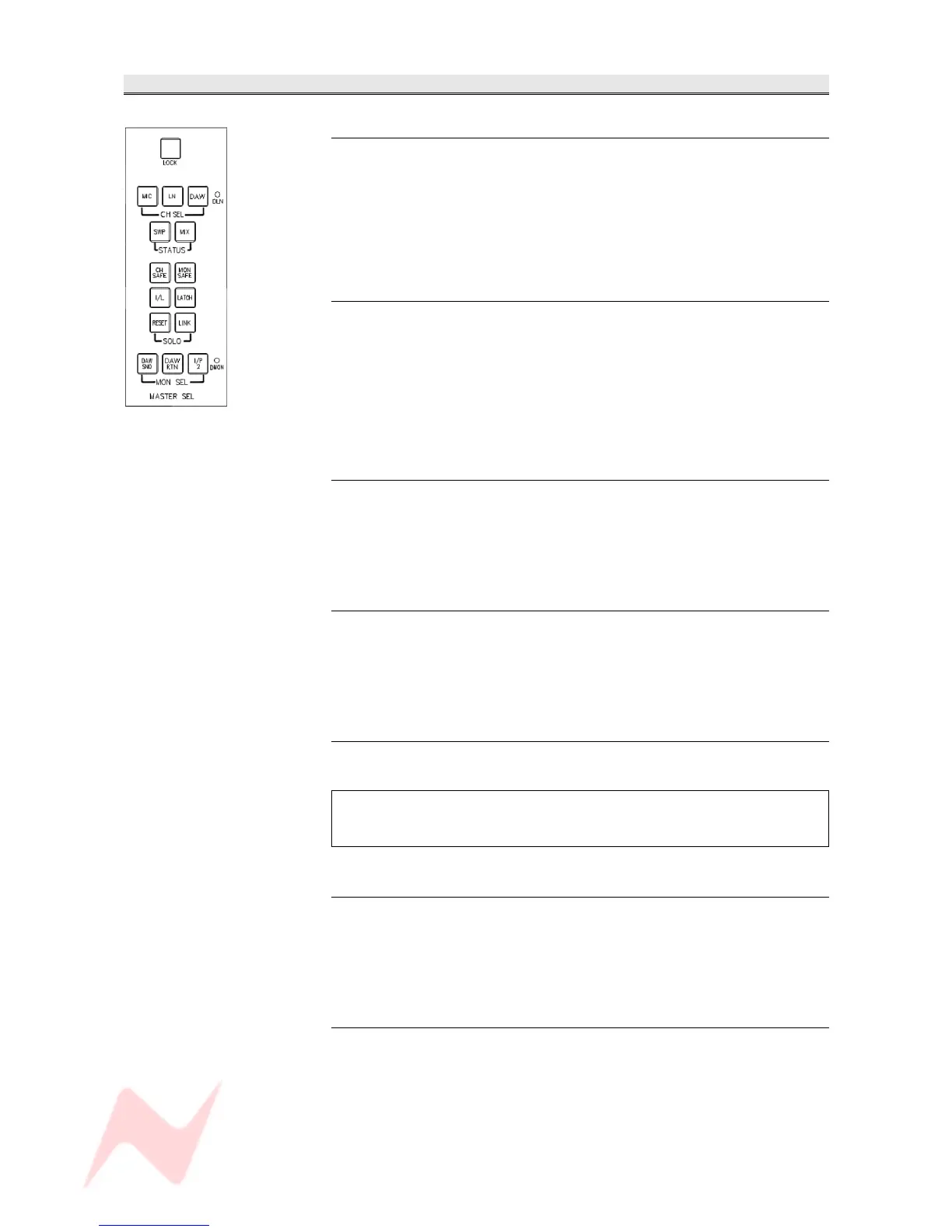
MASTER SEL Section
LOCK
Lights red and locks the MIC, LN, DAW, SWP & MIX buttons (plus the
DLN led) to their current state, preventing them from accidental
operation.
• LOCK needs to be held for 3 seconds before locking or unlocking.
• Pressing LOCK and then RTE SEL together will put the panel into
SEL mode.
MIC
Lights red and cancels other selections.
It will change the audio feed to the Channel path by switching all the
modules to Mic input, and this will be displayed by a red led on each
module.
NB. MIC is interlocked with MIX to clearly define two different states the
console can be in, either Record (MIC) or Mixdown (MIX).
LN
Lights green and cancels all other selections.
It will change the audio feed to the Channel path by switching all the
modules to Line input, and this will be displayed by a green led on each
module.
DAW
Lights green and cancels other selections.
It will change the audio feed to the Channel path by switching all the
modules to the workstation, and the green DAW led will be lit on each
module.
DLN led
The D-LINE Inputs (and it's led) are turned on when the three interlocked
options above are all turned off.
The DLN led will only light if a AD/DA cassette has been detected.
If there is no cassette, it will not be possible to turn the other CH DLN
selection on either.
SWP
Lights blue and swaps the Channel and Monitor paths (the red SWP led
will light on each channel).
This globally swaps the Large Fader & Cut with the Small Fader and Cut
within the Channel and Monitor paths.
MIX
Puts the console into Mix-down mode and cancels the Mic Inputs to clearly
indicate Mix Mode.
It will change the audio feeds to the channel and monitor auxes from Pre-
cut (pre-fade), to Post-cut (pre-fade) within the channel.
This will allow the Auxes to be Pre-Cut for recording, but Post-Cut for
mixing.
- 39 -


 To Next Page