GENESYS User Manual Issue 1
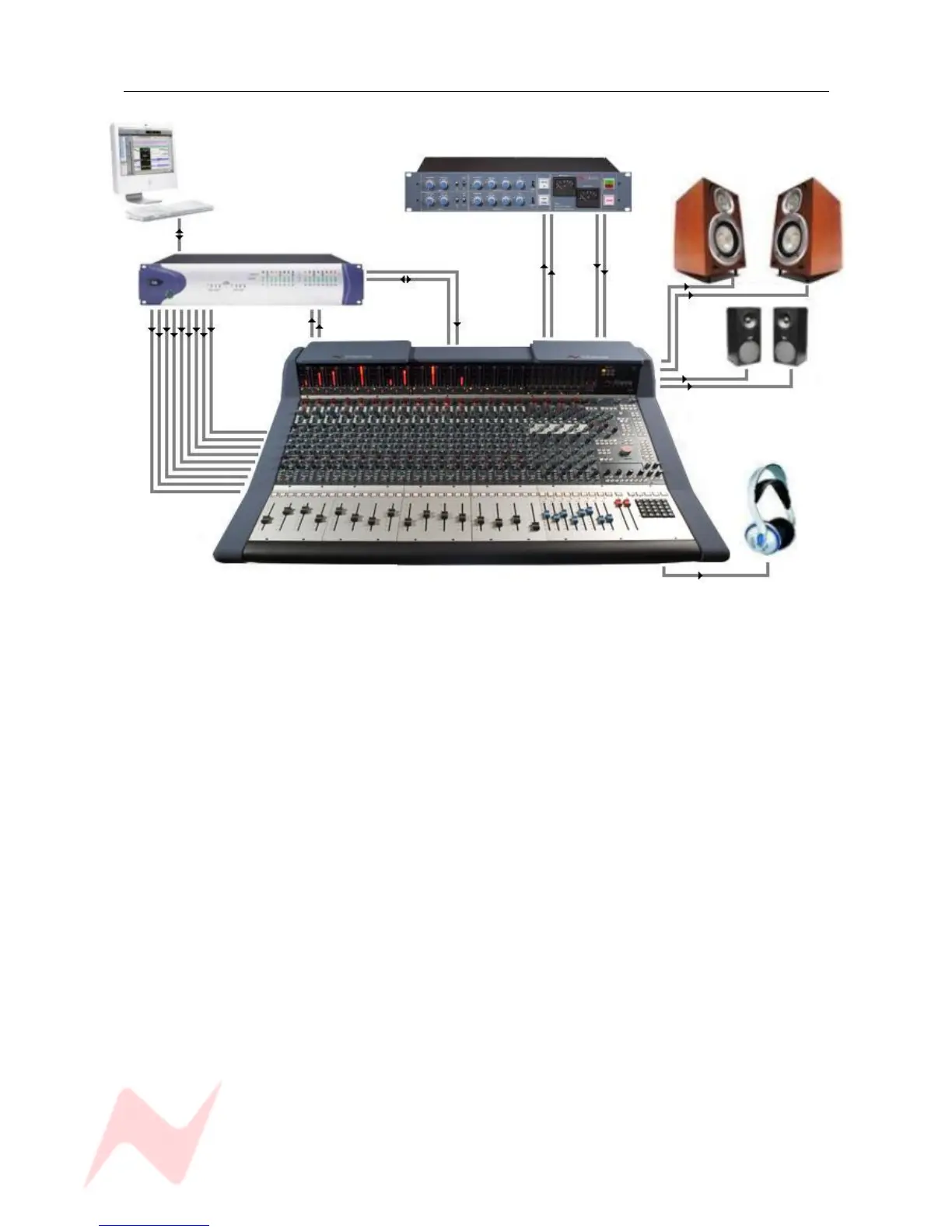
Hui Control of DAW (inc Sub-mixing)
Neve 33609 Compressor
Pro Tools Mac / PC M1 speakers
Main Mix Send Return
Pro Tools I/O
Timecode
Ethernet
Main Mix
DAW RTN
1 – 32 to
Genesys
M2 speakers
Engineers
Headphones
In this scenario, the first 16 channels from Pro Tools are fed into the desk at Line level.
This may, for example, be a percussion group that you want to mix on Genesys.
This is sent through a 33609 using the Main Mix Insert and then returned to Pro Tools as a mixed and
finished section.
Pro Tools channels 17 and onwards are controlled via HUI, so even though the audio for these paths does
not pass through the console, it is still balanced and mixed on Genesys using the 8T faders and the
encoders underneath the DAW/Console Control screen.
These faders can be assigned to blocks of 8 Pro Tools paths at a time, so by reassigning this block of
faders, it is possible to manipulate all of the Pro Tools paths.
Any automation data you record for these paths will be stored on Pro Tools.
To enable both the HUI control and the automation, the timecode from Pro Tools needs to be referenced
to Genesys, plus an Ethernet cable for the HUI data needs to be plugged from Pro Tools into Ether 1
Auto on the rear of the console.
Please see the section on HUI Setup to configure communication between Genesys and your DAW.
- 23 -


 To Next Page