GENESYS User Manual Issue 1
Faders & Keypad
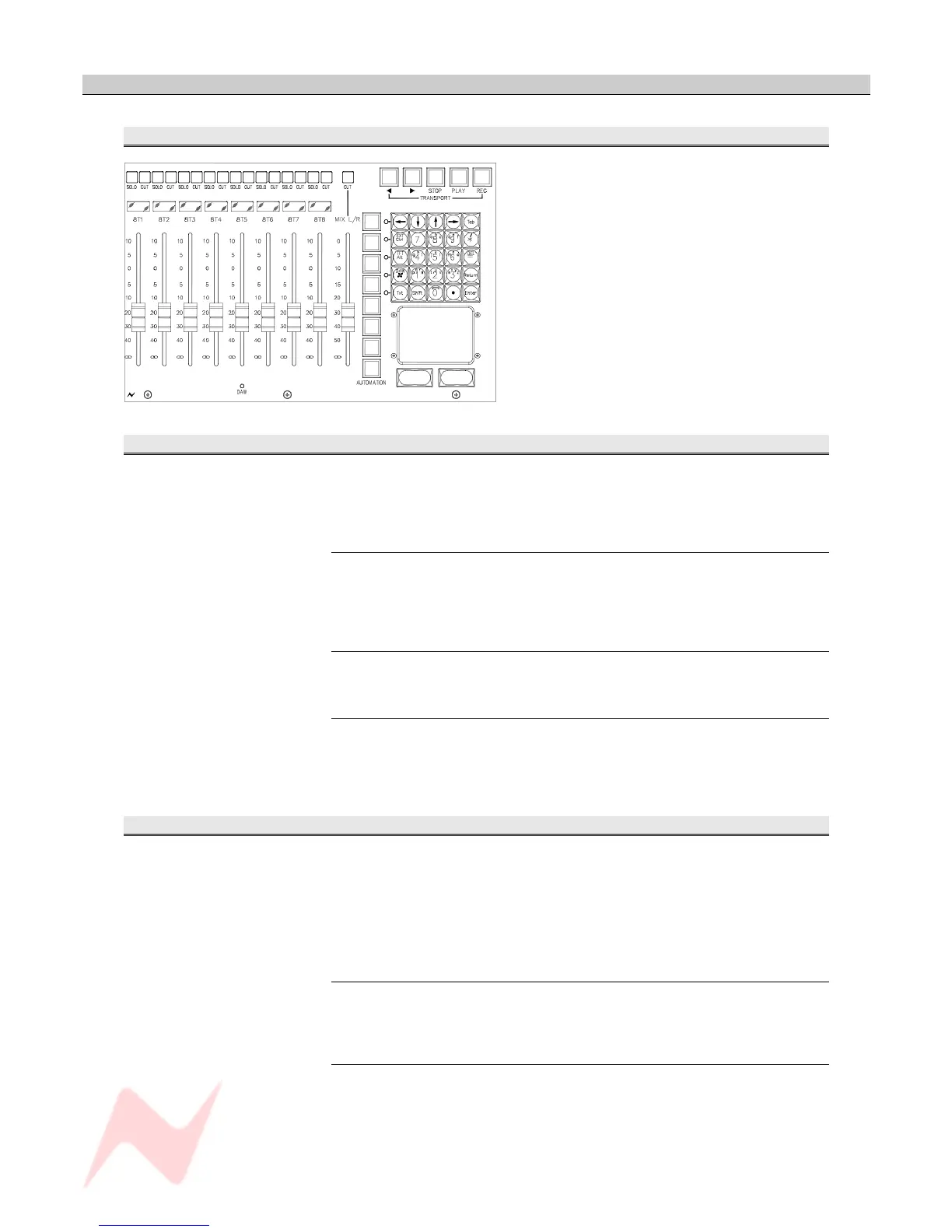
Master Faders
The 8T faders can either control the 8T levels or
a block of 8 DAW faders (the red led underneath
the faders will light when DAW control has been
established).
The main output fader always controls the Main
Mix Output.
Channel Faders
Each fader has a range of -∞ to +10dB, with it's own CUT and SOLO
button.
CUT
Cuts the paths audio.
In Mix Mode, Pre-fade contributions to auxes will be affected by the cut.
SOLO
A Channel SOLO will override any CUT that is already in place.
Alpha Display
The four-character alpha display above each fader is used to display:
• The automation modes (Automation consoles)
• DAW track information (Automation consoles)
• User path-names (Standard consoles).
8T Faders
The 8T faders can either control the 8T levels, or a block of 8 DAW tracks
(the red DAW led underneath the faders will light when DAW control has
been established).
Each fader has a range of -∞ to +10dB.
CUT / SOLO
Each fader has a CUT / SOLO button whose function is switched with the
adjacent CUT buttons to solo an 8T group.
Alpha Display
The four-character alpha display above each fader is used for displaying
8T 1 – 8 or DAW track information.
- 59 -


 To Next Page