GENESYS User Manual Issue 1
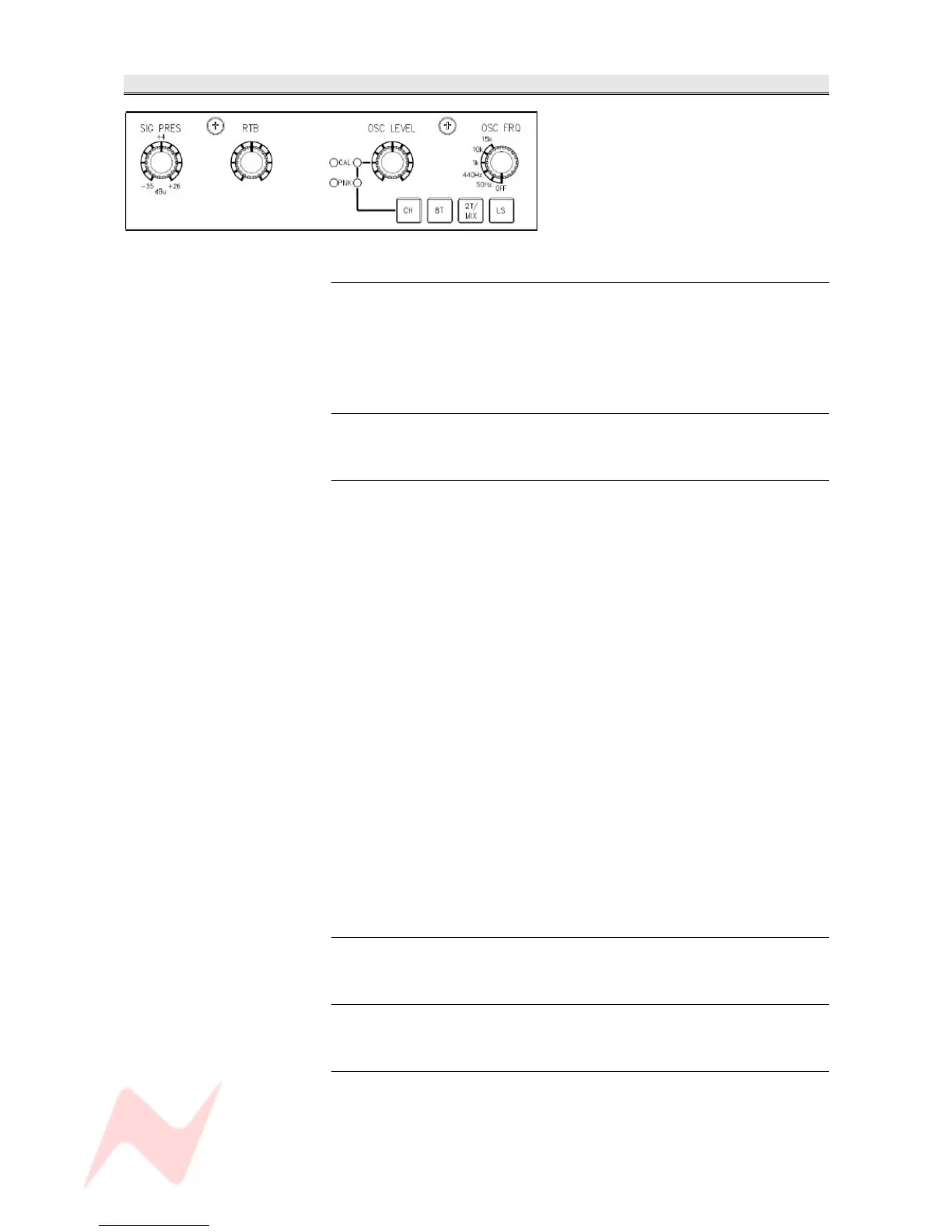
TONE / RTB Section
SIG PRES
Sets the level at which the Meterbridge Signal Present leds come on for
channels and 8T's, it has a range of -35dBu (signal present) to +26dBu
(overload).
It has a centre detent which is calibrated to +4dB via a Trim Pot.
RTB
Sets the level for Return Talkback to the M2 speakers.
OSC LEVEL
This has a 3-state operation which can be cycled by pressing the control.
The function is indicated by leds to the left of the knob.
In it's default state (both leds off), it sets the level of TONE, with a range
of -∞ to +20dB.
+4dBu is set roughly at the 11.30 mark.
The buttons underneath select the destination (CH, 8T, 2T/MIX and LS).
> On the 1st press, the CAL led will light. Instead of the tone level being
set by the knob, it is now set via the Trim Pot on the left of the CAL led.
The trim pot has the same range as the knob.
> On the 2nd press, the PNK led will light and pink noise will be
generated instead of sine-wave tone. The level of the pink noise is set via
the Trim Pot to the left of the led.
> The 3rd press turns both of these functions off (both leds off) and the
tone generator returns to it's default state.
NB:
In it's default state, the 2T/MIX button will only send tone to MIX.
If you wish to send tone to the 2T as well, this must be configured in the
Settings screen, by ticking the Osc to 2T option.
CH
Sends tone to the Direct Outputs of all channels.
8T
Sends tone to the 8T Outputs.
2T/MIX
Sends tone to the 2T and Mix Outputs, as set on the Setup page.
The OSC routing buttons have no interlock, so is is possible to route the
oscillator to multiple destinations at once.
- 36 -


 To Next Page