GENESYS User Manual Issue 1
MAIN MIX Fader
An independent fader controls the Left & Right of the main mix with a
range of to 0dB.
The CUT button acts on both the L & R of the Main Mix.
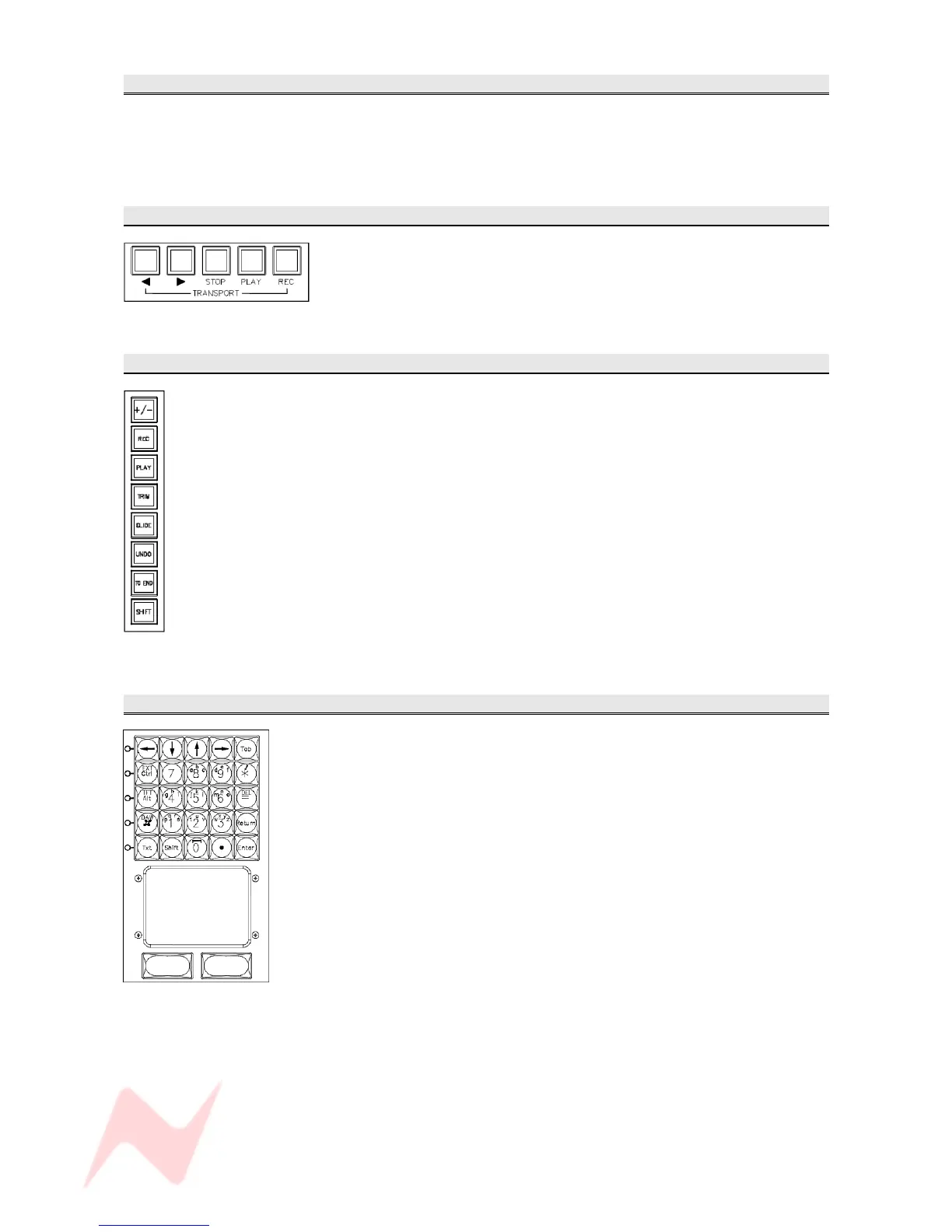
TRANSPORT Keys
WIND, REWIND, STOP, PLAY and RECORD buttons control the DAW.
Each button lights yellow to confirm the function has been selected, apart
from PLAY (lights green) and REC (lights red).
MASTER AUTOMATION buttons
The Master Automation keys are only present on consoles that have the
optional Encore Plus™ Automation package fitted (automation software
not available in this version of software).
Each button lights yellow to confirm the function has been selected, apart
from PLAY (which lights green) and REC (which lights red).
KEYPAD
In Text mode , it is used for entering filenames on screen and navigating
around on-screen applications (Text button selected).
In Non-text mode, it is also used for setting up Cue cycles and Copy /
Paste / Edit functions within the DAW (text button not selected).
A full sized keyboard can be plugged into the rear of the console if more
functionality is required.
The glide pad and two buttons act as mouse, or an external mouse (or
trackball) can be plugged into the rear of the console.
- 60 -


 To Next Page