E Series Automated Dispensing System
14 www.nordsonefd.com info@nordsonefd.com 800-556-3484 Sales and service of Nordson EFD dispensing systems are available worldwide.
Installation
Use this section in tandem with the Quick Start Guide and the valve system manuals to install all components of the
system.
Unpack the System Components
CAUTION
Unpacking the robot requires a minimum of two people.
Do not attempt to lift the robot without assistance.
1. Remove all system components and ship-with
items from the packaging.
2. With assistance, carefully lift the robot by its base
and transfer it to a stable workbench. Never lift the
robot by its cross member.
NOTE: All units are shipped from the factory with
foam protectors that secure the worktable to
the X-axis and the Z-head to prevent movement
and damage during shipment. Nordson EFD
recommends retaining all packing material for use if
the robot is shipped or moved in the future.
3. Remove the protective foam covers and tape.
4. Double-check the shipping box to ensure you have
removed everything.
Foam
protector
Cross
member (do
not use to
lift the robot)
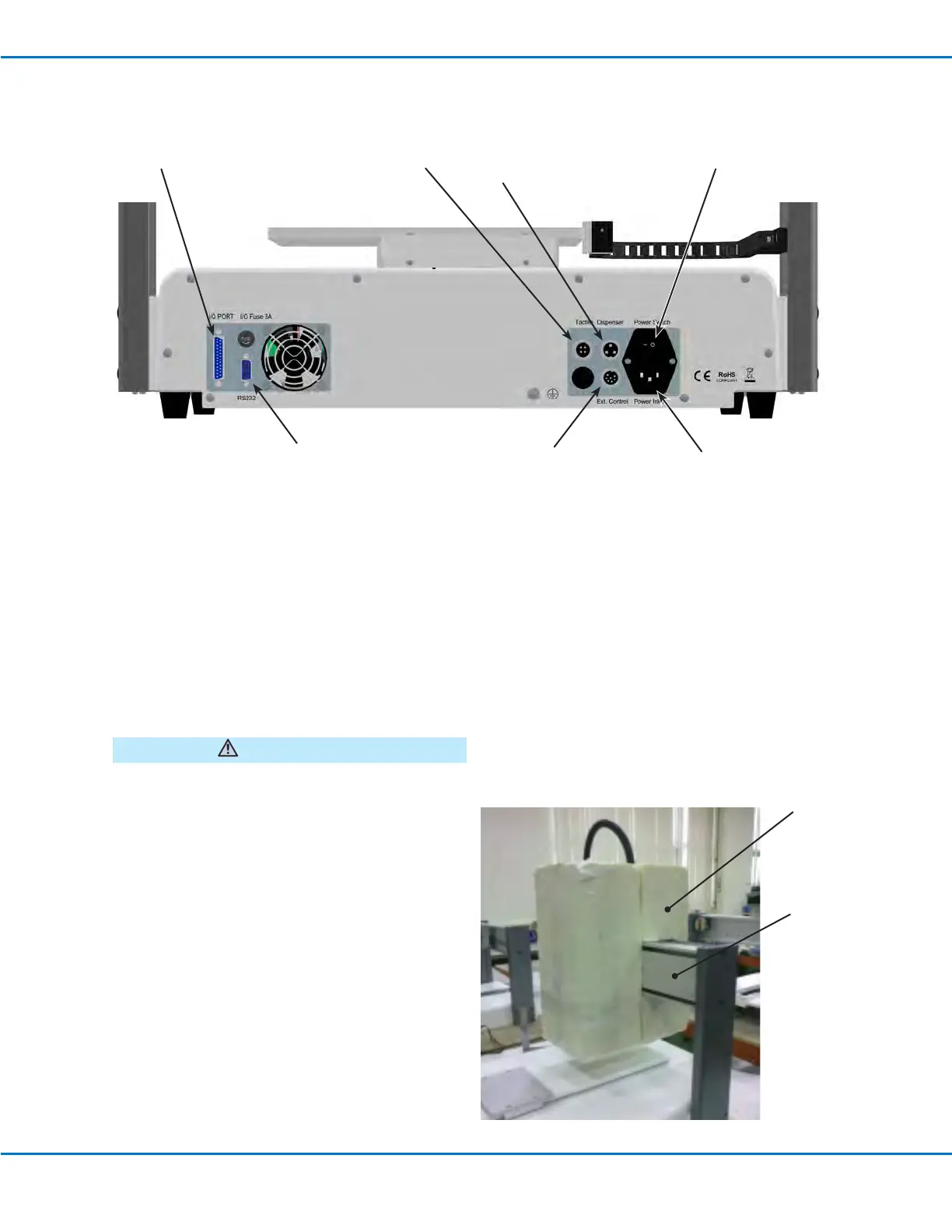
Back Panel
Dispenser port (for dispenser /
controller initiation)
Power
Switch
I/O Port (for
input / output
connections)
RS232 port
Ext. Control port
(for the I/O safety plug)
Power Inlet
Tactile port (for the tip
detector, if present)



 To Next Page