E Series Automated Dispensing System
117www.nordsonefd.com info@nordsonefd.com 800-556-3484 Sales and service of Nordson EFD dispensing systems are available worldwide.
Program Screen and Icons
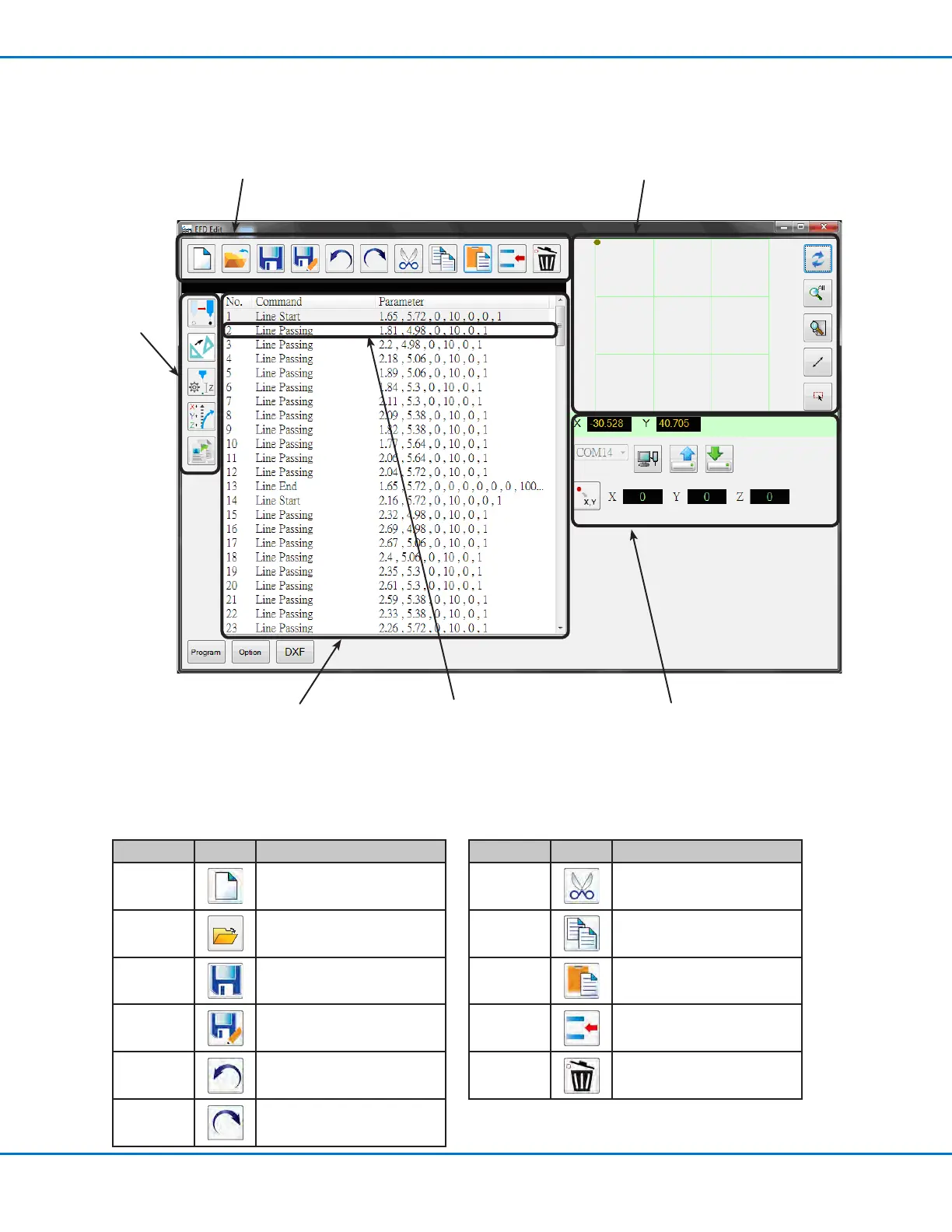
The Program screen is used to modify the command list that is generated after le import and to view a
representation of the resulting dispense pattern.
1. Program screen editing icons 6. Grid window and icons
2. Coordinate
function icons
5. Coordinates and
connection status area
3. Program screen
command window
Icon Name Icon Function
A New File
Creates a new le
Open a File Opens a le
Save
Saves the open le
Save as Saves the open le as a new
le name
Undo
Undoes the last command
Redo
Restores the last Undo action
Icon Name Icon Function
Cut
Cuts a selection
Copy Copies a selection
Paste
Pastes a selection
Insert Inserts a command
Delete
Deletes the current command
1. Program Screen Editing Icons
The Program screen editing icons are used to open program les and to manipulate commands within a program
le.
4. Command line
(double-click opens the
command Edit window)



 To Next Page