E Series Automated Dispensing System
113www.nordsonefd.com info@nordsonefd.com 800-556-3484 Sales and service of Nordson EFD dispensing systems are available worldwide.
Appendix B, RS-232 Communication Protocol
You can perform some robot operations remotely through a personal computer (PC) or programmable logic
controller (PLC).
Setting Up the System for Remote Operation
1. Connect a DB9 female straight cable to (1) the RS232 port on the back of
the robot and (2) to the PC/PLC.
NOTE: If the PC does not have an on-board serial port, use a USB-to-serial
converter with the DB9 cable. Refer to “Pre-Congured Output Cables” on
page78 for part numbers.
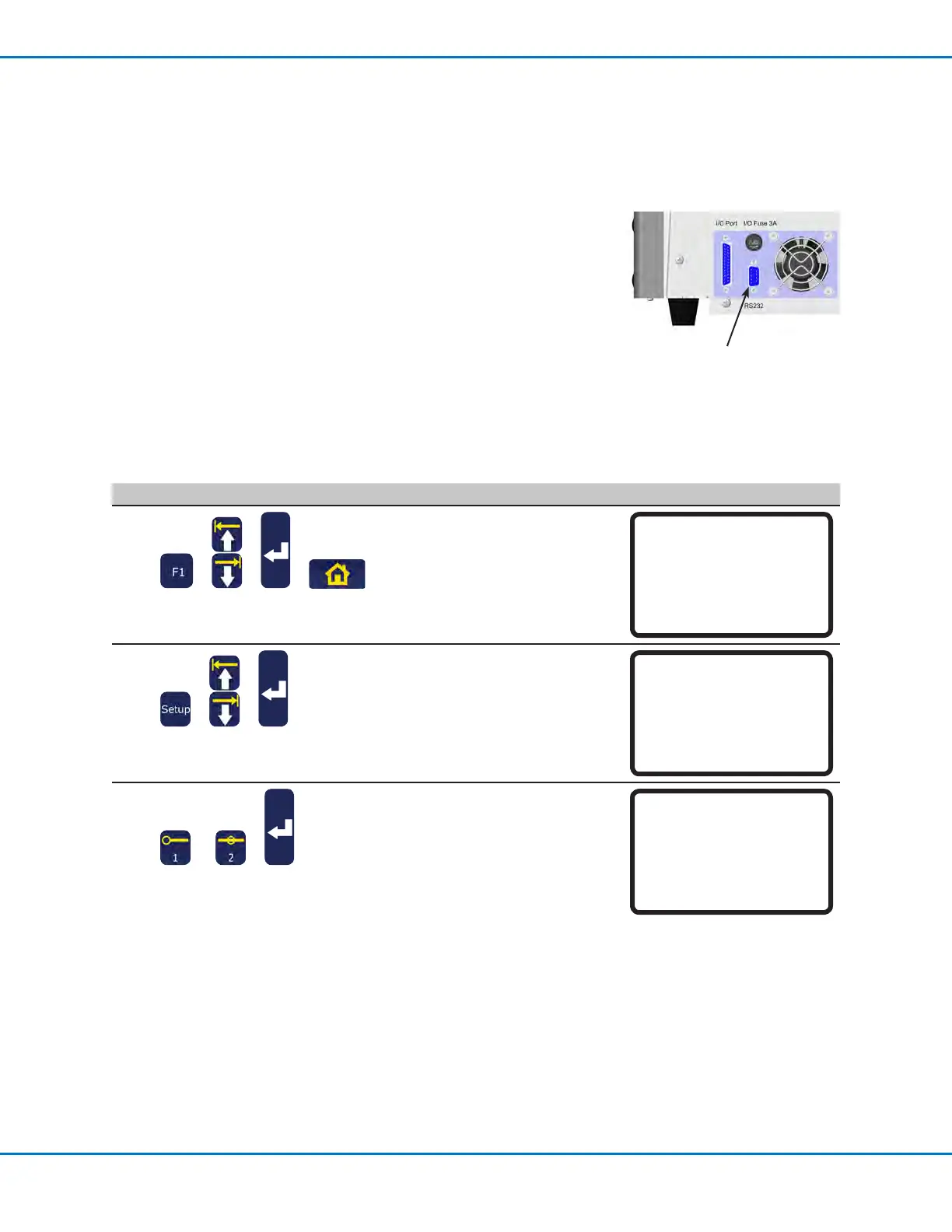
2. Enable Remote Command under the Setup menu. Refer to “Enabling or
Disabling Remote Communication” below.
3. Refer to the following additional information also provided in this section:
• “Communication Specications” on page114
• “Commands” on page114
RS232 port
Enabling or Disabling Remote Communication
# Key Press Step Teach Pendant Display
1
> > >
• Press F1.
• MOVE UP / DOWN to TEACH/
RUN.
• Press ENTER.
• Press HOME. If prompted, enter
a password.
[PROGRAM MENU] 1/1
01*Teach/Run
02 Program List
03 Reset Counter
04 Program Offset
05 Needle Adjust
06 Auto Needle Adjust
2
> >
• Press SETUP.
• MOVE UP / DOWN to REMOTE
COMMAND.
• Press ENTER.
[SETUP] 3/3
15 Measurement Unit
16 Password Setup
17*Remote Command
18 Height Sensor
19 Language
20 System Information
3
or >
• Press 1 ENABLE to enable
remote communication.
• Press 2 DISABLE to disable
remote communication.
• Press F1 to save or exit.
Remote Command
Disable
-----------------------------
1 Enable
2 Disable
Select: _
[F1] OK



 To Next Page