E Series Automated Dispensing System
46 www.nordsonefd.com info@nordsonefd.com 800-556-3484 Sales and service of Nordson EFD dispensing systems are available worldwide.
How to Name a Program
Nordson EFD recommends assigning a unique name to all programs. If a program is not named, the system
prompts for a Program Name. Program names are limited to 15characters. A program name is required for the
barcode scanning capability.
PREREQUISITES
The system is in the Teach Mode. Refer to “How to Switch from Run Mode to Teach Mode” on page44.
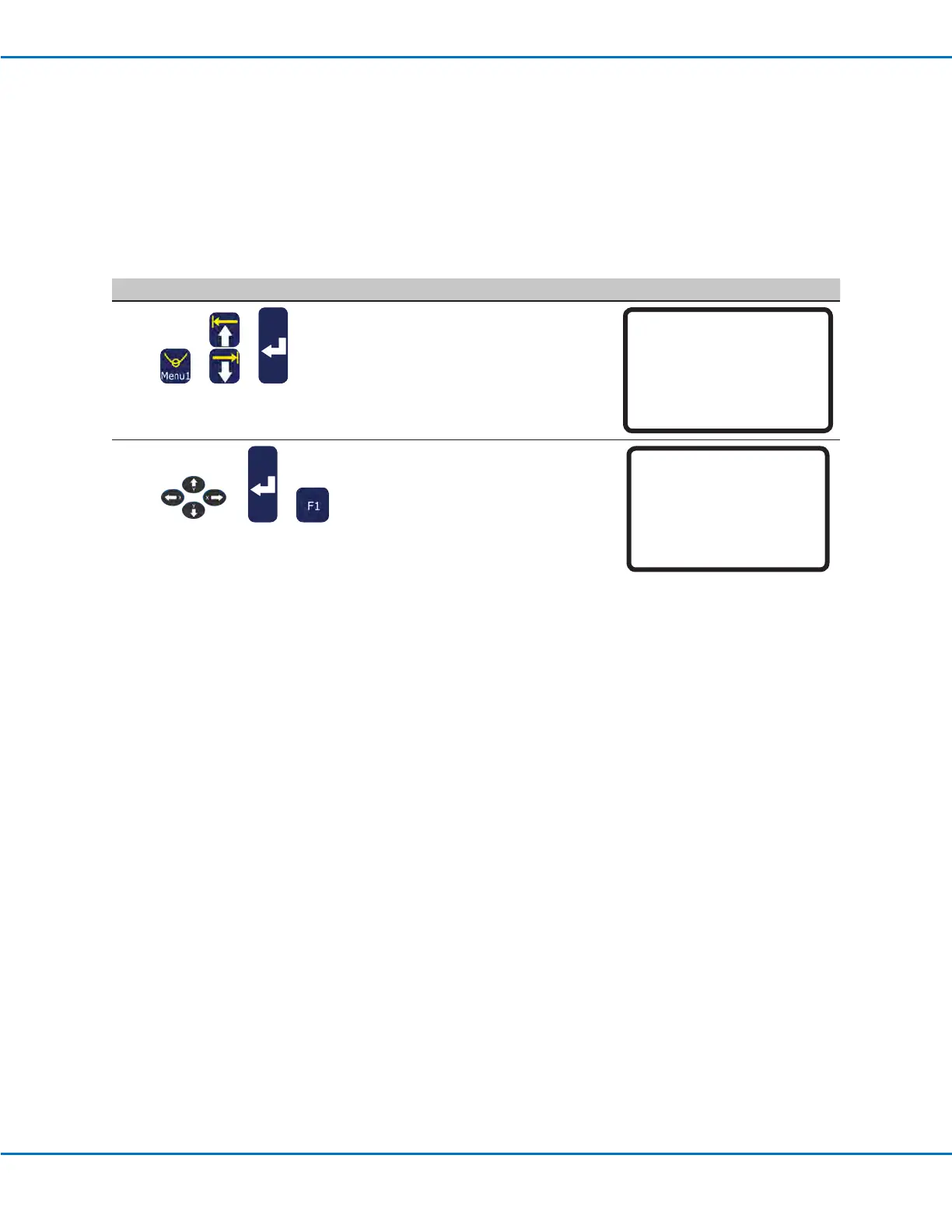
# Key Press Step Teach Pendant Display
1
> >
• Press MENU1.
• MOVE UP / DOWN to PROGRAM
NAME.
• Press ENTER.
[MENU 1] 1/2
01 Group Edit
02 Ex. Step & Repeat
03*Program Name
04 Axis Limit
05 Initialize Output
06 Jog Acceleration
07 Teach Move Z Clearance
2
> >
• Press the X jog buttons to move left /
right and the Y jog buttons to move up /
down through the characters.
• Press ENTER to select characters.
• Press CLEAR to delete characters.
• Press F1 to save and exit.
Program Name
-----------------------------
EXAMPLE
-----------------------------
0123456789-._
ABCDEFGHIJKLM
NOPQRSTUVWXYZ
[F1] OK
Working with Programs and Commands (continued)



 To Next Page