E Series Automated Dispensing System
120 www.nordsonefd.com info@nordsonefd.com 800-556-3484 Sales and service of Nordson EFD dispensing systems are available worldwide.
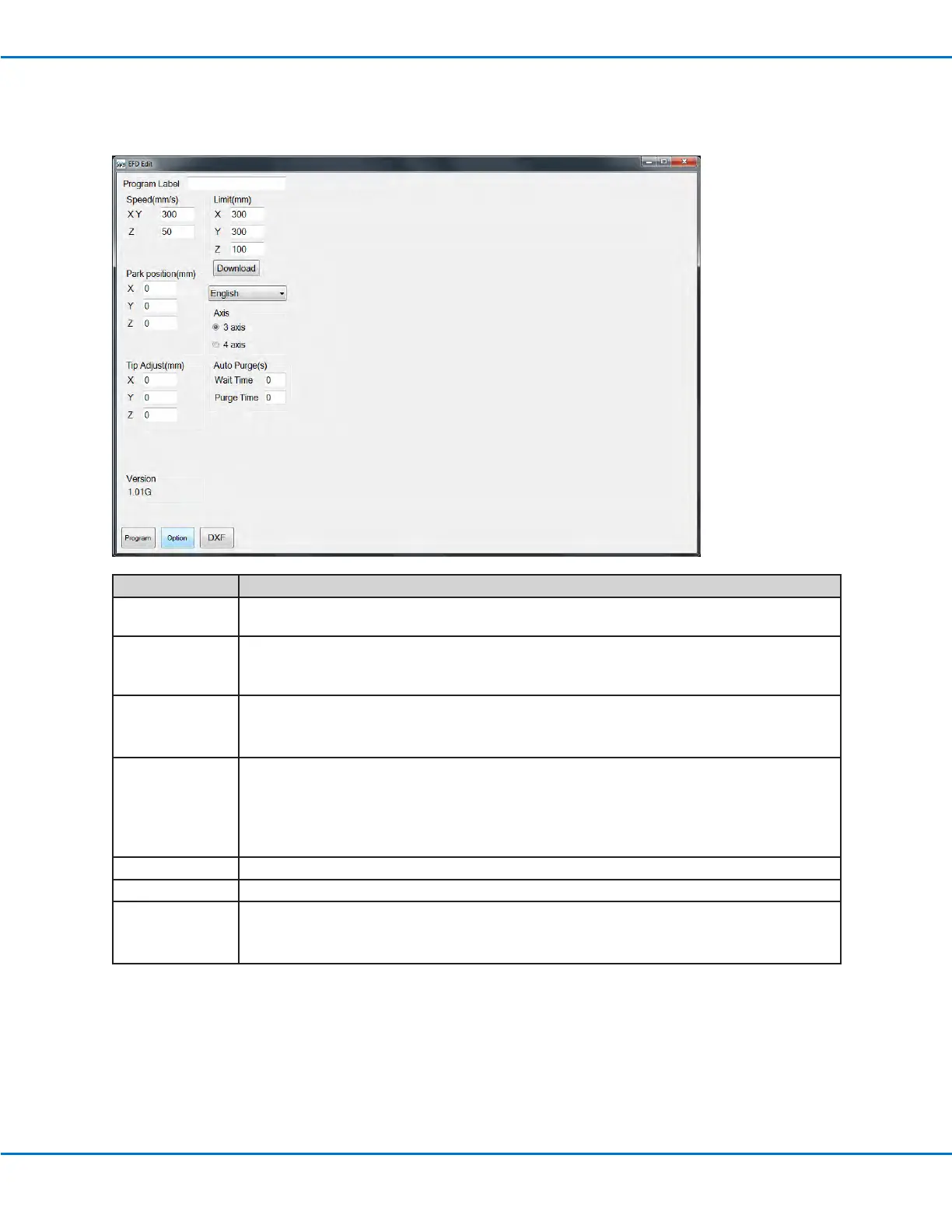
Option Screen
The Option screen is used to set up the system-level settings the system uses when the TeachMotion DXF software
is running.
Item Description
Program Label Names the set of commands generated during DXF import. This information transfers to the
Program Name eld on the Teach Pendant.
Speed (mm/s) Sets the speed of the of X and Y axis movement:
• Maximum XY speed: 800 (mm/s)
• Default: 100 (mm/s)
Park Position Sets the Park Position coordinates. You can enter these values or download them from the
robot.
NOTE: Refer to “Park Position” on page35 for more information.
Tip Adjust (mm) Sets the coordinates of the calibration point. You can enter these values or download them
from the robot.
NOTES:
• Tip Adjust is available only when 3 AXIS is selected.
• Refer to “Calibrating the Tip Height” on page70 for more information.
Limit (mm) Do not modify these settings.
Axis Species the number of axes for the robot currently connected to the PC.
Auto Purge(s) Sets the Auto Purge parameters. You can enter these values or download them from the
robot.
NOTE: Refer to “Auto Purge” on page39 for more information.



 To Next Page