P a g e | 68 P o o l C o p M a n u a l : V 4 2 EN
www.poolcop.com PCFR
Set and Adjust Filtration
PoolCop allows you to manually or automatically control the filtration duration, using two daily cycles. See programming guide
(Section 4) for more information on filtration
Whenever quitting the FILTRATION MODES menu, PoolCop checks and adjust the status of the pump and auxiliaries, and switches
them ON or OFF as required to match programmed running times.
4.4.4.6.1 Filtration Timers and Modes
Navigate to FILTRATION MODES in the POOLCOP MENU.
Select the MODE.
Use the UP and DOWN arrows to adjust the ON and OFF times.
Use the SELECT button to enter the adjusted value.
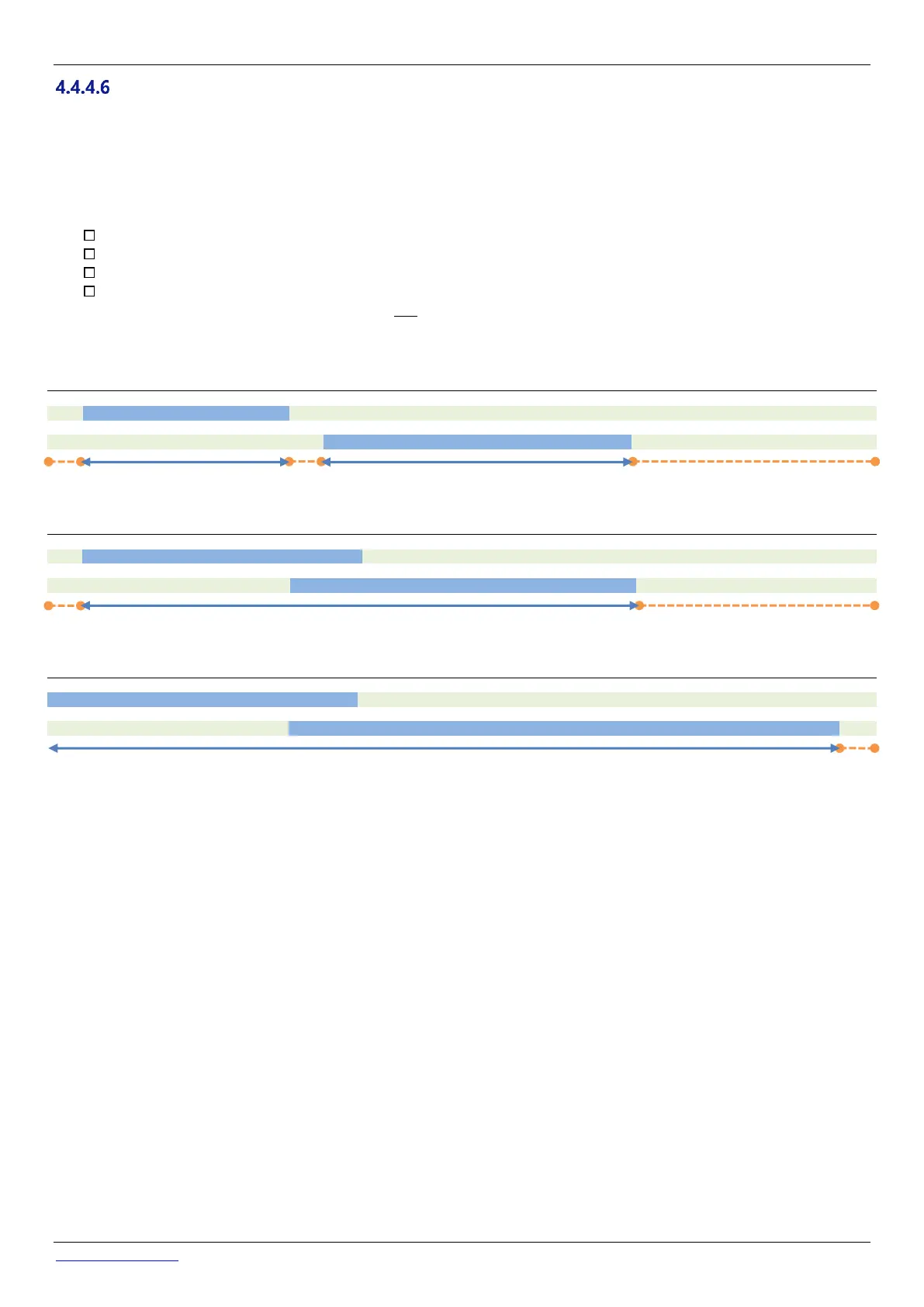
It is recommended to set both filtration cycles (Cycle 1 and Cycle 2) for best results.
It is recommended to leave a gap of at least 30 minutes between two timer cycles to allow PoolCop to take necessary
measurements make subsequent adjustments and carry out the periodic backwash if selected.
If, however the timers are set to overlap, then the total filtration time will be from the earlier cycle ON time until the later timer OFF
time.
It is recommended to never exceed 23:00 per day, to allow PoolCop to take necessary measurements, make subsequent
adjustments and carry out the periodic backwash if selected.



 To Next Page