Page 12-4 LTV
®
Series ventilator Operator’s Manual
p/n 10664, Rev. Y
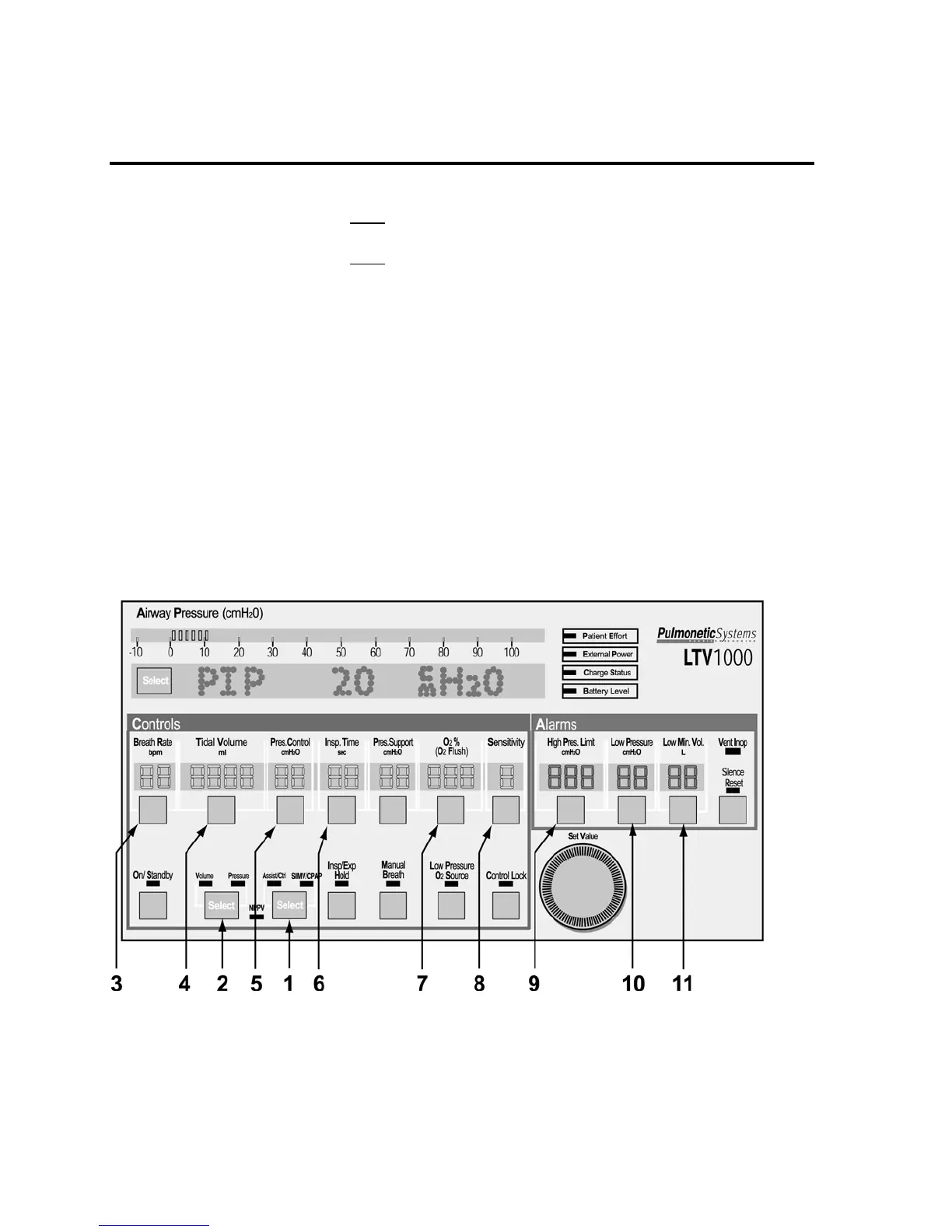
Procedure for Control Mode Set Up
Set any desired Extended Features options and:
1) Push the mode Select button twice to toggle the modes between Assist / Control and SIMV /
CPAP. Select the Assist / Control mode.
2) Push the mode Select button twice to toggle between Volume and Pressure ventilation. Select
Volume or Pressure, as desired. (not available on LTV
®
900)
3) Establish the Breath Rate.
4) If Volume ventilation is selected, establish the Tidal Volume. The calculated peak flow Vcalc is
displayed in the window while Tidal Volume is being changed.
5) If Pressure ventilation is selected, establish the Pressure Control (Not available on LTV
®
900).
6) Establish the Inspiratory Time. The calculated peak flow Vcalc is displayed in the window while
Inspiratory Time is being changed. Vcalc only applies to volume ventilation.
7) Set the desired percentage of oxygen to be delivered by the ventilator (LTV
®
1000 only).
8) Set the Sensitivity to dashes “- -”.
9) Set the High Pressure Limit alarm.
10) Set the Low Pressure alarm.
11) Set the Low Minute Volume alarm.
12) Adjust the PEEP valve to set the PEEP control (Ref. page 6-21).



 To Next Page