Page 14-2 LTV
®
Series ventilator Operator’s Manual
p/n 10664, Rev. Y
Using the AC Adapter
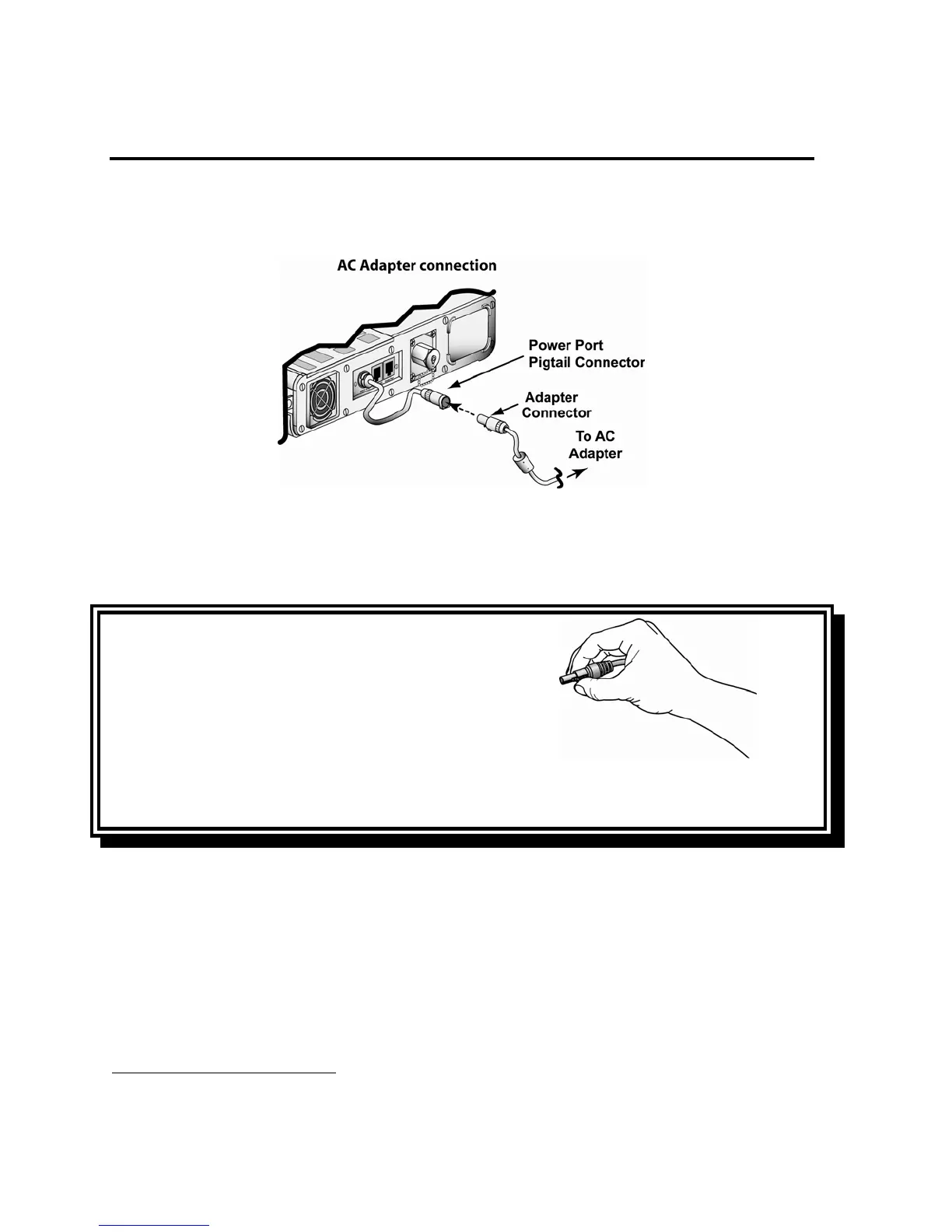
To run the ventilator from the Pulmonetic Systems AC Power Adapter:
65
1) Attach the power connector from the AC Adapter to the ventilator as shown here.
2) Connect the proper AC power cable (110V or 220V plug) to the AC Power Adapter.
3) Connect the 110V
66
or 220V power cable to a suitable power source. Verify the EXTERNAL
POWER LED shows green or amber.
CAUTION
Release Button - To avoid damaging the ventilator or the
power connector, push the release button on the connector
before removing it from the ventilator power port or the
power port pigtail connector.
ATTENTION
Bouton de déclenchement – Pour éviter d'endommager le ventilateur ou le connecteur
d'alimentation, appuyer sur le bouton de déclenchement situé sur le connecteur avant de le retirer du
port d'alimentation du ventilateur ou du raccord de queue de cochon du port d'alimentation.
While the ventilator is plugged in, the internal battery is continuously charged.
65
Pulmonetic Systems AC Adapter, P/N 10537, 11537, or 18053-001
66
Pulmonetic Systems Power Cord, P/N 10536



 To Next Page