Operator’s Manual LTV
®
Series ventilator Page 13-5
p/n 10664, Rev. Y
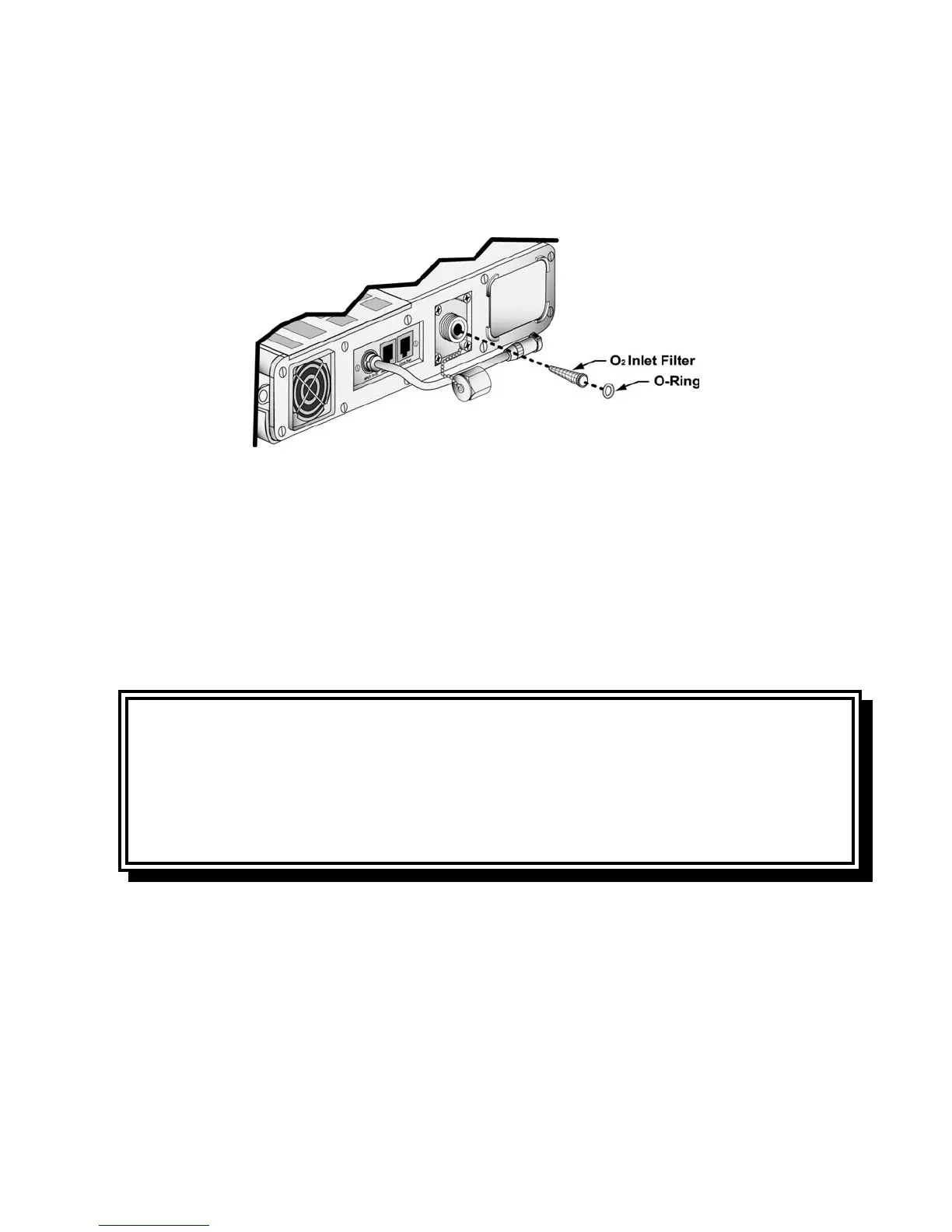
3) Using a pick, gently remove the rubber O-Ring from inside the O
2
inlet port. Use caution: Do not
damage the O-Ring while removing it. Tip the ventilator to allow the O
2
Inlet Filter to slide out.
4) Clean the filter using a mild cleanser, warm water and a soft brush. Rinse the filter thoroughly to
remove all traces of the cleanser. Allow the filter to dry completely before replacing it in the
ventilator.
5) Inspect the filter for damage. If the filter is not intact, shows signs of damage or cannot be
completely cleaned, replace it with a new O
2
Inlet Filter (P/N 14313) and O-Ring (P/N 10609),
available from Pulmonetic Systems.
6) Replace the filter by sliding it back into the O
2
inlet port. Replace the O-Ring, making sure it is
completely tucked under the retaining lip on the inside of the O
2
inlet port.
7) Reconnect the high pressure O
2
line or the barbed adapter and low pressure O
2
line.
CAUTION
Wet or Damp Filters - Do not install a wet or damp filter into the LTV
®
Series ventilators. This could
damage the ventilator.
ATTENTION
Filtres mouillés ou humides - Ne pas installer des filtres mouillés ou humides dans les ventilateurs
de la série LTV
®
. Cela pourrait endommager le ventilateur.



 To Next Page