Mechanical Installation
2
2.8 Change the Drive Enclosure Type
SIEPYEUOQ2A01G AC Drive Q2A Technical Manual 55
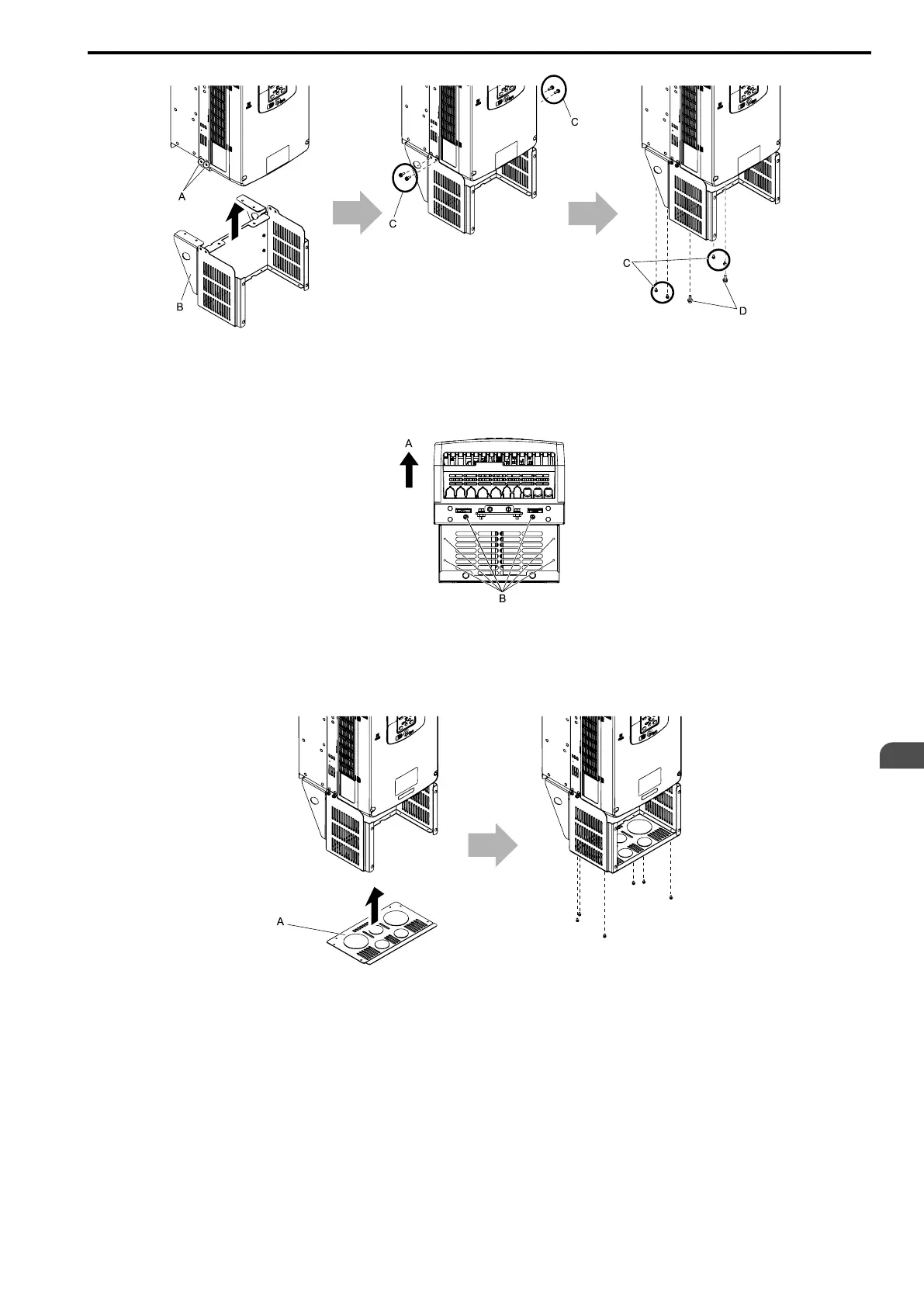
A - Screw holes on sides
B - Conduit bracket 1
C - Screws A
D - Screws B
Figure 2.51 Attach Conduit Bracket 1
Figure 2.52 shows the locations of the screw holes on the bottom of the drive.
A - Front of drive B - Screw holes on bottom
Figure 2.52 Locations of Screw Holes on Bottom
3. Align the screw holes on conduit bracket 2 with the screw holes on conduit bracket 1.
Tighten the screws to a tightening torque of 0.98 N∙m to 1.33 N∙m (8.67 lb.∙in. to 11.77 lb.∙in.).
A - Conduit bracket 2
Figure 2.53 Attach Conduit Bracket 2
Figure 2.54 shows the locations of the screw holes on the bottom of conduit bracket 1.


 To Next Page