Parameter Details
12
12.7 H: TERMINALS
SIEPYEUOQ2A01G AC Drive Q2A Technical Manual 693
.
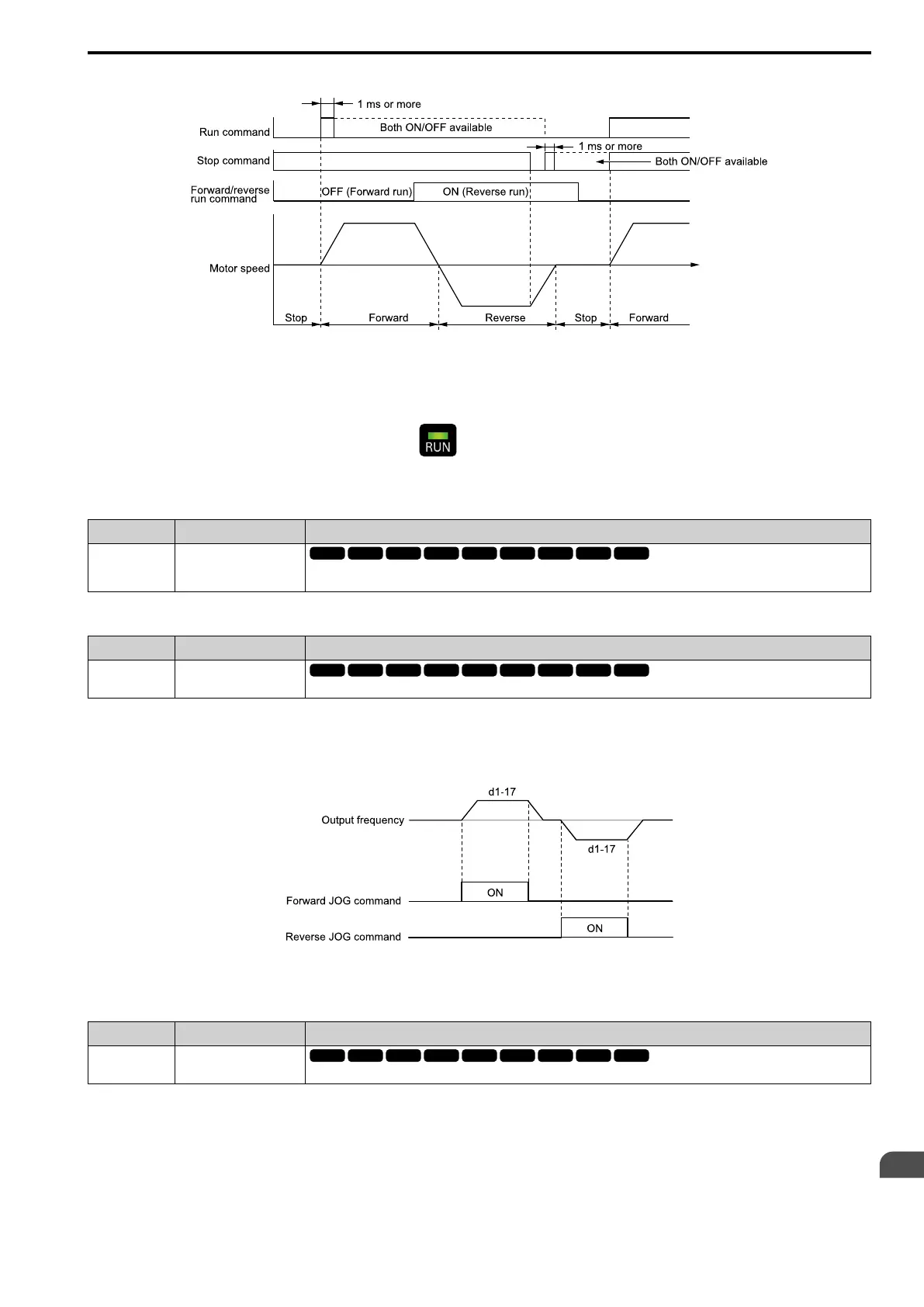
Figure 12.74 3-Wire Sequence Time Chart
Note:
• To input the Run command, activate the terminal for 1 ms minimum.
• The default setting for b1-17 [RUN@PowerUp Selection] is 1 [Disregard RUN]. If you enable the Run command when the drive is
energized, the protective function will activate and the will flash quickly. If Run is permitted in the application, set b1-17 = 2
[Accept RUN].
■ 6: Jog Reference
Setting Function Description
6 Jog Reference
Sets the drive to use the JOG Frequency Reference (JOG command) set in d1-17. The JOG Frequency Reference (JOG
command) overrides Frequency References 1 to 16 (d1-01 to d1-16).
■ 7: Jog Forward
Setting Function Description
7 Jog Forward
Sets the command to operate the motor in the forward direction at the Jog Frequency set in d1-17 [Jog Reference].
Note:
• It is not necessary to input the Run command.
• The Forward JOG command has priority over all other frequency references.
• When the Forward JOG and Reverse JOG commands are activated at the same time for 500 ms or longer, the drive will ramp to stop.
Figure 12.75 JOG Operation Pattern
■ 8: Jog Reverse
Setting Function Description
8 Jog Reverse
Sets the command to operate the motor in the reverse direction at the Jog Frequency set in d1-17 [Jog Reference].
Note:
• It is not necessary to input the Run command.
• The Reverse JOG command has priority over all other frequency references.
• When the Forward JOG and Reverse JOG commands are activated at the same time for 500 ms or longer, the drive will ramp to stop.


 To Next Page