USER MANUAL (Instruction for Use) SW 6.1
Treatment Selection
Version 6.1.6 dated 2020-01-31 EN Page 167 of 201
Steps for pachymetric measurements during the treatment can be defined in the Treatment
Assistant Manager. To save the pachymetric values during these steps, the <AquirePachy>
button has to be pressed or the measurement will be saved automatically if the step is defined
as auto under Auto Mode in the treatment Assistant Manager. (Please refer also to chapter 7.5
Treatment Assistant Manager for detailed information).
During the treatment the system will additionally save a pachymetric value every second. These
values are displayed in the form of a diagram on the treatment printout after the laser treatment.
The Online Coherence Pachymeter is ready for measurement and displays the corneal thickness
values automatically when the patient eye’s lateral position is centred and in focus. (Please see
to adjust to the correct focal point).
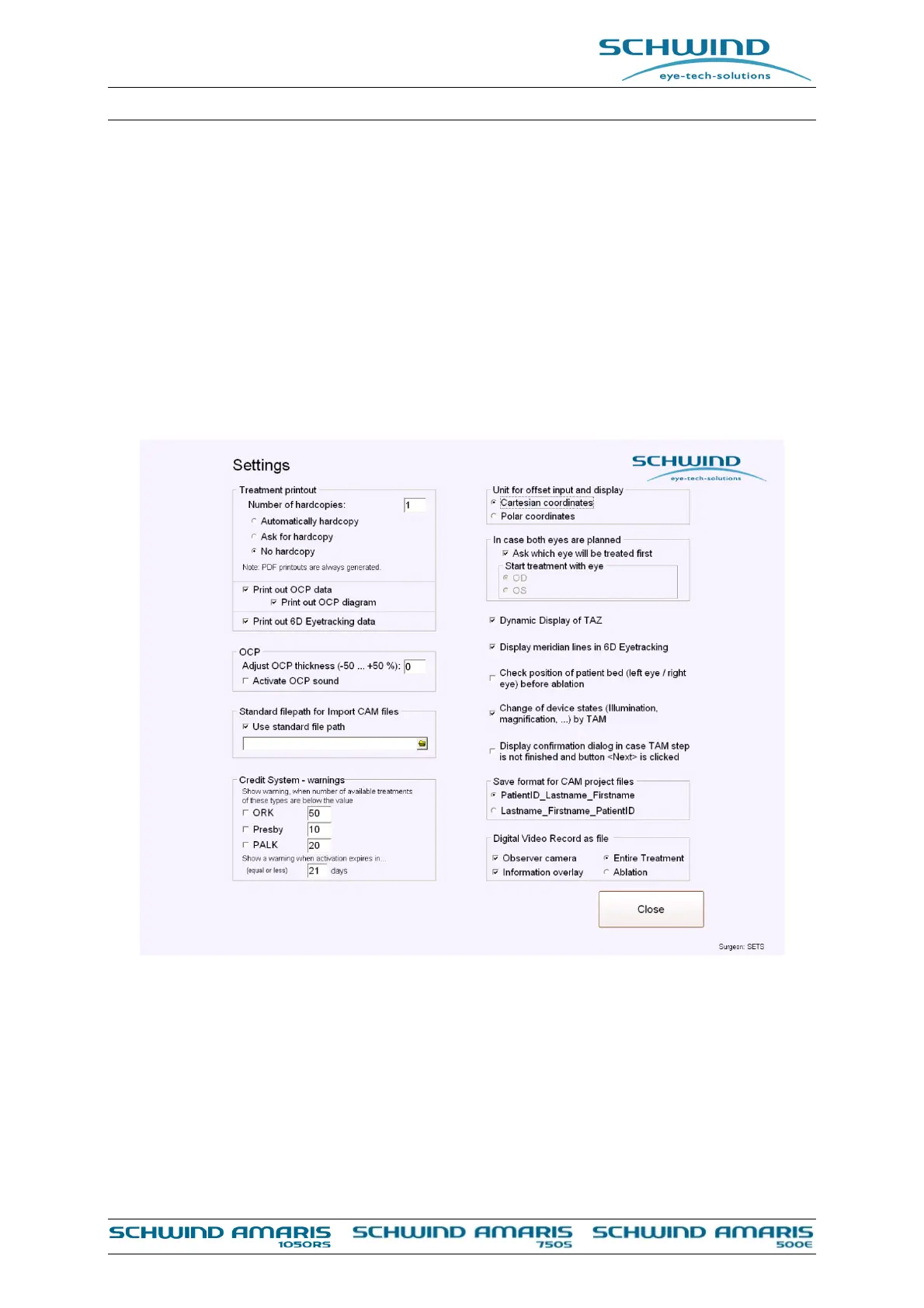
Figure 8-24: Online OCP setting in the Settings menu
In the Settings Menu of the AMARIS Application software the following Settings for OCP can be
defined:
Adjust OCP Thickness
o The displayed value for the measured corneal thickness can be changed with this
option to make the displayed value equal to other devices. (E.g. ultrasound
pachymetry). The displayed value can be adjusted by entering a positive or
negative percentage between +50% and -50%.


 To Next Page