Page 17
Art. no.: 2.511407 Rev.: a
Introduction 2
User guide Keyboard 2.5
CT8000P-2
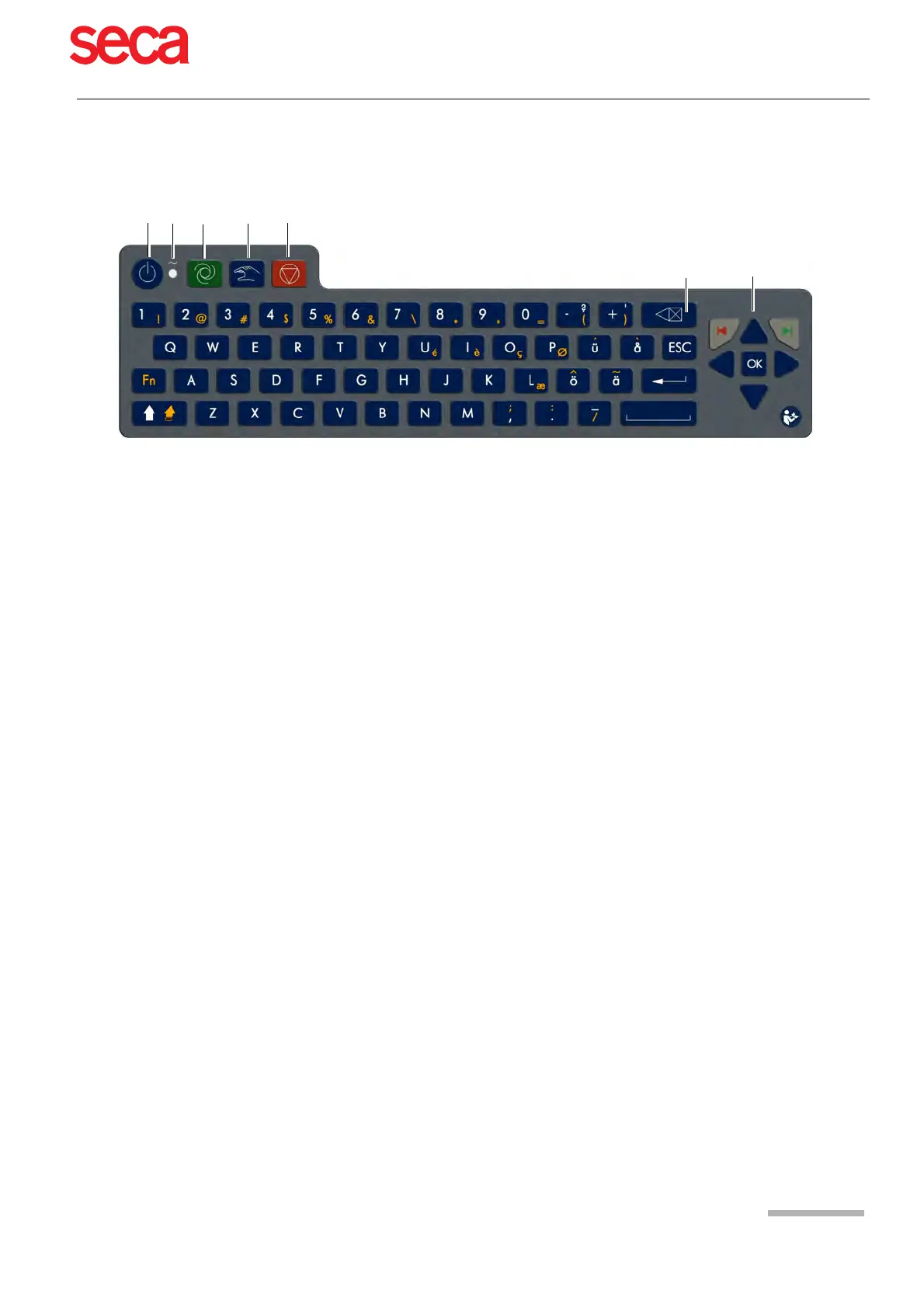
2.5 Keyboard
(1) Power On/OFF Press the On/Off button to switch the device on or off.
(2) Power Indicator The power supply LEDs indicate the power source (see Page 21).
(3) Direct function key Auto Start Auto Start key - take auto recording
(4) Direct function key Manual start Man Start key - real time printout
(5) Direct function key Stop Stop key - stop printout / advance paper to beginning of new page
(6) Delete input The entered data is deleted
(7) Menu selection and navigation • the centre key is the Confirm key - confirm current / displayed setting
• Left arrow key - move cursor to the left / select next menu option
• Right arrow key - move cursor to the right / select previous menu option
• Up arrow key - move cursor or menu bar up
• Down arrow key - move cursor or menu bar down
• Red arrow key, left (back/cancel dialogue)
• Green arrow key, right (select/confirm dialogue)



 To Next Page