•
A manual start is ignored.
•
A cyclic start is only executed in the next cycle.
[7sc80-bat-test-131106, 1, en_US]
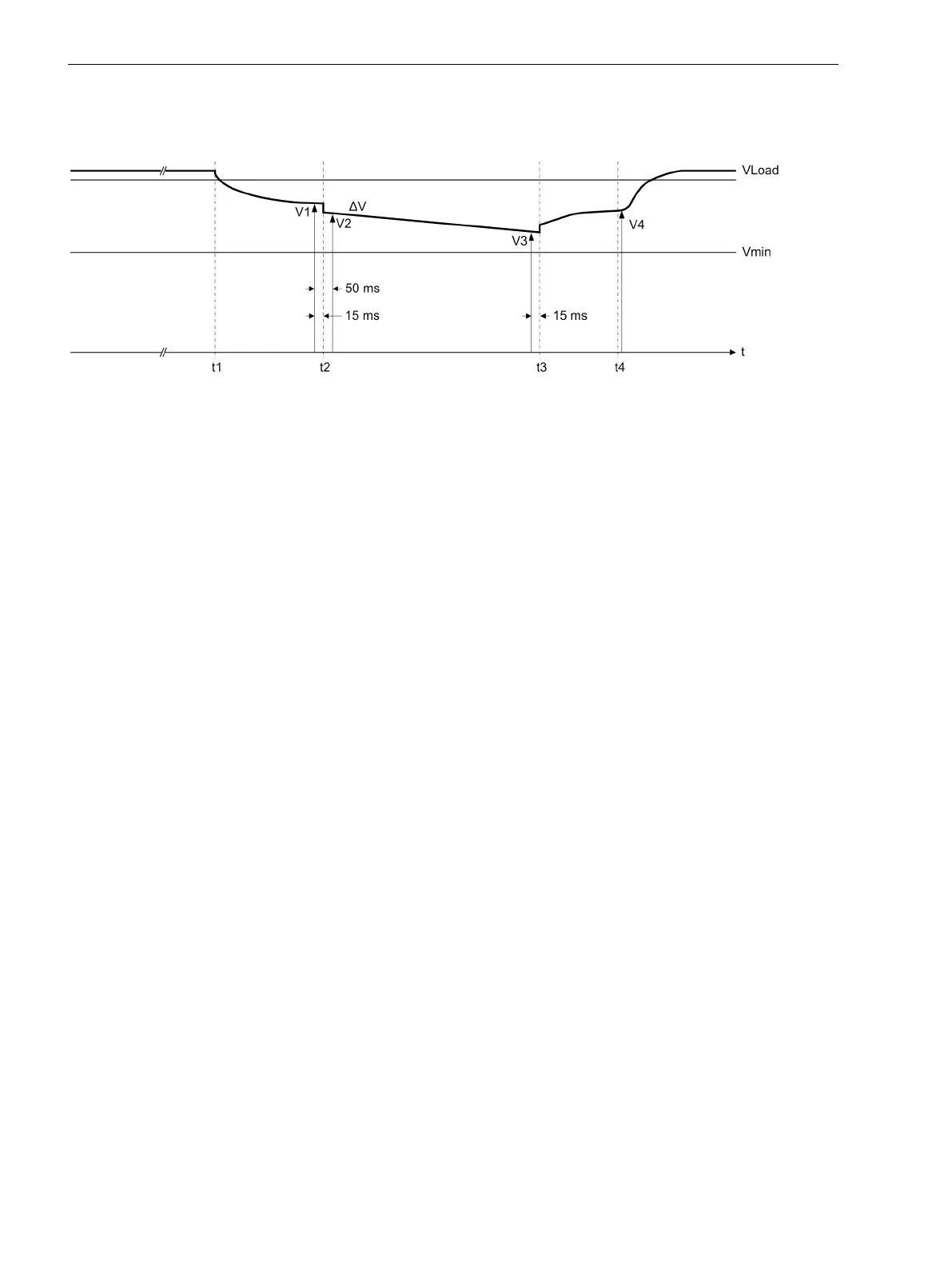
Figure 2-2 Battery test
t1 Start of battery test (disconnect battery from charging unit)
t2 Start of battery load test
t3 End of battery load test
t4 End of battery test (reconnect battery with charging unit)
Direct Control
If you want to use the two Open/Close buttons at the top for direct switching operations, select the setting
YES at address 618 Direct Control. The two Open/Close buttons at the bottom are always used for direct
control.
LEDs are integrated into the buttons. These can be activated as optical indication with the help of the
following input signals:
•
6011
>Opened Ctrl 1
•
420
>Opened Ctrl 2
•
421
>Opened Ctrl 3
•
6012
>Closed Ctrl 1
•
422
>Closed Ctrl 2
•
423
>Closed Ctrl 3
The activation of a button is signaled by the associated indication:
•
6013
Open Ctrl 1
•
424
Open Ctrl 2
•
426
Open Ctrl 3
•
6014
Close Ctrl 1
•
425
Close Ctrl 2
•
427
Close Ctrl 3
Service Interlocking
The service interlocking function evaluates the status of the binary input 2535
>HotLineTag ext
and the
status of the two taggings 373.3001
HotLineTag int.
and 373.3002
HotLineTag ext.
(also see next
figure). Switching operations are only allowed if none of the three indications is active. As soon as the status
of at least one of the 3 indications changes to active, however, any switching state changes of the discon-
nector/circuit breaker are suppressed.
Functions
2.1 General
44 SIPROTEC Compact, 7SC80, Manual
E50417-G1140-C486-A8, Edition 07.2017



 To Next Page