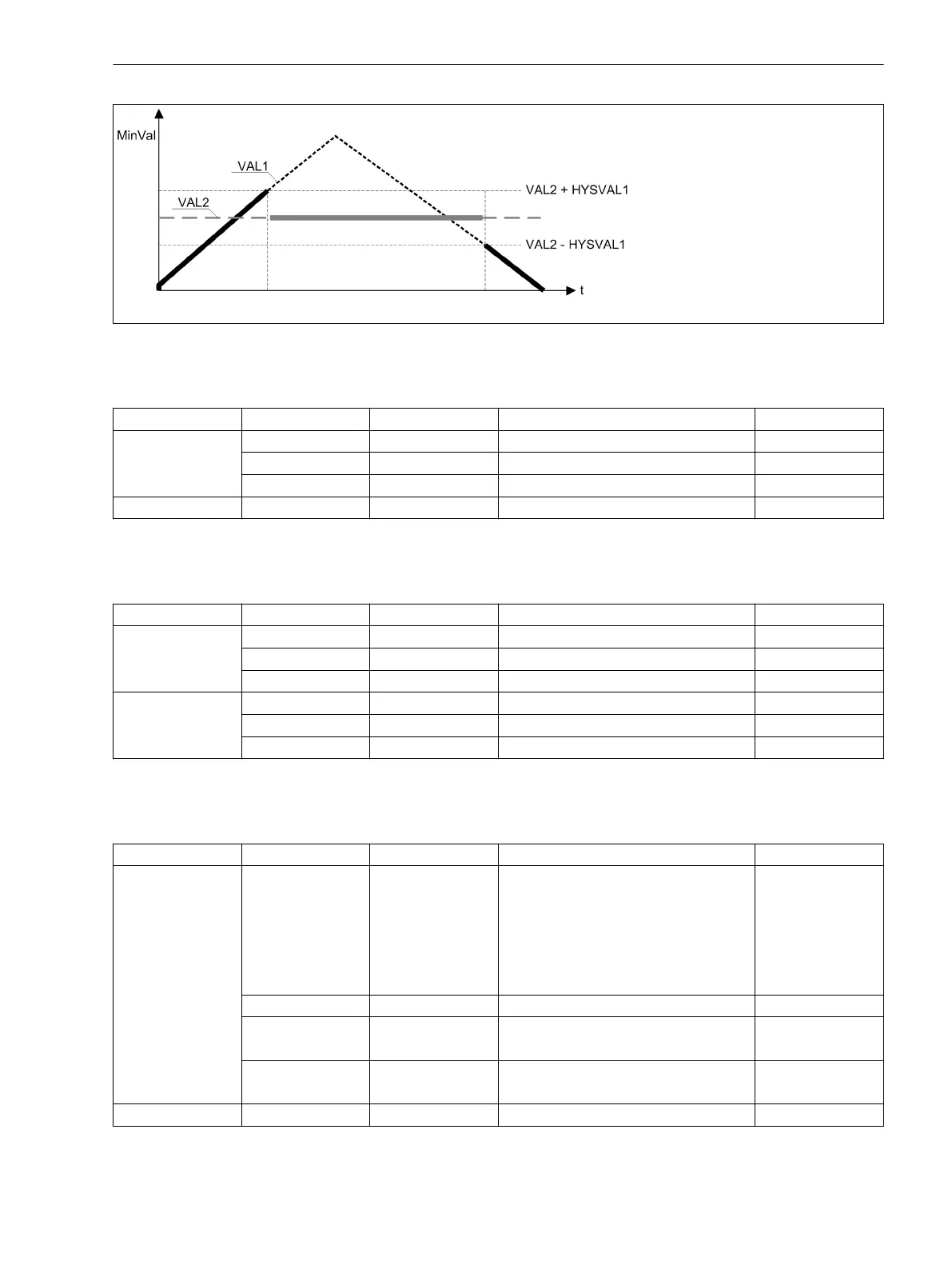
Figure 4-16 Example: result of a MinVal comparison of two input values
Table 4-4 With the CFC block Fault Recorder Trigger, you can form a group indication of the connected
inputs. This happens because only positive edges (from 0 to 1) are recognized by the circuit
and these are combined via an OR operation
Name Type Description Default function
Input X0 BOOL Dynamic input 0
... ... ... ...
X9 BOOL Dynamic input 0
Output Y BOOL Result from OR 0
Table 4-5 The CFC block Connector loops the values of up to 10 inputs X0 to X9 directly through to the
outputs Y0 to Y9. From 4 connections on, this Connector is more effective than the CONNECT
block.
Name Type Description Default function
Input X0 BOOL Input 0
... ... ... ...
X9 BOOL Input 0
Output Y0 BOOL Output 0
... ... ... ...
Y9 BOOL Output 0
Table 4-6 The CFC block Status Feedback switches between the inputs a_52 and b_52 and the status
SIM_52_A at Own_a and Own_b. By allocating the input SIM_ON to 1, the status of the input
SIM_52_a is forwarded to the outputs Own_a and Own_b.
Name Type Description Default function
Input SIM_ON BOOL Simulation ON
0 => Own_a = a_52
=> Own_b = b_52
1 => Own_a = SIM52_ a
=> Own_b = not SIM52_a
0
SIM52_a BOOL Simulated a_52 value 0
a_52 BOOL 1 if breaker closed
0 if breaker open
0
b_52 BOOL 1 if breaker open
0 if breaker closed
0
Output Own_a BOOL Result from OR 0
Technical Data
4.22 User-defined Functions (CFC)
SIPROTEC Compact, 7SC80, Manual 567
E50417-G1140-C486-A8, Edition 07.2017



 To Next Page