Y070.302/EN Page 27
Operation instructions
SIPOS SEVEN: PROFITRON, HiMod
5
Start menu
5 Start menu
Operation sequence
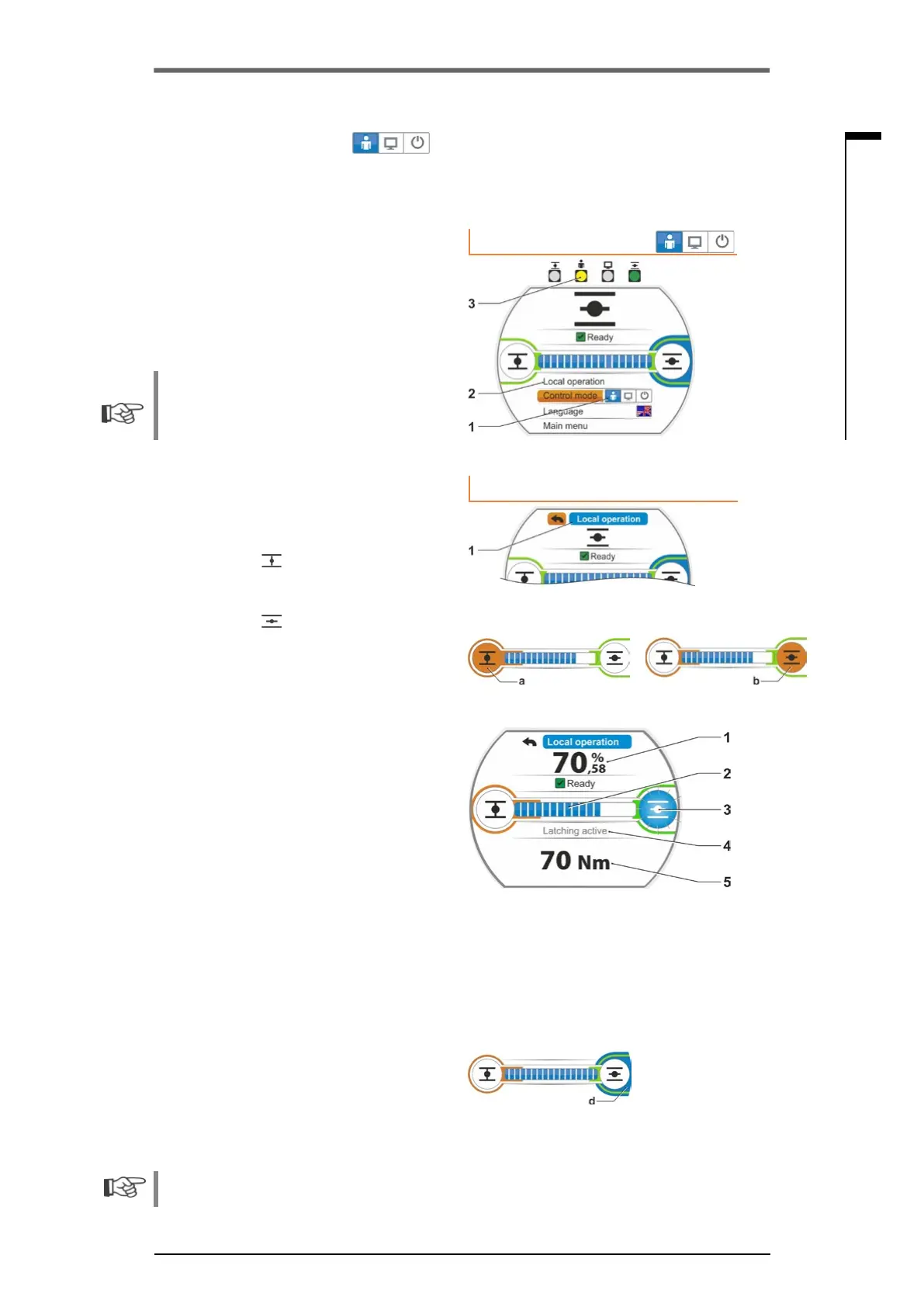
1. Select "Control mode“ menu item.
2. Press Drive Controller until symbol for LO-
CALisactive,g.,1,item1.
"Local operation" is displayed in the line
above (refer to item 2) and the yellow LO-
CAL LED is illuminated (item 3).
Should the message appear that the func-
tion cannot be performed with the logged on
access level, change the access level, refer to
chapter „6 User management“ on page 31.
3. Select “Local operation“ menu item and
conrm.
"Local operation" is indicated in the display,
refer to g.,2,item1.
4. Selectdirectionofoperation(refertog.,3
on the right)
– a: Symbol
= operation in CLOSE
direction
or
– b: Symbol
=
operation in OPEN
direction
Selected end position symbol is shaded in
orange.
5. Press Drive Controller.
The actuator operates and
– The end position symbol in operation
direction, in our example end position
OPEN,isashinginblue(g.4,item3);
– The value (item 1) indicates in % how far
the actuator has been operated to posi-
tion OPEN and
– The position bar (2) indicates the prog-
ress of the operation;
– Ifatorquemeasurementangeiscon-
nected, the current torque will be indi-
cated (5).
If the Drive Controller is held down for more
than3seconds,‘self-retaining’(g.4,item4)
is indicated in the display and the actuator
resumes operation once the Drive Control-
lers is released until;
– the end position or the target position has
been reached or
– the Drive Controller is pressed once
again.
Once the end position has been reached,
thisisindicatedbytheblueeldbehindthe
endpositionsymbol(g.5,itemd)andthe
respective LED is illuminated.
In the local state, all changes (display language, end positions, parameters values) are possible, if
youhavesufcientaccessrights.Refertotableabove.
Control mode
Fig� 1: Control mode
Local operation
Fig� 2: “Local operation” display
Fig� 3: Selection operation direction
Fig� 4: Indication during operation
Fig� 5: Actuator in end position indication
5�1�1 "LOCAL“ control mode: ‘Local' actuator operation
If "LOCAL" control is selected, the menu item "Local operation" is displayed. Via this menu item,
the actuator can be operated locally (OPEN, CLOSE as well as STOP), control from "REMOTE" is
disabled.



 To Next Page