Operation instructions
SIPOS SEVEN: PROFITRON, HiMod
Page 16 Y070.302/EN
4 Instructions on operator control and operation
4
Instructions on operator control and operation
4�2 Light emitting diodes (LED) and display
The actuator informs the user via
■
Light emitting diodes (LED).
The light emitting diodes indicate the current status of the actuator.
■
Display.
The graphic color displays informs the user on the status of the actuator. Clearly arranged repre-
sentation and menu structure allow for comfortable operation and parameter setting. The Drive
Controller (rotary push button) enables operation directly at the actuator.
This chapter contains an overview of light emitting diodes and the information they provide for the
user.
An overview of the display status indication shows the multitude of information available for the
user.
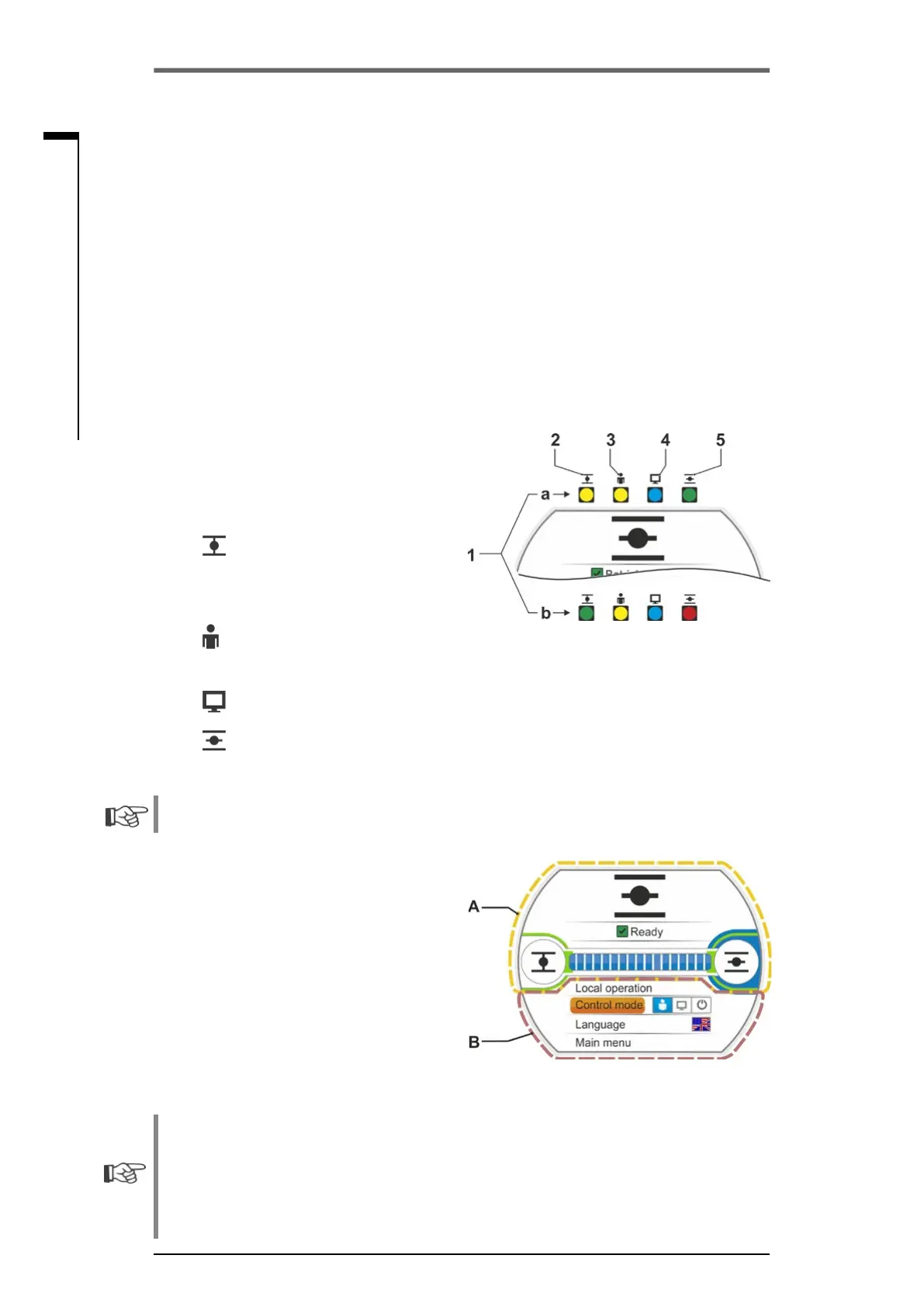
4�2�1 Overview of light emitting diodes
1 Depending on the actuator ordered, the col-
ors of the light emitting diodes might vary:
a) Standard,
b) With add. version C73.
2 LED
(CLOSE).
TheCLOSELEDisashingiftheactuator
moves in CLOSE direction and is continuous-
ly illuminated, if the actuator is in end position
CLOSED.
3 LED
LOCAL
The LOCAL LED is illuminated if "local" con-
trol is selected.
Fig�: LEDs
4 LED
REMOTE
The REMOTE LED is illuminated if "REMOTE" control is selected.
5 LED
(CLOSE).
TheOPENLEDisashingiftheactuatormovesinOPENdirectionandiscontinuouslyillumi-
nated, if the actuator is in end position OPEN.
Further descriptions included in these operation instructions always refer to the standard version
of the LEDs.
4�2�6 Overview of status indication
Display areas
If the Drive Controller (rotary push button) is
operated in the standby status, the display will
be activated and show the status indication. The
status indication has two areas, refer to illustra-
tion:
■
A = The upper section provides actuator sta-
tus information.
■
B = The lower section shows the start menu
which allows access to the different operating
and parameterization menus.
If the Drive Controller is not operated, the display automatically changes from the active state to
the standby state after a preset duration (default value: 10 min.):
– Display illumination is reduced and
– The display changes to standby screen.
Turning or pressing the Drive Controller resets the display to the active state.
Refer also to „Standby screen“ on page 94.
Fig�: Display areas



 To Next Page