Operation instructions
SIPOS SEVEN: PROFITRON, HiMod
Page 28 Y070.302/EN
5 Start menu
5
Start menu
Operation sequence
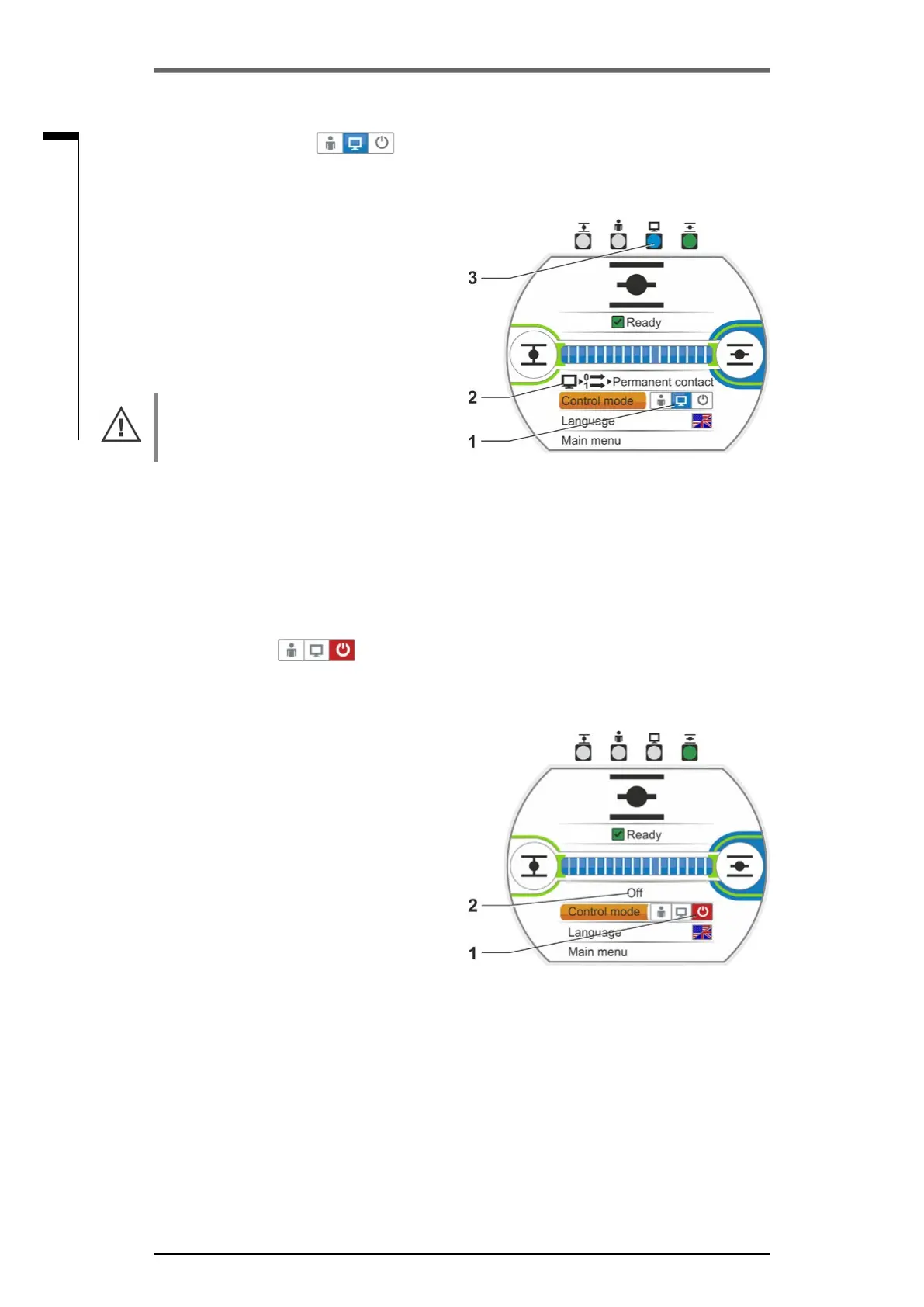
1. Select "Control mode“ menu item.
2. Press Drive Controller until symbol for re-
mote is active,g.,item1.
Additional information on the control mode is
displayed in the line above (item 2) and the
blue REMOTE LED is illuminated (item 3).
Actuator control is performed via the automa-
tion system, e.g. the DCS.
If LOCAL control is changed to "remote“
control, the actuator is operated if an operation
command by the automation system (DCS) is
present!
In REMOTE mode, the following can be per-
formed on the actuator without interrupting
operation:
■
Selecting another language.
■
Use the main menu to access information
on the actuator, refer to table in chapter „5.1
Control mode“ on page 26.
5�1�3 “OFF“ control:
In this state, local or remote actuator operation
is not possible.
Operation sequence
1. Select "Control mode“ menu item.
2. Press Drive Controller until symbol for OFF is
active, g.,item1.
The message 'OFF' is displayed in the line
aboverefertog.,item2.
Now the following options are available at the
actuator
■
Selecting another language.
■
Use the main menu, parameters and system
settings as well as to display information on
the actuator and valve maintenance, refer to
table in chapter „5.1 Control mode“ on page
26.
Fig�: Remote control mode
Fig�: Off control mode
5�1�2 ”REMOTE“ control:
In the "Remote" state, the actuator is controlled by the automation system (DCS).
In the REMOTE state, the display language can be selected and parameters be read.



 To Next Page