Operation instructions
SIPOS SEVEN: PROFITRON, HiMod
Page 26 Y070.302/EN
5 Start menu
5
Start menu
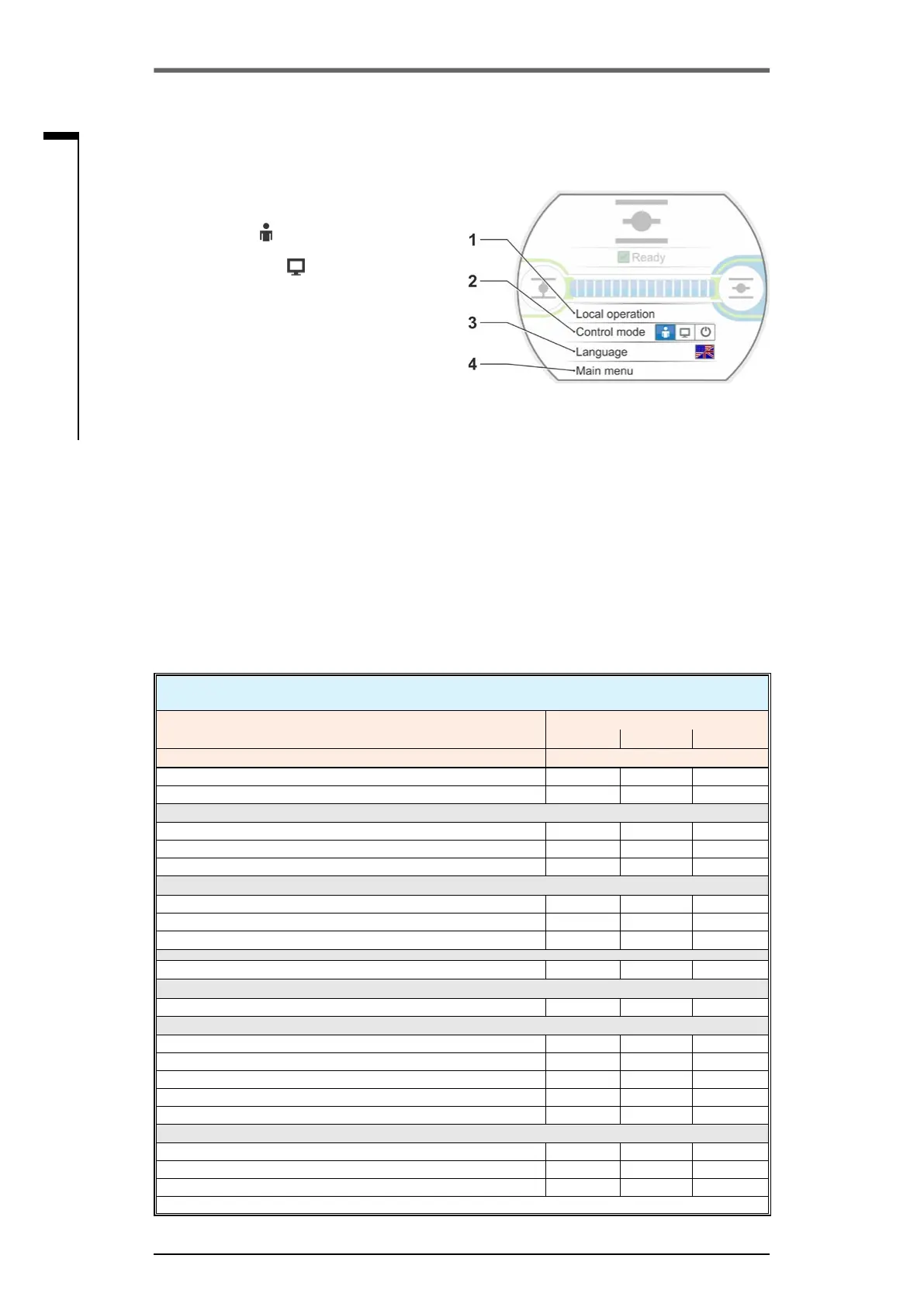
1 Depending on the selected control mode, this
menu line is active:
– If "LOCAL“
control is selected,"Local
operation“ is displayed in this menu line.
– For "REMOTE“
control further informa-
tion on control mode REMOTE is dis-
played here.
2 Control:
Change over between "LOCAL", "REMOTE"
or "OFF".
3 Language selection:
The display language is selected via this
menu item. In addition to the text in the
desiredlanguage,therespectiveagis
displayed.
4 Main menu:
Access into the main menu for observing,
parameterization of the actuator as well as
end position setting.
Fig�: Start menu
5�1 Control mode
Use the ‘Control mode’ menu item to change between ‘LOCAL’, ‘REMOTE’ and ‘OFF’. The following
table indicates the actuator control mode and which parameters can actually be changed and which
parameters can only be displayed.)
Display/change parameters at the actuator
Menu
Control mode
Local Remote OFF
Parameter
Display = O, Change* = X
Language selection X X X
Operate actuator X – –
Observing
Electronic name plate O O O
Inputs and outputs O O O
Actuator status O O O
Diagnosis
Operating data of actuator O O O
Maintenance limits O O O
Valve maintenance O O O
End position adjustment
X – –
Parameter
Parameter values X O X
USB ash drive
Updatermware X – X
SaveparametersonUSBashdrive X X X
LoadparametersfromUSBashdrive X – X
Save torque curves X X X
Clone actuator X – X
System settings
Display orientation X O X
Bluetooth activation X O X
Real time clock X O X
*iftheselecteduserlevelhassufcientaccessrights
5 Start menu



 To Next Page