Y070.302/EN Page 23
Operation instructions
SIPOS SEVEN: PROFITRON, HiMod
4
Instructions on operator control and operation
4 Instructions on operator control and operation
4�4�1 Operation of the Drive Controller
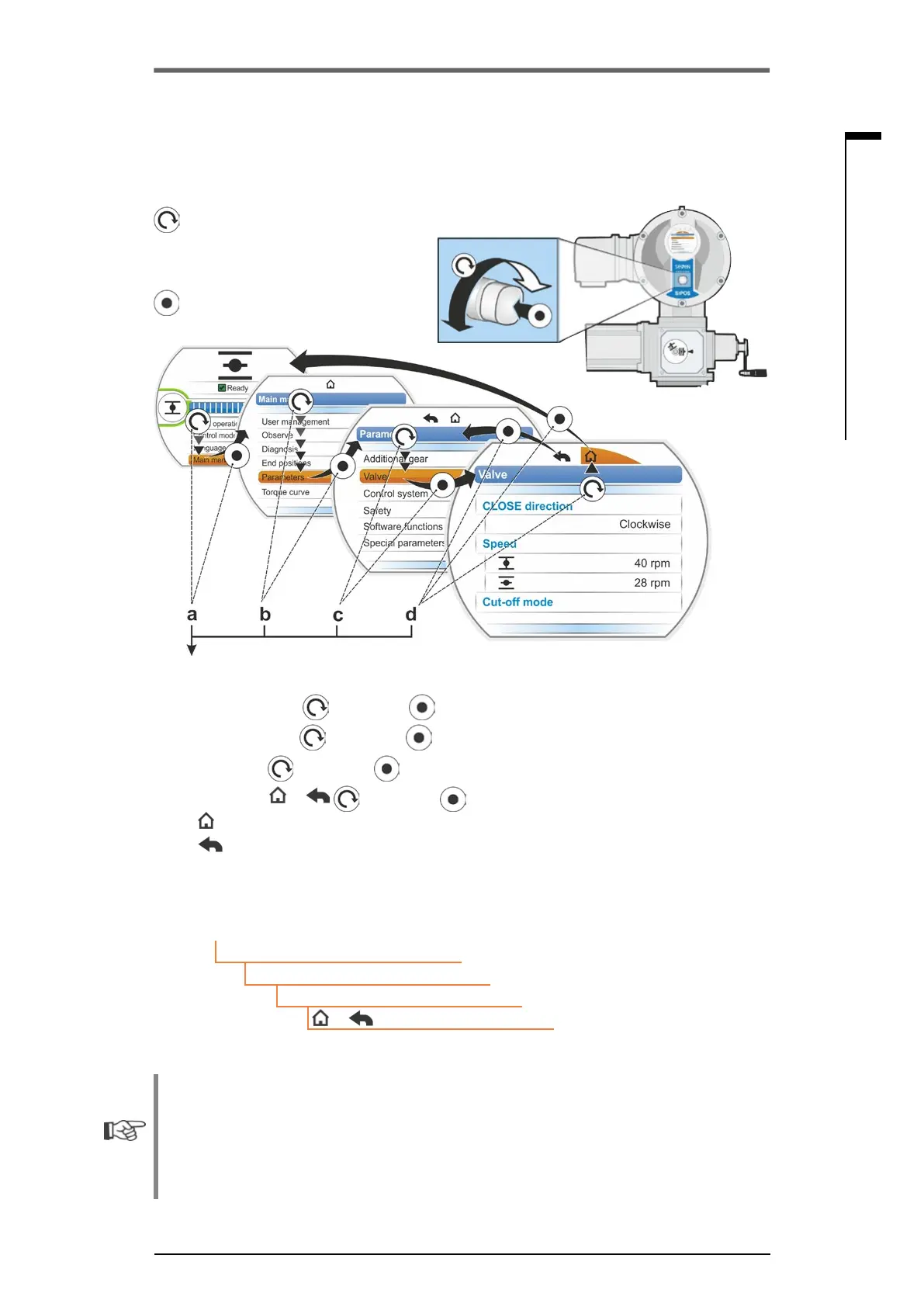
= Turn Drive Controller (rotary push
button):
Selection (selected menu item is
shaded in orange).
= Press Drive Controller:
Conrmselection.
Operation sequence:
a = Select "Main menu“ andconrm . Display changes to "Main menu".
b = Select "Parameter“
andconrm . Display changes to "Parameter" menu.
c = Select "Valve“
andconrm . Display changes to "Valve" menu.
d = Select "Back“,
or andconrm .
–
: Display changes to status indication.
–
: Display changes one level back to "Parameter" menu.
Representation of operating sequence in the operation instructions:
a → Main menu
b → Parameter
c → Valve
d →
or
If the Drive Controller is not operated for a preset time (default value: 10 min.), the display
changes from the active state to the standby state.
– Display illumination is reduced and
– The display changes to standby screen.
Turning or pressing the Drive Controller resets the display to the active state.
Refer also to „Standby screen“ on page 94.
4�4 Navigation through the menus



 To Next Page