Operation instructions
SIPOS SEVEN: PROFITRON, HiMod
Page 96 Y070.302/EN
9 System settings
9
System settings
9�3 Activate, deactivate Bluetooth
Actuators are equipped with Bluetooth. Each
Bluetooth device (slave) has an unambiguous
Bluetoothaddressforidentication.Tofacilitate
selection, each Bluetooth device has a device
name, consisting of the plant ID (if available)
and the 9-position serial number of the actuator
as a standard.
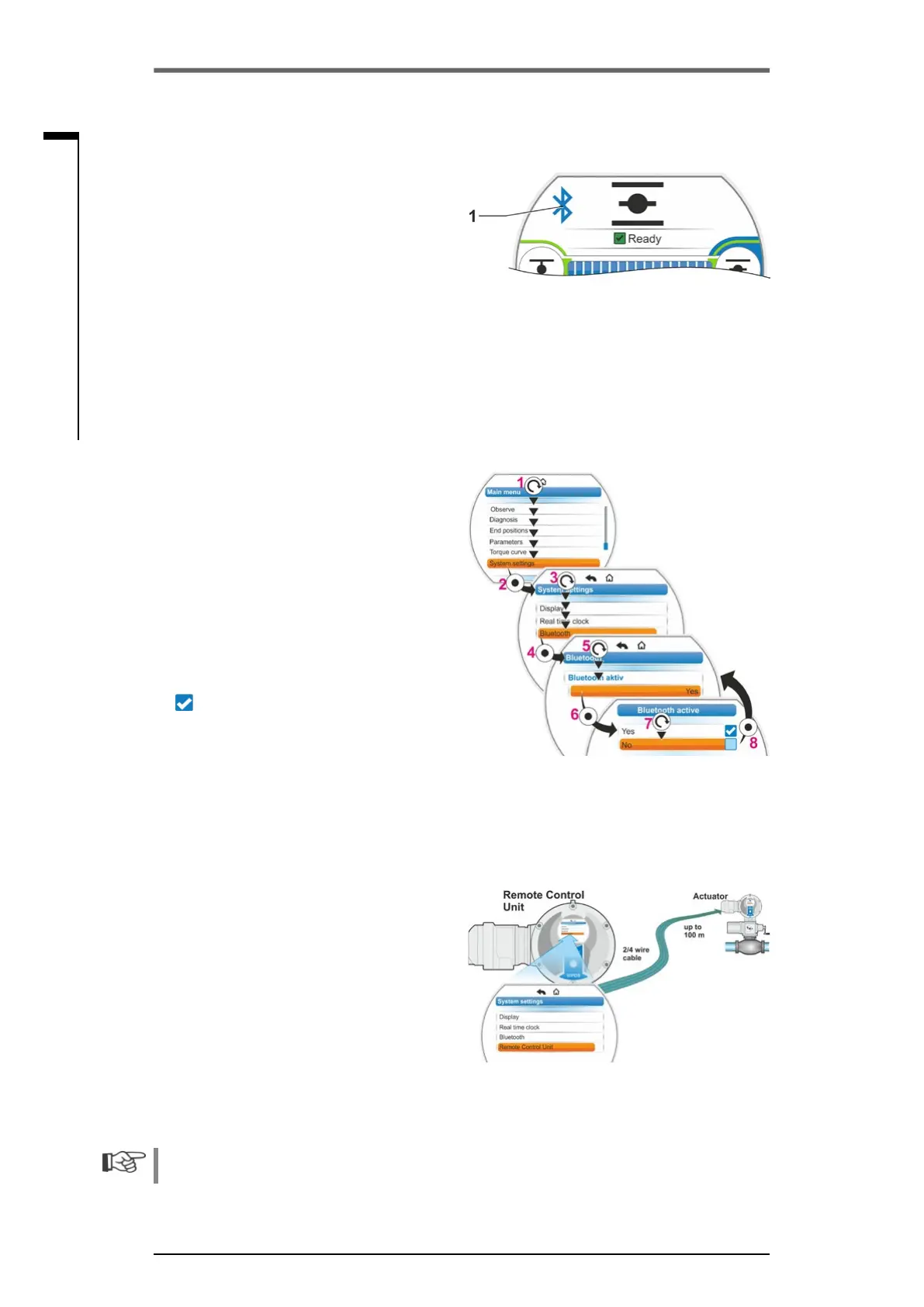
The actuator signals Bluetooth communication
viatheashingBluetoothsymbol(g.,item1)in
the display.
As standard, Bluetooth is active, but can also
be deactivated. The operation sequence below
shows Bluetooth deactivation.
Operation sequence
1. Select 'System settings’ in the main menu
(g.,item1)andconrm(item2).
‘The ‘System settings’ menu appears.
2. Set selection marker to 'Bluetooth' (3) and
conrm(4).
The ‘Bluetooth’ menu appears in the current
state, in our example ‘Bluetooth active Yes’.
3. Set selection marker to 'Yes' (5) and
conrm(6).
The display changes to ‘Bluetooth active’
setting menu. The current setting is ticked
.
4. Set selection marker to desired setting (7)
andconrm(8).
The indication in the display changes to the
'Bluetooth' menu.
9�4 Remote control unit
The remote control unit provides the option to
operate an actuator from a distance of up to
100 m and thus has the function of a second
local control unit. The representation on the
display and the LED indication of the actuator
is “projected” to the remote control unit. This
ensures 1:1 operation of the actuator from the
remote control unit.
The actuator must be prepared for using a
remote control unit. Data exchange between
actuator and remote control unit is made via a
RS485connectionwithjustone2/4-wireeldbus
cable. Refer to the terminal plan for proper wir-
ing.
When connecting the remote control unit, the
two termination resistors must be set to ON!
Fig�: Indication in the display: Communica-
tion via Bluetooth
Fig�: Activate/deactivate Bluetooth
Fig� 1: Remote control principle



 To Next Page