Y070.302/EN Page 97
Operation instructions
SIPOS SEVEN: PROFITRON, HiMod
9
System settings
9 System settings
Operation sequence:
Activate remote control unit
Activate the “Remote control unit” function both
at the actuator and the remote control unit.
Except for step 3 of the operation sequence, the
operation sequence is identical for both cases.
The following operation sequence applies to the
actuator.
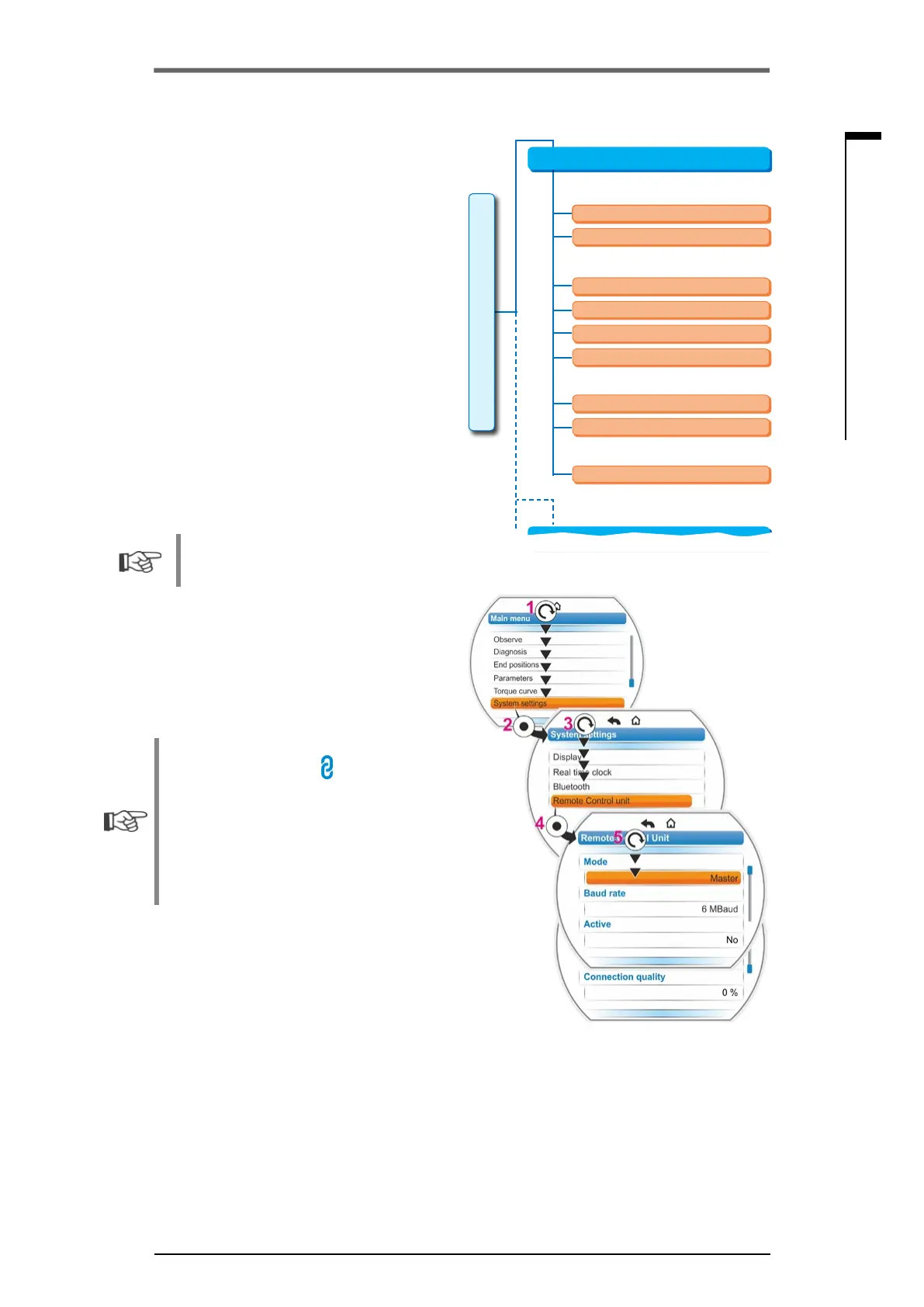
1. Select 'System settings’ in the main menu
(g.3,item1)andconrm(item2).
‘The ‘System settings’ menu appears.
2. Set selection marker to ‘Remote control unit‘
(3)andconrm(4).
‘The ‘Remote control unit’ menu appears.
3. Select “Actuator” parameter for ”mode“ (5).
Select “Remote control unit” for parameter-
ization of the remote control unit.
4. Select the transmission rate for “Baud rate“.
Should the connection quality not be
sufcient(seebottompartofthedisplay),
reduce baud rate.
5. Set the remote control unit in “active” selec-
tion to “yes”.
6. Also execute operation steps 1 to 5 at re-
mote control unit.
■
The connection is visualized by means of
the connection symbol
in the status bar:
– Symbol is illuminated: Connection
available,
–Symbolisashing:Noconnection
– No symbol: Connection “Not active”
■
Priortoapossiblermwareupdateatthe
remote control unit, set the remote control
unit in “Active” selection to “No”.
Fig� 2: Remote control unit menu
6 Mbit/s
2 Mbit/s
Yes
No
0 % – 100 %
3 Mbit/s
1 Mbit/s
Remote control unit
Actuator
Modus
Baud rate
Active
Connection quality
Remote control unit
System settings
Alternative control mode
Fig� 3: Activate remote control unit



 To Next Page