Y070.302/EN Page 99
Operation instructions
SIPOS SEVEN: PROFITRON, HiMod
10
Torque curve
10 Torque curve
Operation sequence
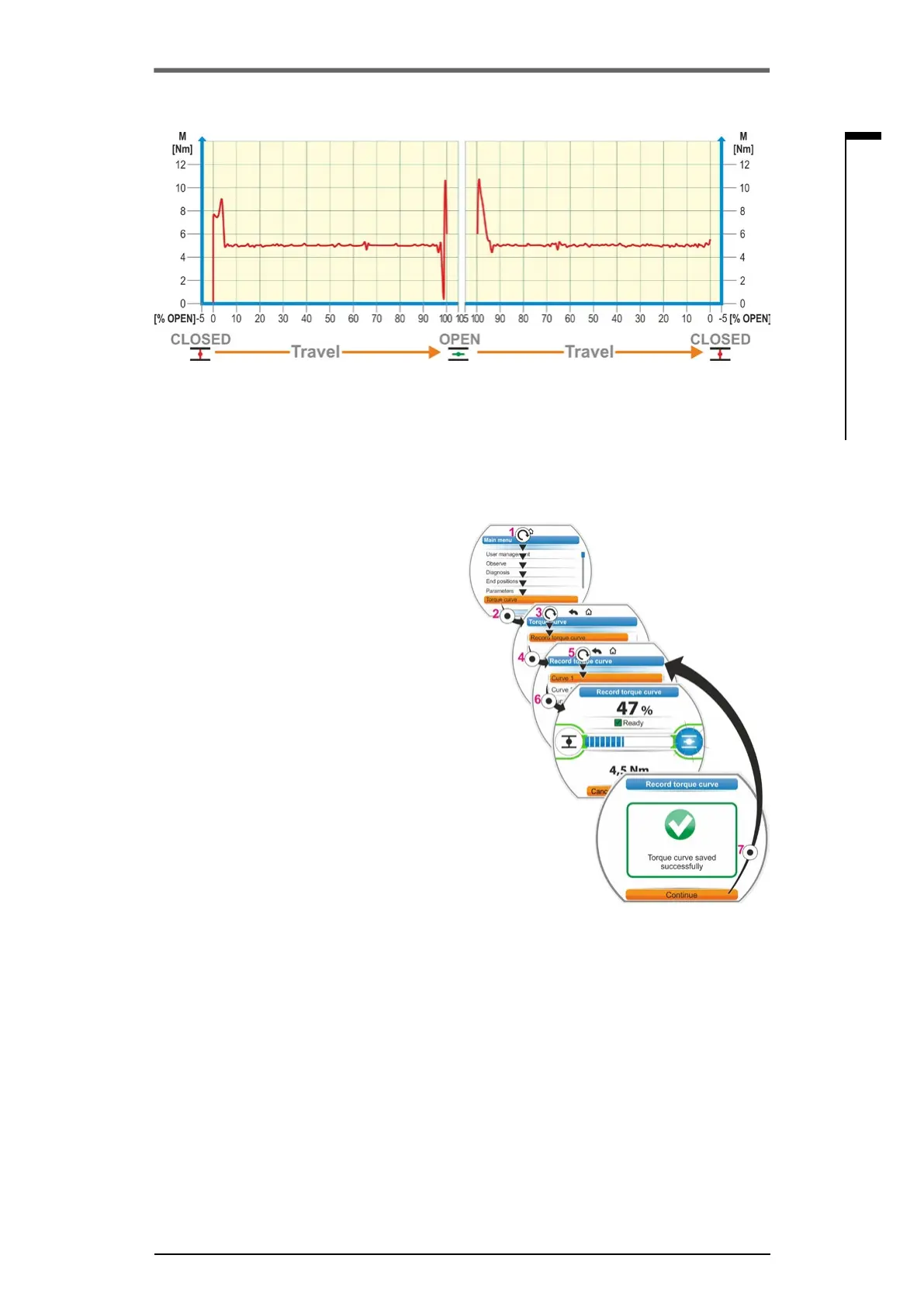
1. Select'Torquecurve’inthemainmenu(g.,
item 1)andconrm(item2).
‘The ‘Torque curve’ menu appears.
2. Set selection marker to ‘Torque curve‘ (3)
andconrm(4).
’Record torque curve’ appears and you can
choose between three curves.
3. Set selection marker to curve 1, 2 or 3. In our
example ’curve 1‘ (5)andconrm(6).
The display changes to the ‘Record torque
curve’ screen and the actuator starts the
recording.
The display shows
– the current position in percent and on the
progress bar,
– the torque applied.
The actuator runs into both directions over
the complete travel.
Therecordingcanbeaborted.Conrm
‘Abort’.
The torque curve is saved and the success-
fulsavingisconrmedinthedisplay.
4. Conrm‘Continue’(7). The display changes
to the selection of the torque curves.
Fig�: Record torque curve
Fig�: Example of a valve torque curve
10�2 Record torque curve



 To Next Page