Operation instructions
SIPOS SEVEN: PROFITRON, HiMod
Page 84 Y070.302/EN
8 Parameters and possible parameter values
8.6 Special parameters
8
Parameters and possible parameter values
8�6�1 Tag number
Thetagnumberisusedforplantidentication.It
may contain up to 20 characters.
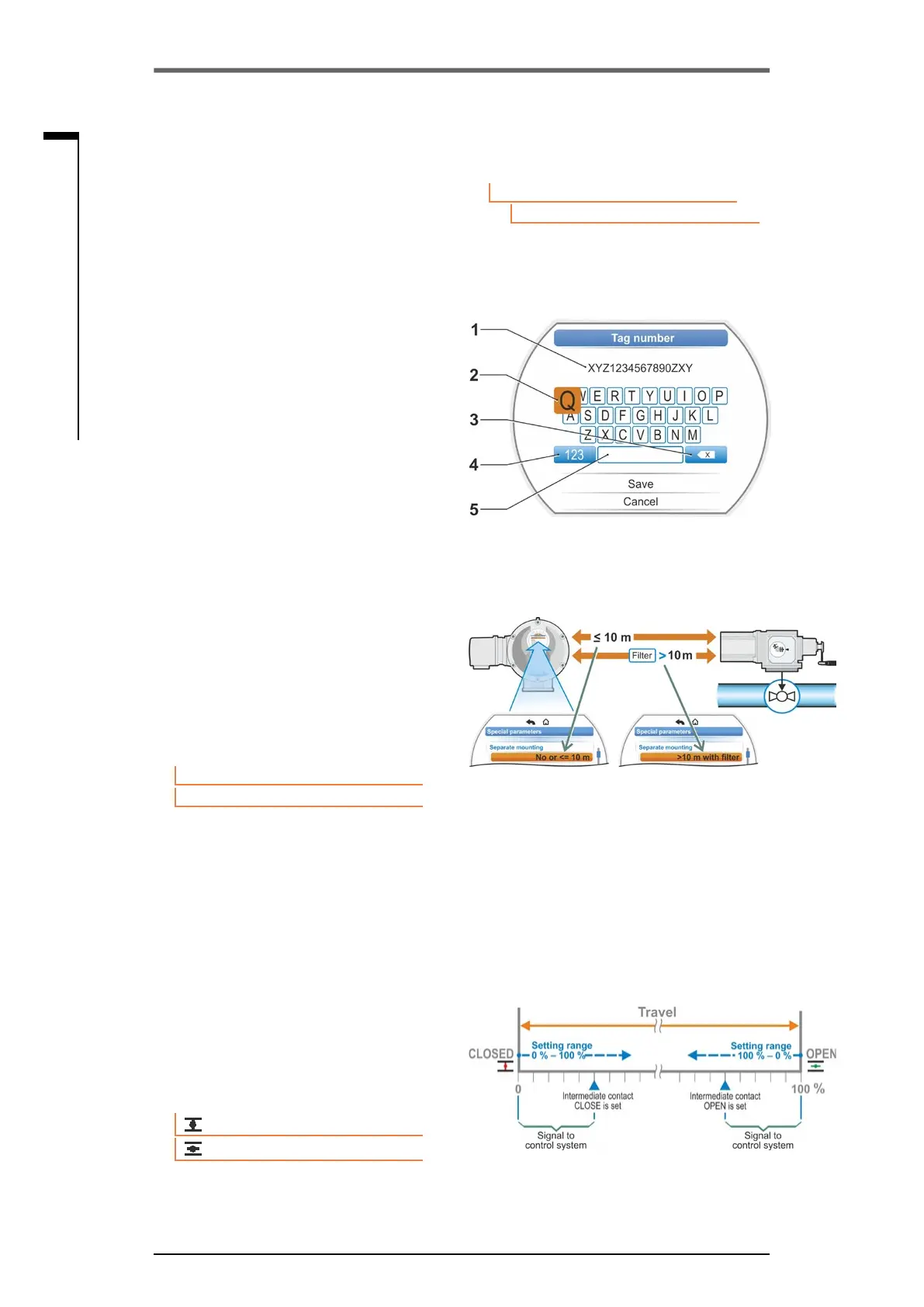
If “Tag number” is selected in the “Special pa-
rameters” menu, the indication on the right with
the current tag number is shown in the display,
g.2,item1.
Tag number entry
1. Turn Drive Controller and highlight desired
character with the orange selection marker
(g.2,item2).
2. Press Drive Controller. The desired character
iscopiedtotheentryline(g.2,item1).
To correct the last entry use
xbutton(g.2,
item 3).
Use 123 key to change over to digit entry
(item 4).
Blanks are entered via the space bar (item 5).
8�6�2 Separate mounting
If the electronics unit is mounted separately from
the gearbox, this parameter is vital for fault-free
operation of the actuator.
For incorrect setting, a block might not be
detected and the actuator switches off for insuf-
cienttorque.
None or <= 10 m
Setting if no separate mounting or separate mounting of up to 10 m is used
> 10 m with lter
Settingforseparatemountingofmorethan10mwithLClter.
In the factory, the parameter is set according to order.
8�6�3 Intermediate contacts
The “Intermediate contacts” parameter is used
todeneasettingrangeandiftheactuatoris
within this range, a signal (active) will be sent to
the DCS.
Parameter
Special parameters
Tag number
Fig� 2: Tag number entry
Fig�: Separate mounting
Separate mounting
Noneor<=10m
>10mwithlter
Fig�: Intermediate contact function principle
Intermediate contact
0 %
100 %
Fig� 1: Navigation to "Tag number” param-
eter



 To Next Page