Y070.302/EN Page 67
Operation instructions
SIPOS SEVEN: PROFITRON, HiMod
8
Parameters and possible parameter values
8 Parameters and possible parameter values
8�3 Parameters for the DCS
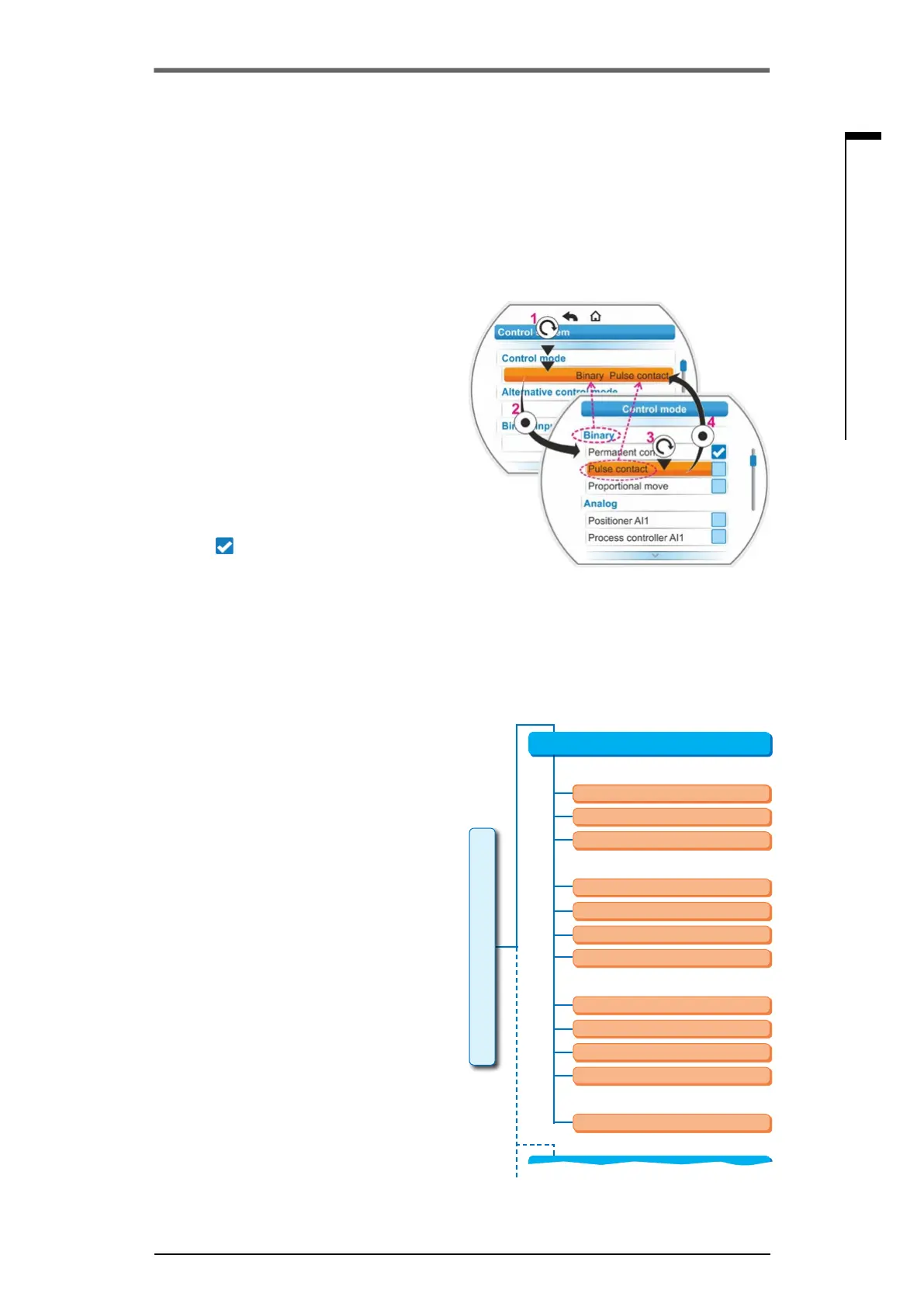
Operation sequence
1. Select the parameter in the 'Control system'
menu, in our example 'Control mode'; set the
orange selection marker to the line below
'CLOSEdirection'(g.,item1).
The selection marker cannot be set to the
heading, in our example 'Control mode' but
only to the line below showing the current
parameter. If the current parameter is to be
changed, continue with step 2.
2. Conrmselection(item2).
The display changes to the 'Control mode'
menu,theselectionmarkerissettotherst
parameter value.
Remark: The current parameter value is
ticked
.
3. Select new parameter for control; set the
orange selection marker to 'Pulse contact' in
the example on the right (item 3).
4. Conrmselection(item4).
Display returns to 'Control system' menu and
the newly set characteristic is displayed for
'Control mode'.
Remark: When changing to the 'Control
system' menu, the 'Pulse contact' parameter
is ticked.
In the following, the parameters and possible
parameter settings for the control system are
listed in a table. The sequence of the param-
eters corresponds to the structure of the 'Control
system' menu.
8�3�3 Control system – Control mode
The illustration on the right shows an overview
of the 'Control system'; depending on the ver-
sion, the actuator can be differently controlled
from the control system:
■
‘Binary‘,
■
‘analog’ or via
■
‘eldbus’.
The control mode is determined by setting a
(parameter)value (shown in orange in the menu
illustration on the right) for the 'Control mode'
parameter.
Permanent contact, Pulse contact or Propor-
tional move can be selected for Binary control
mode.
Fig�: Programming in Control system menu
Fig�: Parameters menu: "Control mode"
Process controller AI2
Process controller
Positioner AI1
Permanent contact
Processcontrollerxedsetpoint
Process controller AI2
Proportional move
Process controller AI1
Positioner
Control mode
Permanent contact
Binary
Analog
Fieldbus
Internal
Pulse contact
Proportional move
Control system
Alternative control mode
8�3�2 Operation sequence: Changing the parameters in the 'Control system'
menu
The procedure for changing the parameter values within the "Control system" menu is identical for
all parameters and is done in four steps.
The individual steps are described in the following operation sequences. In our example the 'Binary'
control - 'Permanent contact' is change to 'Binary' - 'Pulse contact'.



 To Next Page