Operation instructions
SIPOS SEVEN: PROFITRON, HiMod
Page 42 Y070.302/EN
7 Commissioning
7.3 Valve parameters
7
Commissioning
Whenprogrammingthespeed,thedenedmodel(refertochapter„7.2Additionalgear“onpage
36) is considered: The speed values are converted considering the reduction ratio of the addi-
tional gear and indicated in the the display. Parameter names and units are displayed accordingly:
– For rotary actuator: Rev./stroke rpm];
– For linear thrust unit: Stroke [mm/min];
– For part-turn actuator: Angle [s/90°].
In the following operation sequence, programming the the speed is described as example. For lin-
ear thrust units or part-turn actuators, the operation sequence is identical; however values and units
are displayed in accordance with the additional gear selected.
Operation sequence
1. Select "Parameter" menu item in the "Main
menu".
The 'Parameter' menu opens.
2. Select 'Valve' menu item.
‘Speed' is displayed as second parameter
with the current values for operation in
CLOSE(
) and OPEN( )-
directions.
3. If the indicated value is to be changed, set
selection marker to the value to be changed
andconrm.
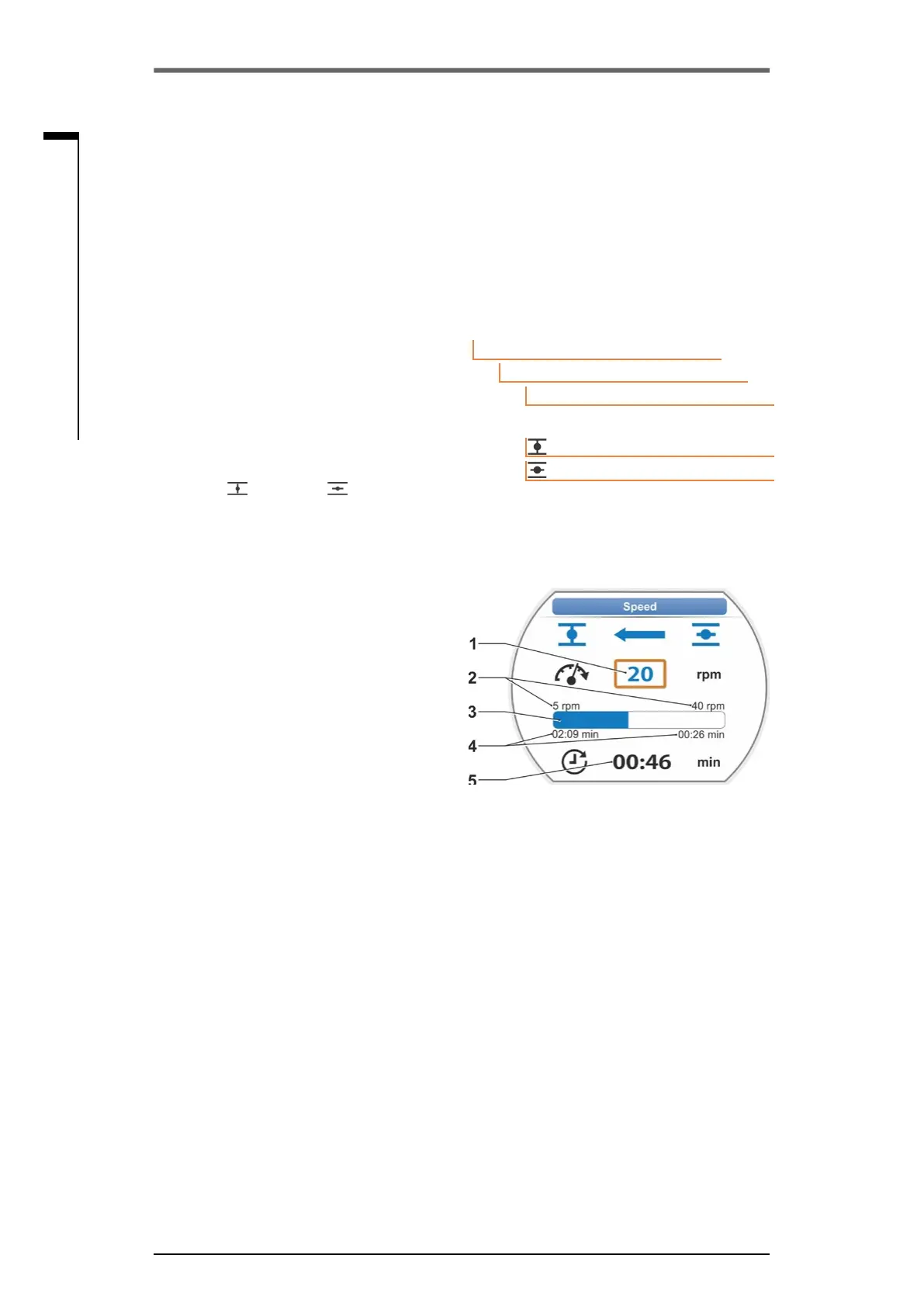
“Speed“ setting menu opens, refer to g.2.
The current value of the speed parameter is
ashingininblue(g.,item1).
4. Turn Drive Controller until desired value is
displayed.
The color of the number changes from blue
to orange and the progress bar (item 3)
graphically represents the setting within the
setting range of both speed (2) and position-
ing time (4).
In addition, the time is displayed (5), which is
required to operate across the whole travel
including the end position ranges.
5. Conrmselectedvalue.
Display returns to "Valve" menu.
Main menu
Parameter
Valve
20 rpm
14 rpm
Speed
Fig� 2: Speed setting menu
Fig� 1: Navigation to "Speed” parameter
7�3�3 Program cut-off modes and tripping torques/forces
Cut-off mode
If the actuator operates, the cut-off mode can be travel-dependent or torque-dependent.
Travel-dependentcut-offmeanstheactuatortripsoncethevalvehasreachedadenedposition.
Torque dependent/force dependent cut-off means the actuator trips after reaching the tripping
torque when moving in the end position range.



 To Next Page