Operation instructions
SIPOS SEVEN: PROFITRON, HiMod
Page 24 Y070.302/EN
4 Instructions on operator control and operation
4
Instructions on operator control and operation
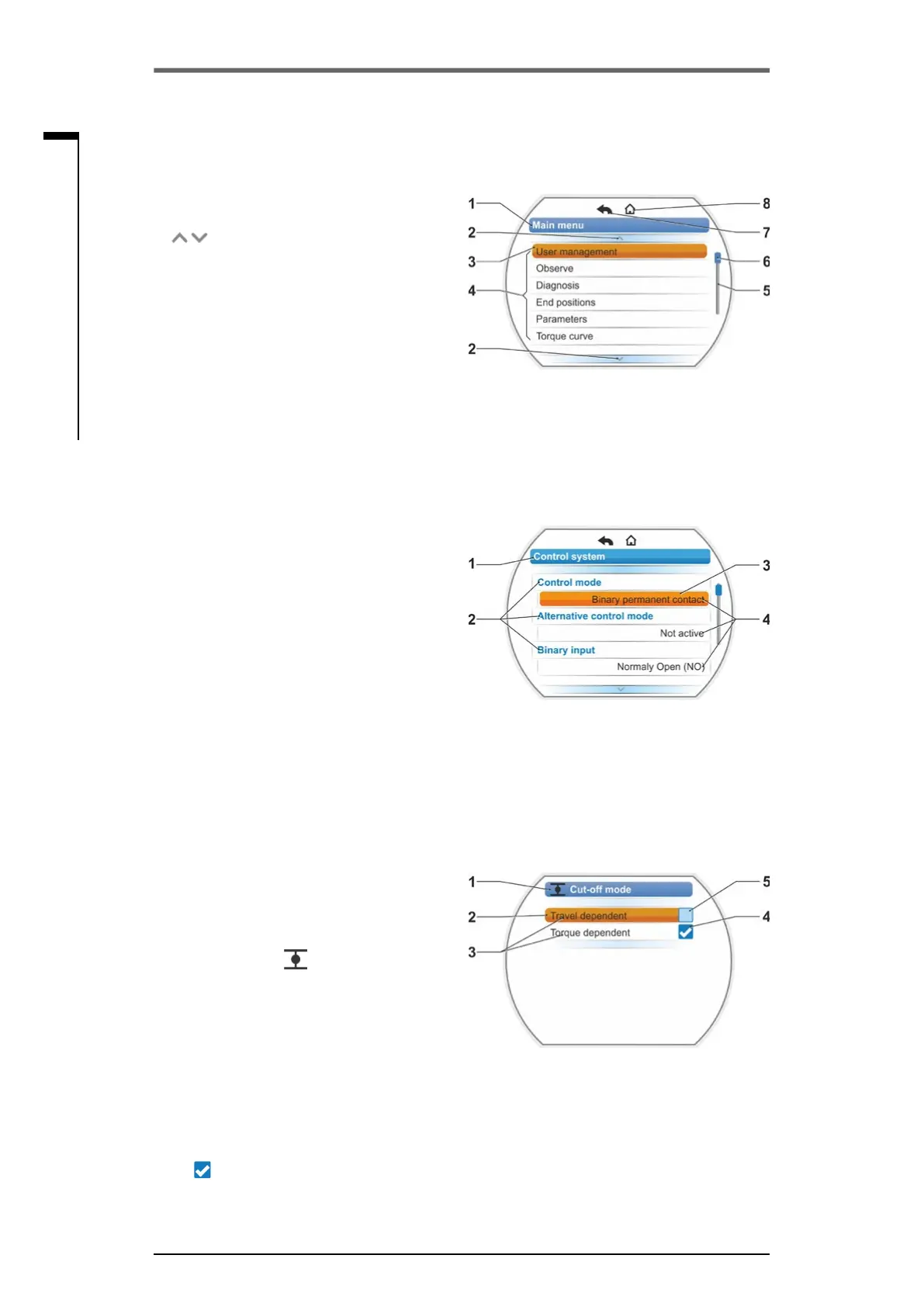
Overview of a menu
1 Name of the menu.
2
Reference to further menu items
above/below within the menu.
3 Selected menu item (shaded with an orange
bar).
4 Menu items, selections within the menu.
5 Progress bar, indicates that there are further
menu items than currently displayed.
6 Slider, changes its position on the scrollbar
according to the position of the selected item
within the menu.
7 Return to previous menu level.
8 Return to status indication.
Parameter selection
Selectparameterrst(shadedinorange)to
change the value/characteristics of a parameter.
Thegureontherightshowstheexampleofthe
selection of a parameter to be changed
1 Name of the menu.
2 Parameter name (cannot be selected)
3 Selection marker
4 Parameter value (current setting)
Changing parameter values/characteris-
tics
Adjustment varies depending on the type of
parameter
Either/or setting
Select parameter value/characteristics out of two
possible options, like for example, for the cut-off
mode: Either "torque-dependent‘ or "travel-de-
pendent‘, refer to illustration on the right:
1 Parameter name ”
Cut-off mode“ (cut-off
mode in end position CLOSED)
2 Selection marker (orange bar)
3 Possible parameter values/settings
4 Setting active
5 Setting not active
Yes/no setting
Furthermore, one or several settings/parameter
values can be set to active. Active settings are
ticked
,refertog.,item4.
Fig�: Overview of a menu
Fig�: Parameter selection menu
Fig�: Cut-off mode end position CLOSE menu
4�4�2 Explanation of symbols, texts within menu



 To Next Page