Y070.302/EN Page 57
Operation instructions
SIPOS SEVEN: PROFITRON, HiMod
7
Commissioning
7 Commissioning
7�5 End positions – non intrusive
The end positions must not be set according
toaspecicsequence.Adjustmentofend
position OPEN is described in the following.
End position CLOSED is adjusted accord-
ingly.
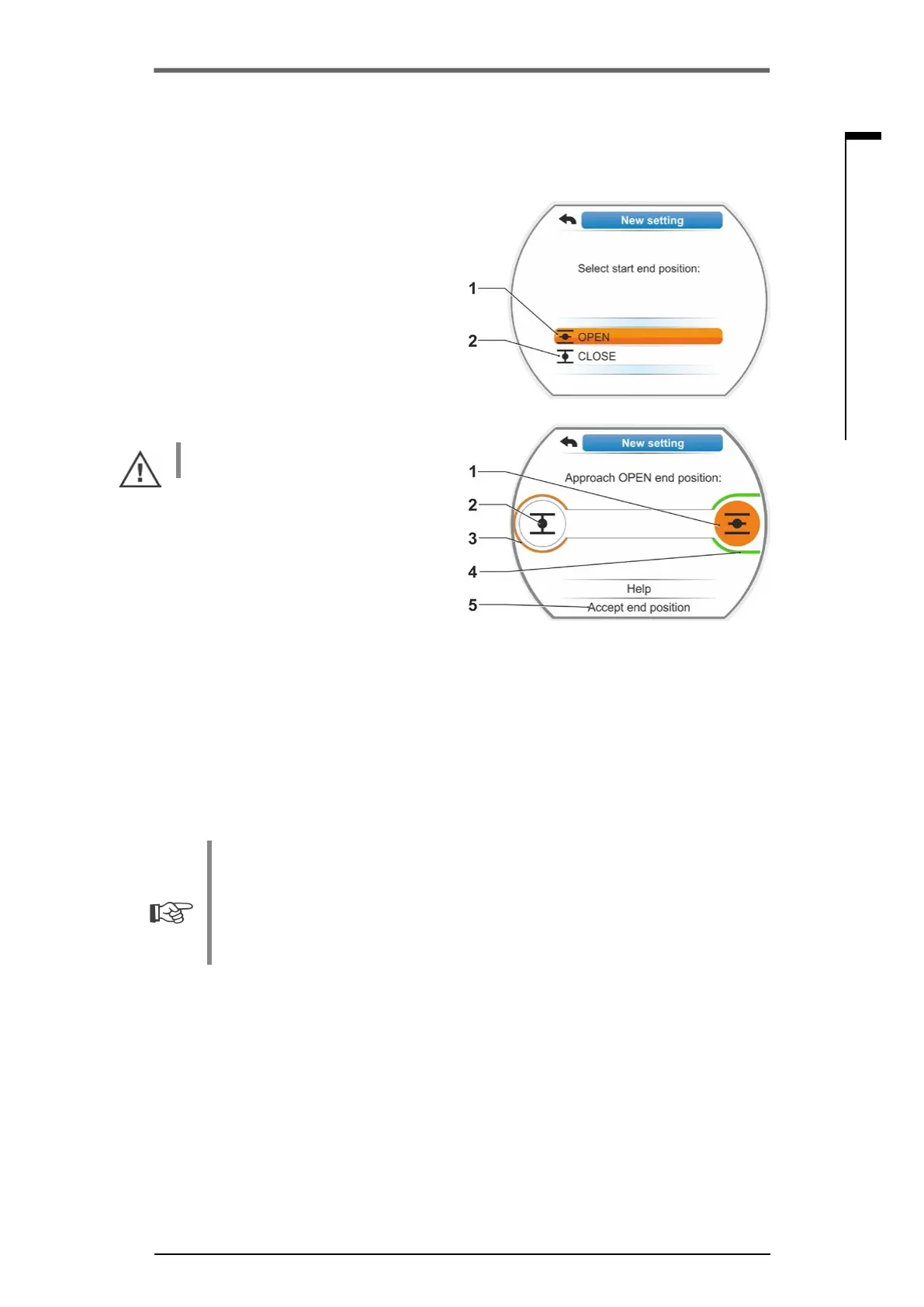
5. Selectendpositiontobesetrst(inour
exampleendpositionOPEN)(g.3,item1)
andconrm.
Display changes to end position adjustment
and you are requested to approach end posi-
tionOPEN(g.4).OPENdirectionisoffered
as operation direction. End position OPEN
symbol is shaded in orange (g.4,item.1).
If operation in the opposite direction is
desired, turn Drive Controller and set orange
selectionmarkedtosymbolCLOSED(g.4,
item 2).
Generally, the end position selected in
operationstep4istobeadjustedrst!
Furthermore, the display indicates the set
cut-off mode. In our example
■
End position CLOSED= torque-dependent
(item 3) and
■
End position OPEN = travel-dependent
(item 4).
6. Depending on whether the cut-off mode
for the end position is travel-dependent or
torque-dependent, select the following op-
eration sequence.
■
Travel dependent cut-off mode:
a) Heed valve position and approach end
position; press Drive Controller.
Operate the actuator until the valve has
reached the end position.*
The LED of the selected end position
asheswhiletheactuatorisoperated.
■
WhenpressingtheDriveControllerforashorttime(<3s),theactuatormovesaslong
astheDriveControllerispressed.Forlongeractivation(>3s),latchingstarts(display
shows ‘Latching active’) and the actuator moves until the Drive Controller is pressed
again.
■
If torque-dependent tripping occurred in travel-dependent cut-off mode, e.g. if the MOV
is sluggish, unfavorable torque characteristics or approaching of a mechanical stop,
"Torque dependent cut-off" is shown in the display.
b) Once the desired position has been
reached, press Drive Controller to stop
theactuator.Performpossiblene
adjustment by operation in the opposite
direction.
Fig� 3: End position selection
Fig� 4: Approach end position in OPEN
direction
___________________________
* If the actuator has switched off automatically before reaching the end position, two causes are possible:
– Sluggish MOV or unfavorable torque curve. In this instance, abort process. Or
– Valve has reached mechanical stop. In this instance, return to desired end position.


 To Next Page