DC5 User’s Manual
Setup 1-4
1.2 DC5(sx) printer components
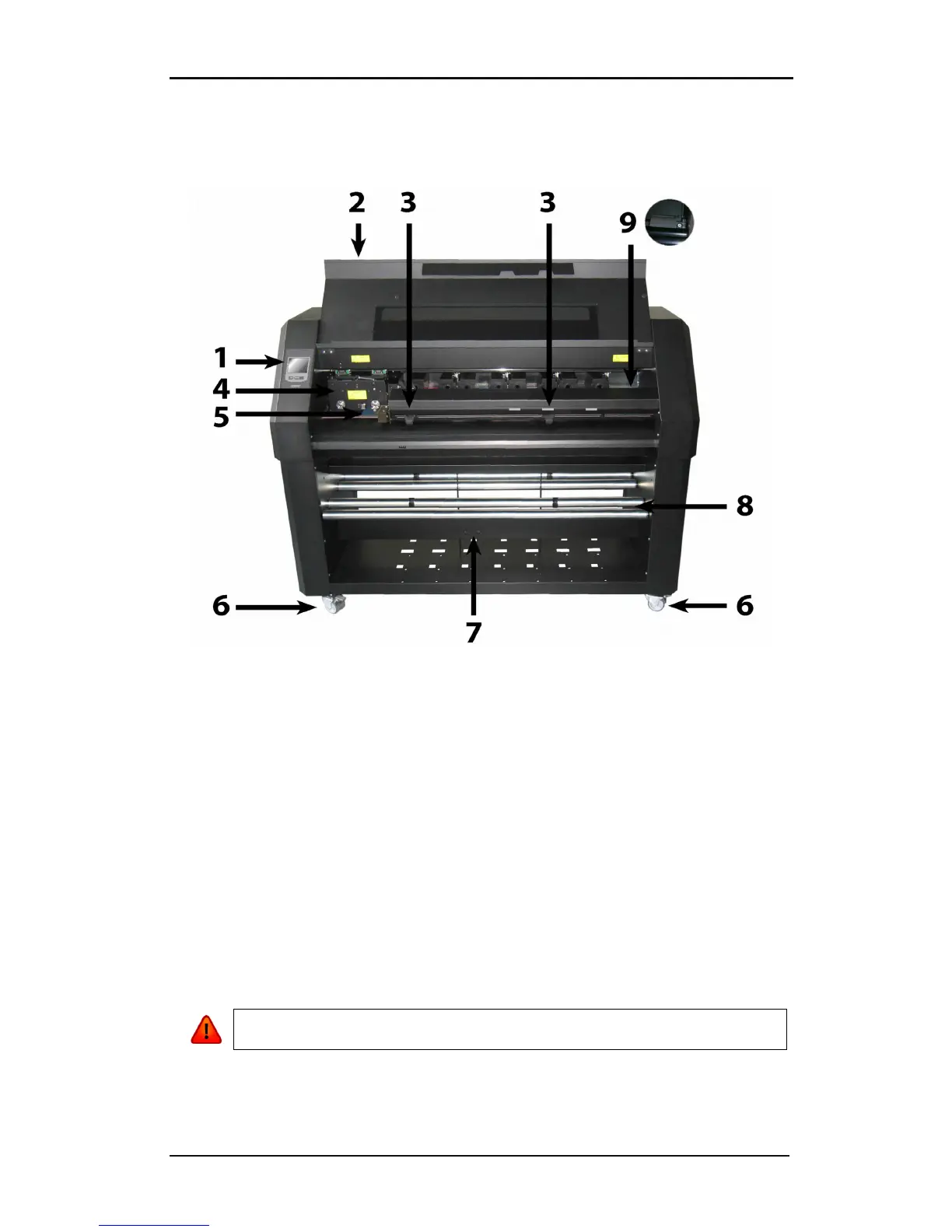
1.2.1 The DC5(sx) as viewed from the front
FIG 1-6
1-6 DC5(sx), FRONT VIEW
1. Control Panel and LCD: All printer activity can be initiated from the 320x240 dot
touch panel. The panel displays information about the printer’s current status and/or
actions that need to be taken. A detailed explanation can be found in section 4.
2. Front Cover: The front cover protects the media from dust and also the operator from
any moving parts during operation. Therefore, the front cover must be kept closed
during operation. To open the front cover, you must first pause the machine.
3. Pinch Rollers: The pinch rollers clamp the media to the drive system and ensure
necessary tracking. The pinch rollers are electrically powered from the keypad. The
right pinch roller can be set in 6 different positions for the DC5 and 3 different
positions for the DC5sx.
4. Printer Carriage: The printer carriage holds the ribbon cassette and the thermal
printhead. The thermal printhead is made from fragile ceramic glaze.
WARNING: The printhead can be very hot, just after printing. Also do not touch
the printhead as oil or moisture can corrode the surface.
5. Cleaning Plate: The cleaning plate is used to clean the thermal printhead. While
printing, the printhead cleans itself automatically and at regular intervals.



 To Next Page