DC5 User’s Manual
Software 6-7
6.2.1 Menu
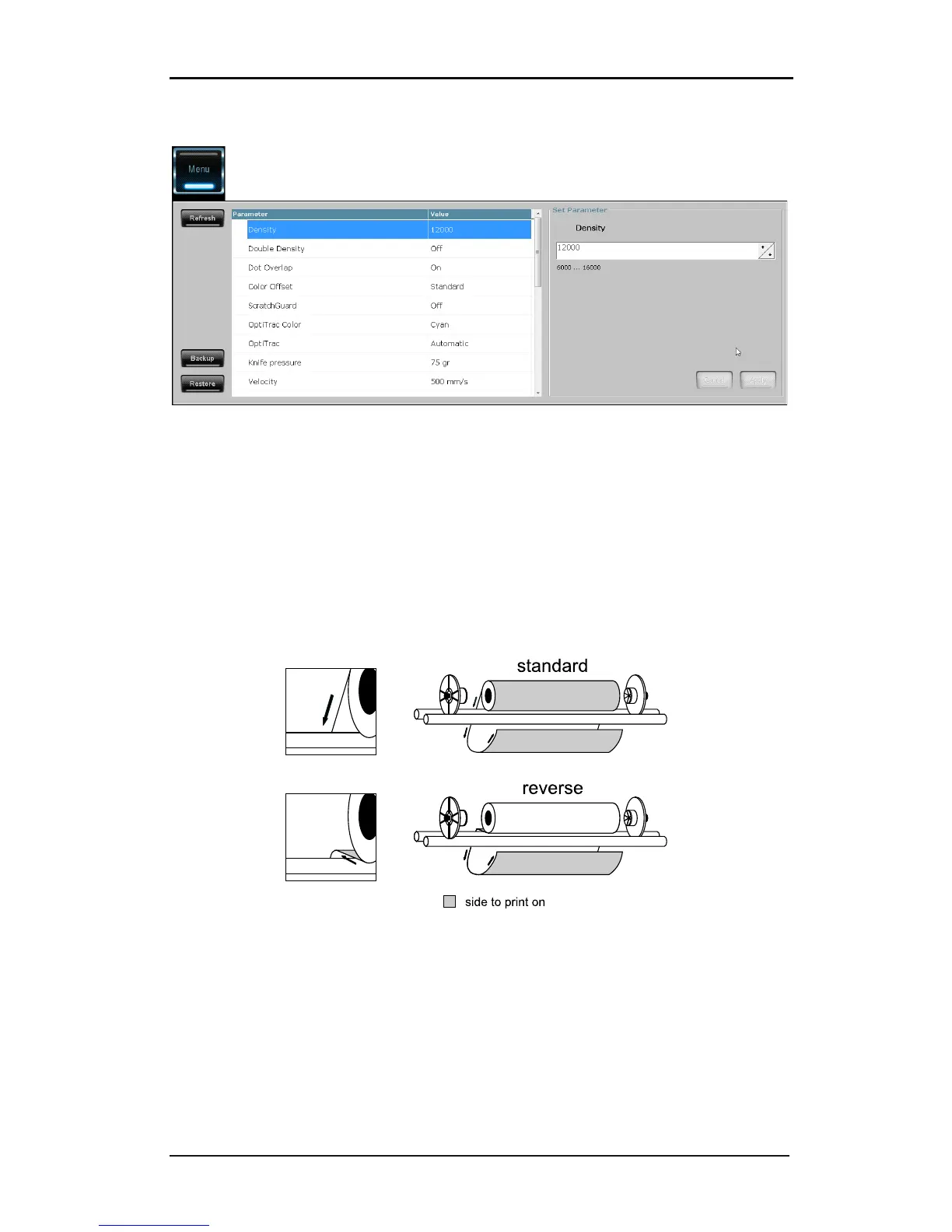
FIG 6-7
6-7 SUMMA PRINTER CONTROL MENU
The menu is a list of all the user parameters that can be set. There are more user parameters
then shown here, but they cannot be set directly; they have to be set with the automatic
calibrations.
Most of the parameters have already been explained in section 2 and 4.
There are some non-common used parameters visible:
First there is the parameter supply direction. Normally the print side of the media is on the
outside of the roll. There exists media where the print side is on the other side. In this case
the media needs to be loaded differently and this parameter needs to be changed from
‘standard’ to ‘reverse’.
FIG 6-8
6-8 LOAD DIRECTION
Another parameter is ribbon save. There are two settings, standard and high. The printer
always tries to use as less ribbon as possible. When this parameter is set to standard, the
quality has a priority to the ribbon save feature. When this parameter is set to high, the
ribbon save feature has priority.
Clean delay determines how many passes the printer has to print before it cleans the head
on the cleaning pad.



 To Next Page